
Affiliate disclosure: VPN Vetted may earn a commission if you buy through some links on this page, at no extra cost to you. Commissions don’t decide our picks; the facts below do, and we list each pick’s drawbacks. Ownership note: Surfshark and NordVPN are part of the same group. Surfshark and Nord Security finalized a merger agreement in 2022, and both companies say they keep operating autonomously (Surfshark, NordVPN). Proton VPN is unrelated to either.
Our picks for Fire TV (October 2026)
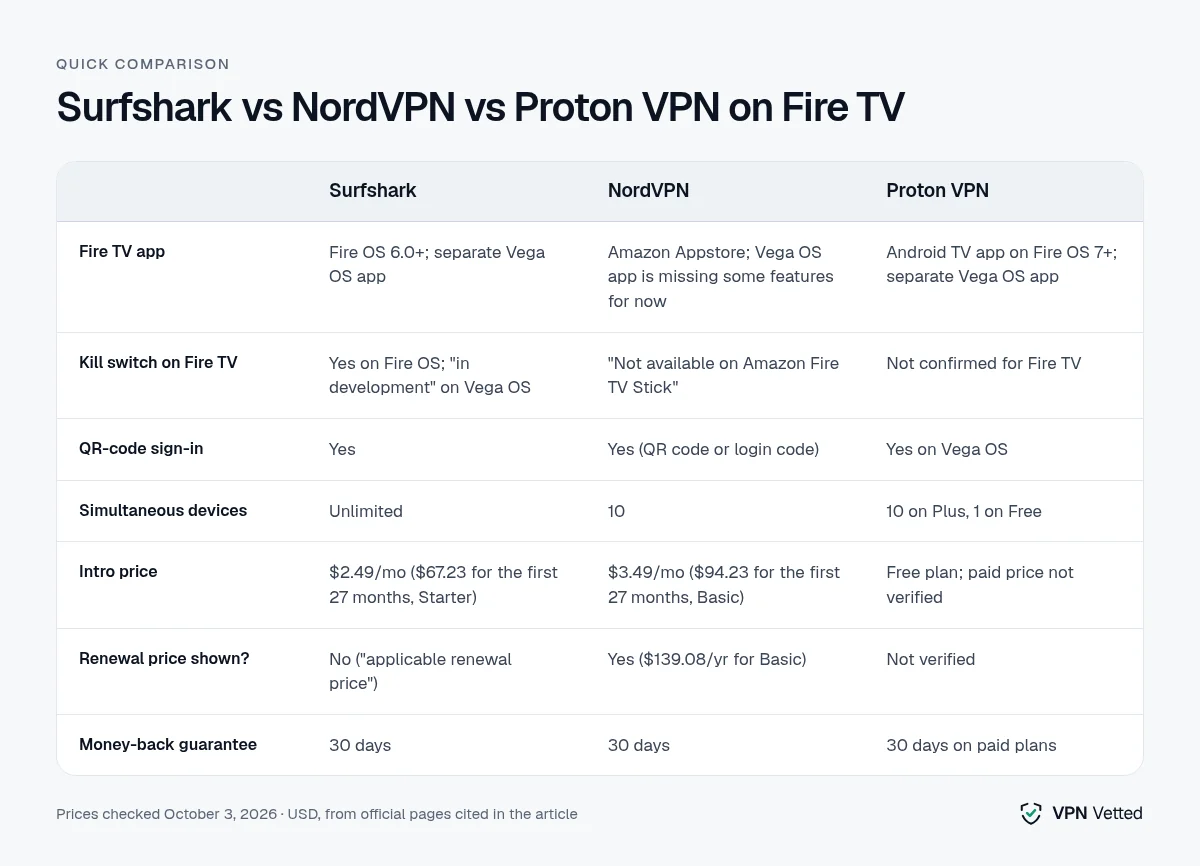
Quick comparison table
| Surfshark | NordVPN | Proton VPN | |
|---|---|---|---|
| Fire TV app | Fire OS 7.0+; separate Vega OS app | Amazon Appstore; Vega OS app is missing some features for now | Android TV app on Fire OS 7+; separate Vega OS app |
| Kill switch on Fire TV | Yes on Fire OS; “in development” on Vega OS | “Not available on Amazon Fire TV Stick” | Not confirmed for Fire TV |
| QR-code sign-in | Yes | Yes (QR code or login code) | Yes on Vega OS |
| Simultaneous devices | Unlimited | 10 | 10 on Plus, 1 on Free |
| Intro price | $2.49/mo ($67.23 for the first 27 months, Starter) | $3.49/mo ($94.23 for the first 27 months, Basic) | Free plan; paid price not verified |
| Renewal price shown? | No (“applicable renewal price”) | Yes ($139.08/yr for Basic) | Not verified |
| Money-back guarantee | 30 days | 30 days | 30 days on paid plans |
| Link | Surfshark | NordVPN | Proton VPN |
Last updated October 3, 2026 · Prices checked October 3, 2026 (USD; sales tax or VAT may apply).
How we review
We built this list from the vendors’ own pricing pages, support articles and Fire TV setup guides, all checked on October 3, 2026, plus Amazon’s developer specs for Fire TV hardware. We compared what each VPN officially documents for Fire TV: which Fire OS and Vega OS versions it supports, whether a kill switch exists on the stick, how you sign in with a remote, device limits, and whether the renewal price is disclosed. We read user reports to learn what problems people actually run into, but we treat them as anecdotes, not measurements. We haven’t run speed tests, so this page doesn’t name a “fastest” VPN.
Best VPNs for Firestick
Surfshark: best overall for Fire TV
Surfshark’s Fire OS app works on Fire OS 7.0 and later. You sign in by scanning a QR code with your phone, entering a login code, or with email and password, so there’s no long password to type with the remote unless you want to (Surfshark Fire TV guide, updated October 6, 2026). Surfshark says the Fire TV app’s steps and interface are identical to Android TV, and its Android TV settings guide lists auto-connect, ad blocker, kill switch and protocol under VPN settings (Android TV settings). It’s also the only one of our three picks with unlimited simultaneous devices, so one subscription can cover every stick and phone in the house (pricing).
The drawbacks: Surfshark’s Vega OS app, for the newer sticks Amazon launched in October 2025, covers the core features only. Surfshark says Clean Web and the kill switch there are “in development and coming soon” (Vega OS page). Its pricing page also doesn’t list a renewal price, only “the applicable renewal price”, so check it at checkout. Plans start at $2.49/mo for Starter ($67.23 for the first 27 months), with a 30-day money-back guarantee.
Surfshark: See the current deal
NordVPN: best for upfront pricing (no kill switch on the stick)
NordVPN’s app installs from the Amazon Appstore. You can sign in with a QR code or a login code, and the settings include auto-connect, Threat Protection, protocol choice (NordLynx, NordWhisper and OpenVPN TCP/UDP), local network discovery and custom DNS (NordVPN on Fire devices). Its plans cover 10 devices.
Pricing is more transparent than Surfshark’s. The 2-year Basic plan is $3.49/mo ($94.23 for the first 27 months), the pricing page shows that it renews at $139.08 a year, and the monthly plan price is listed on the same page (pricing).
The big limitation for this use case: NordVPN says its kill switch “is not available on Amazon Fire TV Stick” (kill switch article). NordVPN also says first-gen sticks don’t allow VPNs, the second-gen and Basic Edition sticks are too old for its app, and the Vega OS app is temporarily missing some features.
NordVPN: See the current deal
Proton VPN: best free option
Proton VPN Free has no data limit. It covers 1 device and connects to servers in 10 countries, which Proton picks for you; you can’t choose (Proton plans). On Fire OS 7 and later it runs as Proton’s Android TV app, and Vega OS gets a separate app with QR sign-in (Fire OS guide, Vega OS guide). Paid Plus adds 10 devices, servers in 140+ countries and streaming support. Paid plans come with a 30-day refund.
The limits: streaming support is for paid plans only, on Fire OS and on Vega OS alike. A kill switch on Fire TV isn’t confirmed either, because Proton’s kill switch guide lists Windows, macOS, iOS/iPadOS, Android and Linux but doesn’t mention Fire TV or Android TV (kill switch guide). The Plus price didn’t load on Proton’s pricing page when we checked, so confirm it before you pay.
Proton VPN: See plans and pricing
Why Firestick slows down on a VPN
A VPN encrypts everything the stick sends and receives, and a streaming stick has far less processing power than a laptop. Amazon’s device specifications list 1 GB to 2 GB of RAM across its streaming sticks. Amazon doesn’t publish VPN throughput figures for any model. Buffering after switching on a VPN is a common complaint in user forums, but that’s anecdotal.
What you can change:
- Switch protocols. NordVPN suggests changing protocols when an Android TV connection keeps dropping (source).
- Pick a nearby, less-loaded location. Surfshark’s app shows load for each location; Quick-connect chooses one for you.
- Try “Small packets” in Surfshark if your Wi-Fi is weak or congested.
- Check your hardware. NordVPN says older sticks can’t run its app at all. If yours is a first- or second-gen model, the stick may be the bottleneck.
How to install a VPN on Fire TV
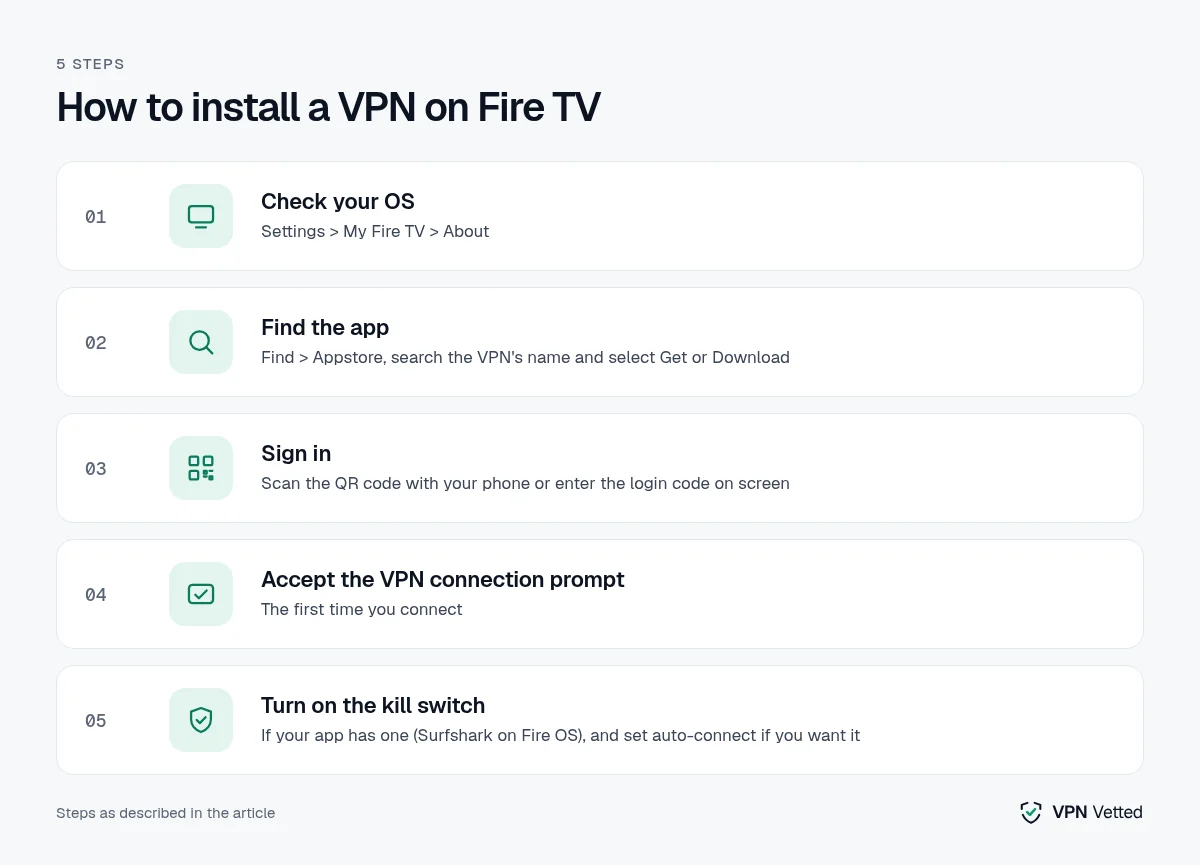
- Check your OS. Go to Settings > My Fire TV > About. Proton says only sticks bought after October 2025 may run Vega OS, and Amazon doesn’t plan to replace Fire OS on existing devices (Proton).
- Find the app. Open Find > Appstore, search for the VPN’s name, and select Get or Download. Proton says voice search for its app “proved unreliable” in its own testing, so type the name.
- Sign in. Scan the QR code with your phone or enter the login code shown on screen.
- Accept the VPN connection prompt the first time you connect.
- Turn on the kill switch if your app has one (Surfshark on Fire OS), and set auto-connect if you want the VPN on at startup.
Prefer to protect every device in the house at once? See our best VPN for router guide.
Do you need a VPN on a Firestick?
A VPN mainly protects your traffic on networks you don’t control, such as hotel, dorm or shared Wi-Fi, and hides your browsing from your internet provider. It doesn’t change what you’re allowed to watch. Use it with legitimate subscriptions and follow each service’s terms; NordVPN, for instance, notes that some streaming services limit VPN connections (NordVPN streaming page).
FAQ
Can I use a free VPN on Firestick? Yes. Proton VPN Free works on Fire OS 7+ and Vega OS, with no data cap, but it covers 1 device, picks the server country for you and doesn’t include streaming support.
Which Fire TV VPN apps have a kill switch? Of our three picks, only Surfshark documents one, and only on Fire OS (it’s “in development” on Vega OS). NordVPN says it isn’t available on Fire TV Stick. Proton’s isn’t confirmed for Fire TV.
Does a VPN work on the new Vega OS sticks? Surfshark, NordVPN and Proton all document Vega OS apps, but each says something is missing or different there, so check the vendor’s Vega OS page before you buy.
Will my old Fire TV Stick run a VPN? NordVPN says first-gen sticks don’t allow VPNs and the second-gen and Basic Edition are too old for its app. Surfshark requires Fire OS 7.0+, and Proton’s app requires Fire OS 7+.
What’s the best VPN for Firestick in the UK? Our picks don’t change by country, and the setup steps are the same on a UK Fire TV Stick. Prices on this page are the US prices in USD; in the UK you’ll see local pricing, and Surfshark notes that VAT may apply. We haven’t checked each app’s listing in the UK Amazon Appstore, so search for it on your stick before you buy. A VPN doesn’t change what your UK streaming subscriptions let you watch.
Is Surfshark the same company as NordVPN? They belong to the same group since a 2022 merger, though both say they operate autonomously with separate infrastructure. For a full comparison, see NordVPN vs Surfshark.
Verdict
Surfshark is our pick for most Fire TV owners: it’s the only one of the three that documents a kill switch on Fire OS, and unlimited devices means you won’t run out of slots. Choose NordVPN if you want the renewal price on the page before you buy and can live without a kill switch on the stick. Start with Proton VPN Free if you only need one device and don’t need streaming support.
Surfshark: Check today’s price
Sources (official pages, checked on October 3, 2026)
These are the official pages cited above. Prices and plans change often, so confirm them on the provider’s site before you buy.
- Surfshark blog: merger with Nord Security: surfshark.com/blog/surfshark-merges-with-nord-security
- NordVPN blog: Nord Security and Surfshark merger agreement: nordvpn.com/blog/nord-security-surfshark-merger-agreement
- Surfshark support: Fire TV: support.surfshark.com/hc/en-us/articles/360018591494
- Surfshark pricing: surfshark.com/pricing
- Surfshark for Vega OS: surfshark.com/download/vega-os
- NordVPN support: NordVPN on Fire devices: support.nordvpn.com/hc/en-us/articles/19453529667089
- NordVPN pricing: nordvpn.com/pricing
- NordVPN support: kill switch: support.nordvpn.com/hc/en-us/articles/19509682644369
- Proton VPN plans: protonvpn.com/support/proton-vpn-plans
- Proton VPN support: Fire OS: protonvpn.com/support/fireos
- Proton VPN support: Vega OS: protonvpn.com/support/vega-os
- Proton VPN support: kill switch: protonvpn.com/support/what-is-kill-switch
- Surfshark support: Android TV settings (kill switch; Fire TV app identical per Surfshark): support.surfshark.com/hc/en-us/articles/39449086079122
- Amazon developer docs: Fire TV device specifications: developer.amazon.com/docs/device-specs/device-specifications-fire-tv-streaming-media-player.html
- NordVPN support: Android TV connection troubleshooting: support.nordvpn.com/hc/en-us/articles/36757458077457
- NordVPN streaming: nordvpn.com/streaming