
Affiliate disclosure: VPN Vetted is reader-supported. Some links below are affiliate links (marked “sponsored”): if you buy through them we may earn a commission at no extra cost to you. We rank by published facts (what each extension does without the app, kill switch, audits, renewal price), never by commission. Surfshark and NordVPN belong to the same group, Nord Security.
Extension details, prices and audits checked October 31, 2026, between 09:13 and 09:14 BRT, on official pages and support centers, in USD, before sales tax or VAT. NordVPN’s main site blocked our check today, so its prices are the ones we last verified; its extension facts come from NordVPN’s support center, which loaded normally.
Last updated: October 31, 2026
Quick answer
- Proton VPN is the best VPN for Chrome for most people. Its extension works on its own (no app needed), it’s available on the free plan, and it also runs in other Chromium browsers like Brave and Edge. Proton’s no-logs audit page (Securitum) was updated June 16, 2026.
- NordVPN is the pick if you want a kill switch inside the extension: NordVPN’s support center says the extension’s kill switch blocks the browser’s internet access if the VPN drops. It renews at $139.08 a year.
- Surfshark is the budget pick for families: one account covers unlimited extensions and devices, and it renews at $79 a year. Its extension has no kill switch; that’s app-only.
All three extensions only protect traffic inside the browser. If you want your whole computer covered, install the full app instead.
Extension vs native app
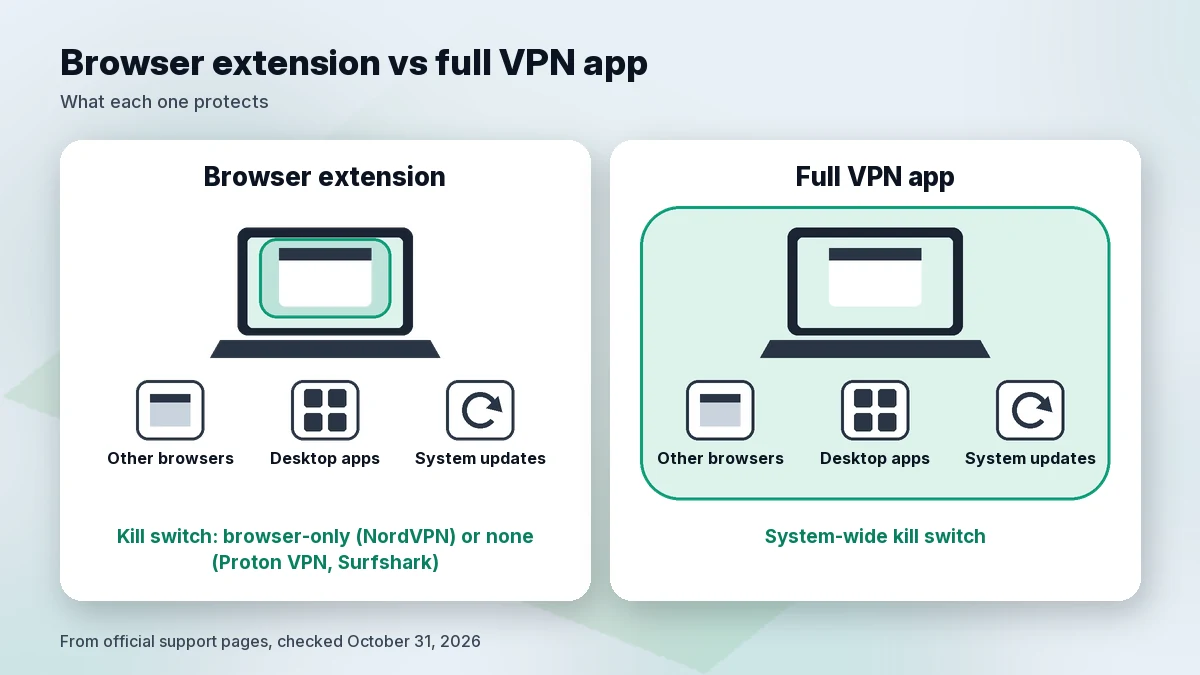
A VPN “extension” for Chrome is, technically, an encrypted proxy that Chrome routes through. A VPN app works at the operating-system level. NordVPN’s own Chrome page puts it plainly: almost all Chrome VPN extensions are proxies, because extensions can only control traffic inside the browser.
| Chrome extension | Full VPN app (Windows/macOS) | |
|---|---|---|
| What’s protected | Only traffic in that browser | All traffic on the device: every browser, app and background service |
| Downloads, email apps, games, updates | Not protected | Protected |
| Kill switch | NordVPN: browser-level. Proton VPN, Surfshark: not in the extension | System-wide (all three) |
| Admin rights to install | Usually no | Usually yes |
| Works without the app | Yes (all three) | n/a |
| Counts as a device | Yes, each connected browser | Yes |
Based on Proton VPN, NordVPN and Surfshark support and download pages, checked October 31, 2026.
Use the extension when you can’t install software (no admin rights), want a light setup, or only care about what you do in Chrome, like browsing on café Wi-Fi.
Use the app when you want everything covered, including downloads and other apps, or you need a system-wide kill switch. Don’t run both at once: NordVPN and Surfshark both warn that connecting the app and the extension at the same time can cause connection problems.
How to set up a VPN in Chrome
The steps are almost identical for all three providers:
- Create an account. Proton VPN works with a free account; NordVPN and Surfshark need an active subscription.
- Install from the Chrome Web Store. Use the link on the provider’s official site, or search the Web Store for the provider’s name, and check that the publisher is the VPN company itself. Click Add to Chrome, then Add extension.
- Pin it. Click the puzzle-piece icon in Chrome’s toolbar and pin the extension so you can see its status.
- Sign in and connect. Open the extension, log in with your VPN account, and click connect (Proton: Quick Connect; NordVPN: “Secure my connection”; Surfshark: Connect).
- Turn on the safety settings. In NordVPN’s extension, enable the kill switch. In Proton VPN’s, turn on Auto connect so it reconnects when you reopen the browser. NordVPN’s extension page also lists WebRTC leak prevention.
- Check it’s working. Surfshark suggests running an IP and DNS leak test after setup; any reputable “what is my IP” page works for a quick check.
If you also use the desktop app, disconnect one before connecting the other.
Limits of a browser extension
- Only Chrome is covered. Other browsers, desktop apps and background services use your normal connection. Proton says the extension “doesn’t protect internet connections made outside the browser.”
- No system kill switch. Proton VPN’s and Surfshark’s kill switches are listed for their apps (Windows, macOS, Android, iOS, Linux), not their extensions. NordVPN’s extension kill switch only blocks the browser.
- Closing the browser ends the session. Proton notes that fully closing the browser ends the VPN session; with Auto connect on, it reconnects to your last server when you reopen.
- Each browser counts as a connection. Proton says each active browser connection counts toward your plan’s limit.
- Work and school networks: an extension doesn’t change the rules of a network you’re on. Follow your organization’s policies.
Proton VPN: best overall VPN extension for Chrome
- Works without the app: yes. Proton’s support page says the browser extension “is a stand-alone product and doesn’t require the Proton VPN app.”
- Free: yes. Since August 14, 2024, Proton’s Chrome and Firefox extensions are available to everyone with a Proton account, including the Free plan.
- Other browsers: Proton says it works in Chromium-based browsers such as Brave, Microsoft Edge, Opera and Vivaldi.
- Kill switch: not in the extension; Proton offers it in its apps on all plans. The extension has Auto connect.
- Price: VPN Plus is $3.49 a month on the 2-year plan, $83.76 for the first 24 months, then $83.88 a year. Up to 10 devices on paid plans.
- Audit: Securitum no-logs audit; Proton’s audit page was updated June 16, 2026.
The free extension makes Proton the easiest place to start: you can try it in Chrome at no cost and upgrade only if you want more servers or devices. See our Proton VPN review.
Buy if: you want a free or low-renewal extension that runs on its own.
Skip if: you need more than 10 connections or a kill switch inside the extension.
NordVPN: best for a kill switch inside the extension
- Works without the app: yes. NordVPN’s support center describes the proxy extension as a lighter option that doesn’t ask for administrator rights and secures only browser traffic.
- Kill switch: yes, browser-level: “blocks your browser’s internet access if the VPN connection drops.” The app has a separate system-wide kill switch.
- Other extension features (per NordVPN): split tunneling for websites, real-time protection against ads, trackers and malicious sites, and WebRTC leak prevention.
- Price: Basic is $3.49 a month, $94.23 for the first 27 months, then $139.08 a year. Up to 10 devices.
- Audit: Deloitte Lithuania, sixth no-logs assurance report issued December 12, 2025.
NordVPN has the most complete extension of the three on safety settings. You pay for it at renewal. More in is NordVPN worth it.
Buy if: you’ll mostly use the extension and want it to block the browser when the VPN drops.
Skip if: a $139.08 renewal is too much, or you want to avoid the Nord Security group.
Surfshark: best budget pick for many browsers and devices
- Works without the app: yes. Surfshark’s support center says the extension is a good fit “when you cannot install the Surfshark application” or want the VPN to affect your browser only. Its Chrome version also works in Brave and Opera.
- Kill switch: not in the extension. Surfshark lists Kill Switch for Android, iOS, macOS, Windows and Linux apps only.
- Other extension features (per Surfshark): CleanWeb (ads, pop-ups, data breach and malware alerts), a cookie pop-up blocker, and split tunneling.
- Price: Starter is $2.49 a month, $67.23 for the first 27 months, then $79 a year. Today the pricing page shows a “Black Friday deal” label on Surfshark One, at the same $2.49 a month and $67.23 for the first 27 months (seen October 31, 2026, 09:13 BRT; may change).
- Devices: unlimited.
- Audit: on June 16, 2025, Surfshark published that Deloitte verified its no-logs policy again.
Surfshark is the cheapest at renewal and the only one here without a connection cap, so you can install it in every browser in the house. Our Surfshark review has the full plan breakdown.
Buy if: you want extensions on lots of browsers and devices for the lowest renewal.
Skip if: you want a free plan for your browser, or a kill switch in the extension.
Comparison table
| Proton VPN | NordVPN | Surfshark | |
|---|---|---|---|
| Extension works without app | Yes | Yes | Yes |
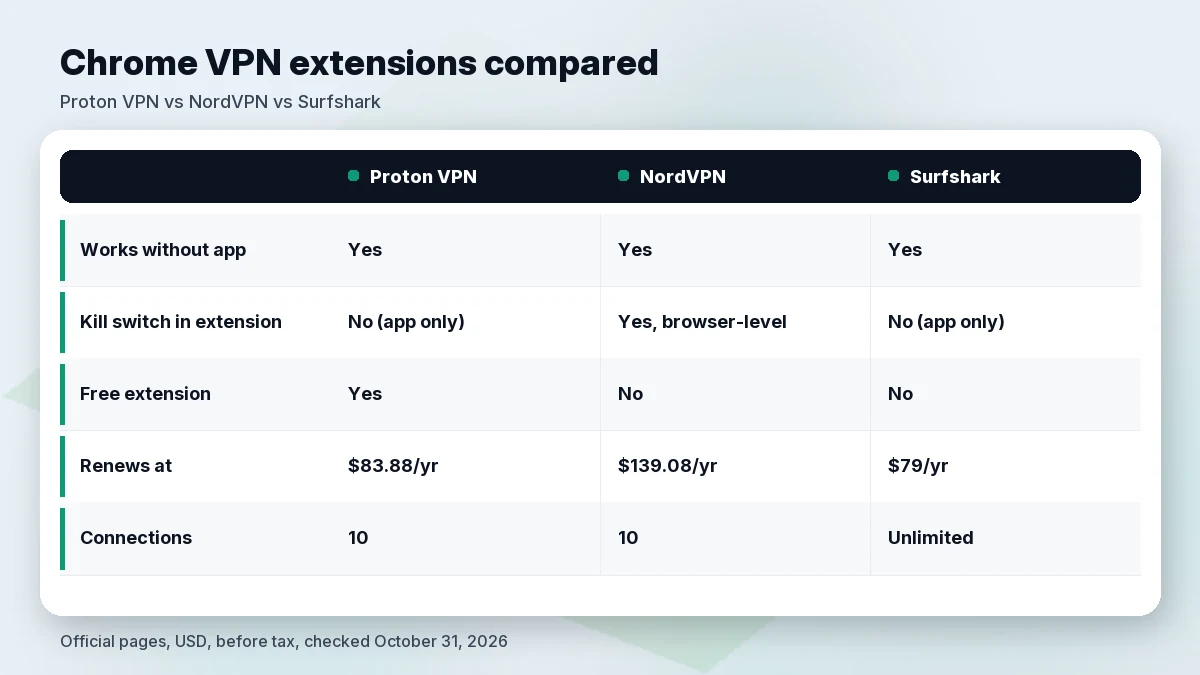
| Kill switch in extension | No (app only; Auto connect in extension) | Yes, browser-level | No (app only) |
| Free extension | Yes | No | No |
| Other Chromium browsers | Brave, Edge, Opera, Vivaldi | Chromium browsers via Chrome Web Store | Brave, Opera |
| Intro price | $83.76 / 24 months | $94.23 / 27 months | $67.23 / 27 months |
| Renews at | $83.88 / year | $139.08 / year | $79 / year |
| Connections | 10 (paid) | 10 | Unlimited |
| Latest named audit | Securitum, page updated Jun 16, 2026 | Deloitte Lithuania, Dec 12, 2025 | Deloitte, published Jun 16, 2025 |
Official pages and support centers, USD, before tax, checked October 31, 2026 (09:13–09:14 BRT). NordVPN prices last verified for our earlier NordVPN coverage because nordvpn.com blocked our check today.
Free Chrome VPN extensions: what to check
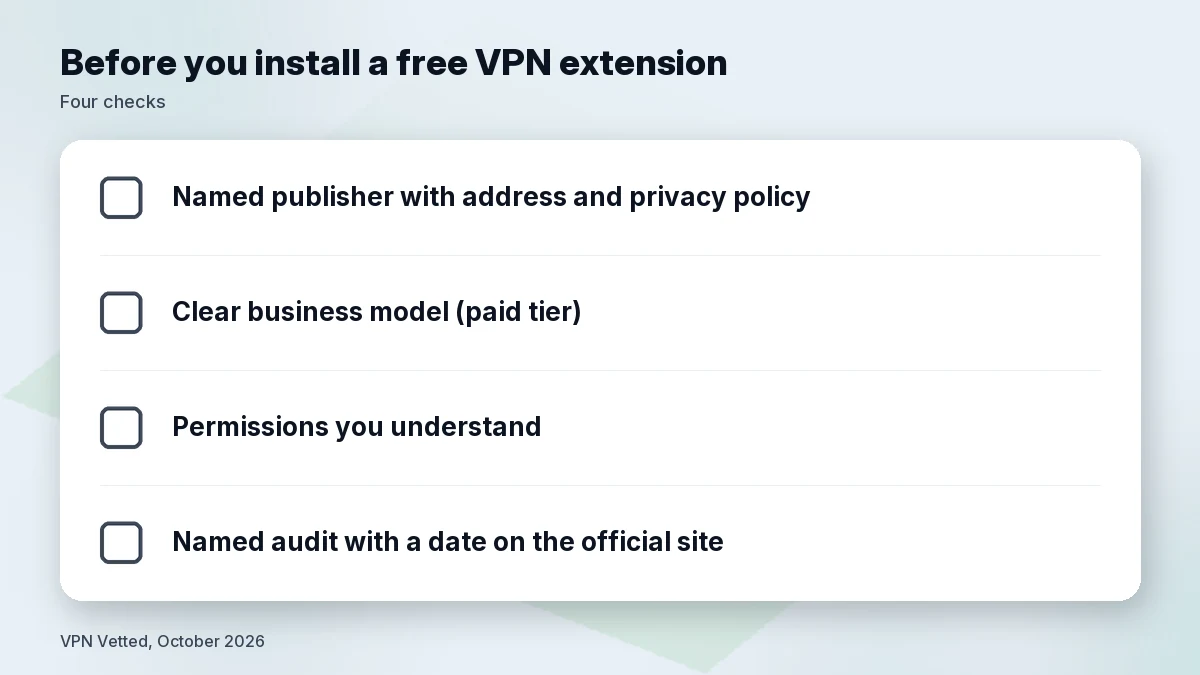
The Chrome Web Store has many free “VPN” extensions. Before installing one, check:
- Who publishes it. A named company with an address and a privacy policy, not just a brand name.
- How it’s paid for. If it’s free with no paid tier, ask how the company makes money.
- Permissions. Any VPN extension needs broad access to your browsing; that’s why the publisher’s trustworthiness matters so much.
- Audits. Look for a named auditor and a date on the provider’s own site.
Proton VPN’s free extension meets these points. For other free options (including Windscribe’s free plan, which also has a Chrome extension), see our best free VPN guide and our Windscribe review.
What about ExpressVPN?
ExpressVPN also offers a Chrome extension, but we didn’t verify today on an official page whether it works on its own or controls the desktop app, so we don’t rank it here. Its plans and audits are covered in our ExpressVPN review.
How we evaluated
On October 31, 2026 (09:13–09:14 BRT) we read each provider’s official extension page, support articles on the extension and kill switch, pricing page and audit page. We ranked by whether the extension works without the app, whether it has a kill switch, free availability, renewal price and audit recency. We didn’t run speed, leak or blocking tests, so we make no performance claims. NordVPN’s main site returned an access error to our checker today; NordVPN extension facts come from its support center and official extension page, and prices from our last verified check.
FAQ
Is a VPN extension a real VPN?
It encrypts and reroutes your browser’s traffic, but technically it works as a secure proxy for that browser only. NordVPN’s own Chrome page says almost all Chrome VPN extensions are proxies. For whole-device protection, use the app.
Does a Chrome VPN extension have a kill switch?
It depends. NordVPN’s extension has a browser-level kill switch. Proton VPN’s and Surfshark’s kill switches are in their apps, not their extensions.
Do I need the app and the extension?
No. All three extensions work on their own. If you install both, don’t connect both at the same time.
Is a free Chrome VPN safe?
A free extension from a provider with a named publisher and published audits, like Proton VPN Free, is a reasonable choice. Be cautious with free extensions that don’t say who runs them or how they make money.
Does it work in Edge or Brave?
Proton VPN says its extension works in Chromium browsers including Brave, Edge, Opera and Vivaldi. Surfshark says its Chrome version also works in Brave and Opera, and it has a separate Edge extension.
How much do these cost after renewal?
As of October 31, 2026: Proton VPN Plus $83.88 a year, NordVPN Basic $139.08 a year, Surfshark Starter $79 a year.
Verdict
For most people, Proton VPN is the best VPN for Chrome: a stand-alone extension, free to start, and a recent named audit. Choose NordVPN if you want a kill switch inside the extension, or Surfshark if you want unlimited browsers and devices for the lowest renewal. And if you want your whole computer protected, install the app; see our best VPN for Mac guide.
Check Proton price · Check NordVPN price · Check Surfshark price
Related
- Best VPN for Chromebook
- Best VPN for public Wi-Fi
- Best free VPN
- Private VPN alternatives
- Best VPN for Android
Sources (official pages, checked on October 31, 2026)
- Proton VPN, Chrome extension: protonvpn.com/download-chrome-extension (09:13 BRT)
- Proton VPN, browser extension support: protonvpn.com/support/browser-extensions (09:14 BRT)
- Proton VPN, free extensions announcement (Aug 14, 2024): protonvpn.com/blog/browser-extension-free
- Proton VPN, kill switch: protonvpn.com/support/what-is-kill-switch (09:14 BRT)
- Proton VPN, pricing and audit: protonvpn.com/pricing (09:13 BRT)
- NordVPN, app vs extension (support): support.nordvpn.com (09:14 BRT)
- NordVPN, Chrome extension page: nordvpn.com/download/chrome-extension
- Surfshark, Chrome extension: surfshark.com/download/chrome (09:13 BRT)
- Surfshark, how to get started (extension without app): support.surfshark.com (09:14 BRT)
- Surfshark, Kill Switch platforms: support.surfshark.com (09:14 BRT)
- Surfshark, pricing: surfshark.com/pricing (09:13 BRT)