

Disclosure: VPN Vetted is reader-supported. Some links below are affiliate links (marked “sponsored”): if you buy through them we may earn a commission at no extra cost to you. Rankings are based on the official facts listed in each section, not on commissions.
Last updated October 10, 2026 · Prices and features checked October 10, 2026 on each provider’s official pages (USD).
Our picks for public Wi-Fi
Is public Wi-Fi safe? What a VPN actually adds
Let’s start honestly. The US Federal Trade Commission says that because most websites now use encryption, “connecting through a public Wi-Fi network is usually safe,” and advises looking for the lock or https in the address bar (FTC). So a VPN isn’t a must-have to check your bank balance in a café.
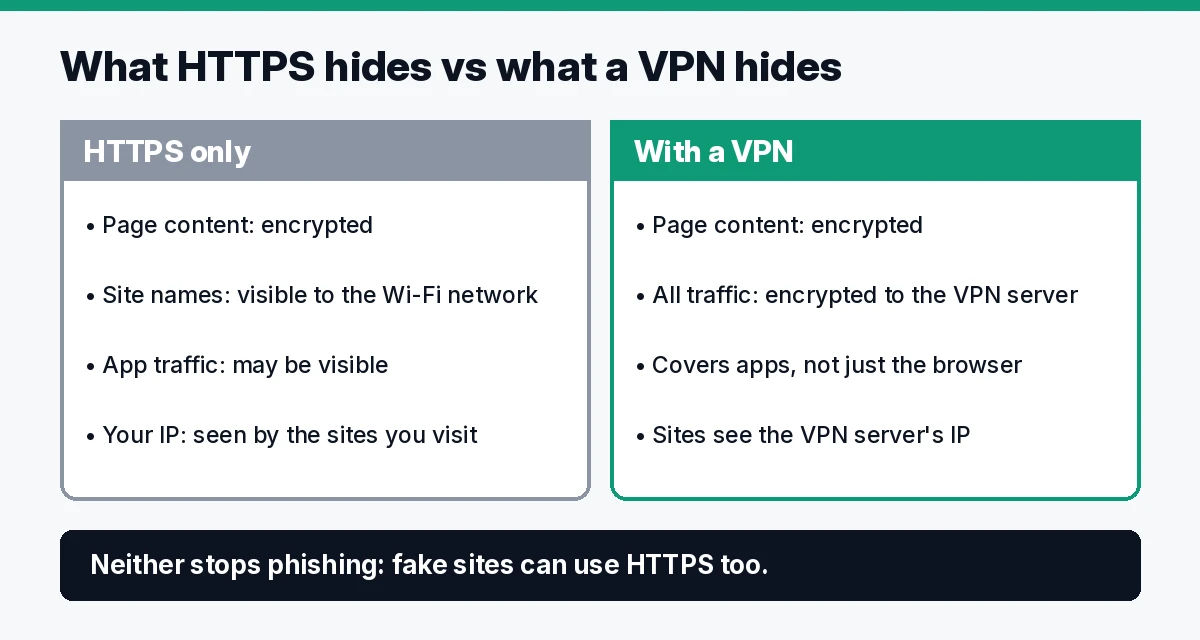
What a VPN adds on top of HTTPS:
- It hides which sites and apps you use from the network. HTTPS protects the content of a page, but the network operator can still see a lot of metadata. A VPN encrypts all your traffic to the VPN server.
- It covers apps, not just the browser. The FTC notes it can be hard to tell whether a mobile app uses encryption, though it says the majority do.
- It hides your IP address from the sites you visit, replacing it with the VPN server’s.
What a VPN does not do: it won’t stop you from typing your password into a fake site. The FTC warns that scammers build encrypted fake websites too (FTC). It also doesn’t make you anonymous; a site you log in to still knows it’s you.
Quick comparison
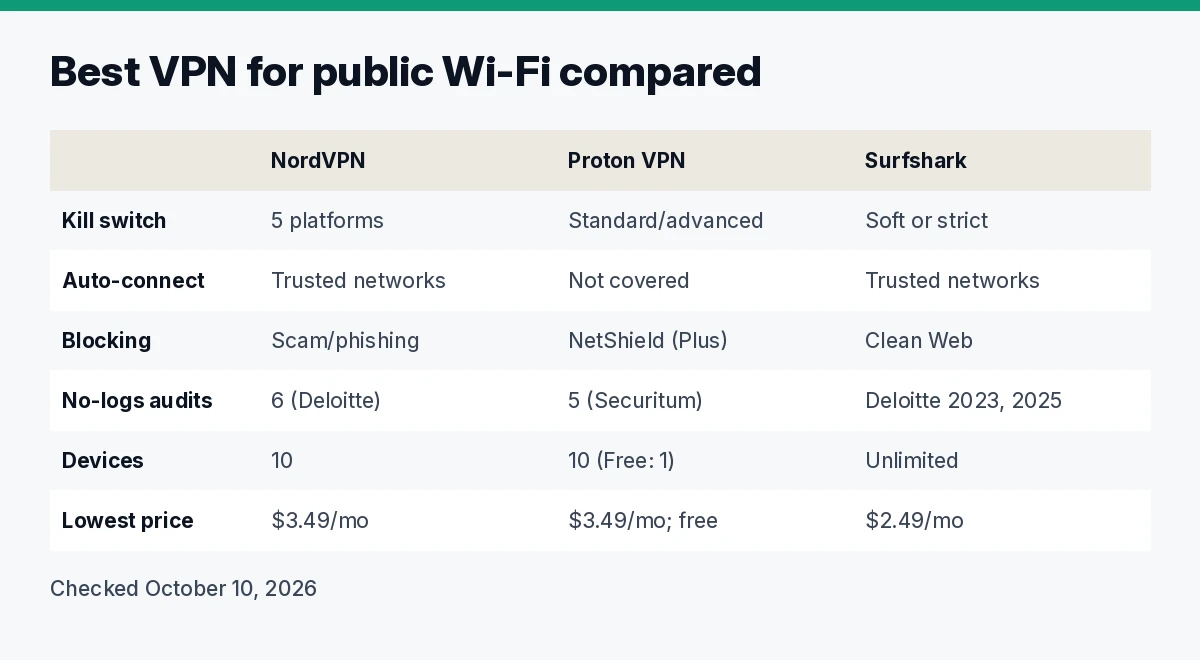
| NordVPN | Surfshark | Proton VPN | |
|---|---|---|---|
| Kill switch | Windows, macOS, Android, iOS, Linux; not activated by default | “Soft” or “strict” mode; iOS, macOS, Android, Windows, Linux | Standard and advanced modes; advanced on Windows, Linux GUI and iOS/iPadOS (beta) |
| Auto-connect on Wi-Fi | Yes, with trusted-networks list | Yes, with trusted-networks list | Not covered here (see note) |
| Blocking of ads and malicious sites | Scam and phishing protection on all plans; ad and tracker blocker on Complete and Prime (desktop) | Clean Web on all plans | NetShield (ads, trackers, malware) on VPN Plus |
| No-logs audits | 6 assurance engagements (latest Deloitte, Dec 2025) | Deloitte (2023, 2025) | 5 consecutive annual audits (latest Securitum) |
| Devices | 10 | Unlimited | 10 (Free: 1) |
| Lowest listed price | $3.49/mo (Basic, 2 years) | $2.49/mo (Starter, 27 months) | $3.49/mo (VPN Plus, 2 years); free plan |
Sources linked in each section below; all checked October 10, 2026.
How we review
We compared the three services using only their official pages, checked October 10, 2026: pricing pages, feature pages, support articles and published audit announcements, plus the FTC’s public Wi-Fi guidance. We ranked on what matters on an untrusted network, in this order: auto-connect (Proton ranks third because we couldn’t confirm this on its official pages), a documented kill switch on each platform, public no-logs audits, leak protection and price. We haven’t run our own leak or speed tests for this guide, so feature claims are the vendors’ own.
1. NordVPN: best overall for public Wi-Fi
NordVPN does the two things that matter most on a café or hotel network without making you remember: it can connect automatically on Wi-Fi, with a list of trusted networks (like your home) where it stays off (auto-connect, trusted networks), and it has a kill switch on Windows, macOS, Android, iOS and Linux. NordVPN says the Kill Switch is not activated by default, so turn it on (kill switch).
For leaks, NordVPN says it uses only its own DNS servers and disables most IPv6 traffic (security). Its sixth no-logs assurance engagement was carried out by Deloitte from November to December 2025 (NordVPN blog).
Pricing (checked October 10, 2026): Basic $3.49/mo for 27 months ($94.23 up front), renewing at $139.08/year. Basic includes the VPN, scam and phishing protection and Dark Web Monitor; the ad and tracker blocker, anti-malware and password manager start on Complete ($4.49/mo for 27 months, $121.23) (pricing). 10 devices on every plan, 30-day money-back guarantee.
Watch out for: hotel and airport login pages. NordVPN’s support says to turn off auto-connect and the kill switch, complete the captive portal, then reconnect and switch both back on (NordVPN support). NordVPN and Surfshark belong to the same company group, Nord Security.
2. Surfshark: best for families and lots of devices
If the whole family is on the hotel Wi-Fi, Surfshark’s unlimited simultaneous devices are the practical win (pricing). Its kill switch has a “soft” mode, which blocks traffic only if the VPN drops unexpectedly, and a “strict” mode, which blocks it whenever the VPN is off (kill switch). Auto-connect and a trusted-networks list are documented in its support center (auto-connect, trusted networks).
Surfshark says it blocks DNS, IPv6 and WebRTC leaks (security). Clean Web filters ads, trackers and malware in the app while you’re connected; the browser extension also works without the VPN (Clean Web). Its trust center lists Deloitte no-logs audits in 2023 and 2025 (trust center).
Pricing (checked October 10, 2026): Starter $2.49/mo ($67.23 for the first 27 months), One $2.49/mo ($67.23), labeled a “Black Friday deal” (promo price as of October 12, 2026), One+ $4.49/mo ($121.23), VAT may apply; 30-day money-back guarantee (pricing).
Watch out for: renewal prices aren’t shown as clearly as NordVPN’s; read the checkout page before paying.
3. Proton VPN: best for transparency (and a free option)
Proton VPN suits people who want to verify claims rather than trust them. Its apps are open source, and it says it has passed a fifth consecutive annual third-party audit of its no-logs policy, by Securitum, and publishes the full report for anyone to read (Proton blog).
Its kill switch has two modes. Standard blocks traffic only when the connection drops by accident; advanced, available on Windows, the Linux GUI app and iOS/iPadOS (beta), allows internet access only while connected to Proton VPN. On Android it uses the system’s “Block connections without VPN” setting, and it isn’t available on Android 7 or earlier (Proton support). NetShield blocks ads and uses DNS filtering against malware and trackers (pricing).
Pricing (checked October 10, 2026): VPN Plus $3.49/mo, billed $83.76 for the first 24 months, then $83.88 every 12 months; 10 devices. The free plan covers 1 device with servers in 10 countries (randomly selected) and no data limits (pricing), which is enough for occasional café use.
Watch out for: we couldn’t confirm an “auto-connect on untrusted Wi-Fi” setting on Proton’s official pages today, so we don’t claim one. Check the app settings before relying on it.
Set it up once: five habits for public Wi-Fi
- Turn on auto-connect for untrusted Wi-Fi, and add your home network to the trusted list.
- Turn on the kill switch, since it’s off by default on several platforms.
- Log in to the captive portal first, then connect the VPN.
- Keep your phone’s private Wi-Fi address on. On iPhone and iPad, Apple says a private address per network reduces tracking across Wi-Fi networks (Apple).
- Use strong passwords and two-factor authentication, and keep software updated, as the FTC recommends (FTC).
Beyond the VPN
A VPN protects the connection, not your accounts. Two add-ons that fit the same goal (not part of the ranking):
- NordPass (password manager): unique passwords make a phishing slip far less costly. Included in NordVPN Complete, or on its own. See NordPass
- Incogni (data removal): removes your details from data brokers and people-search sites, which cuts the raw material scammers use. See Incogni
FAQ
Is public Wi-Fi safe with a VPN? Usually yes, and per the FTC it’s usually safe even without one thanks to HTTPS. A VPN adds encryption for all apps and hides which sites you use from the network, but it doesn’t protect you from phishing.
Is it safe to do banking on public Wi-Fi with a VPN? Your bank’s site and app already use encryption. A VPN adds a layer, but the bigger risks are fake sites and weak passwords, so check the address and use two-factor authentication.
Can someone see what I do on public Wi-Fi? Without a VPN, the network can see which sites you connect to, but not the contents of HTTPS pages. With a VPN, it sees only an encrypted connection to the VPN server.
Do I need a VPN if the site uses HTTPS? Not strictly. HTTPS protects the page; a VPN also hides the rest of your traffic’s metadata from the network and covers apps.
Is a free VPN safe for public Wi-Fi? It depends on the provider. Proton VPN’s free plan is from an audited provider with open-source apps, limited to 1 device and servers in 10 countries.
Should I turn off auto-join for public networks? It’s a sensible habit, so your phone doesn’t silently join a network with a familiar name. Pair it with VPN auto-connect for networks you do join.
Verdict
For most people, NordVPN is the best VPN for public Wi-Fi: auto-connect with trusted networks, a kill switch on every major platform and the most no-logs verifications. Pick Surfshark if you’re protecting many devices at once: it documents auto-connect and trusted networks like NordVPN. Pick Proton VPN if you value open-source apps and published audit reports, or just need a free plan now and then; we rank it third only because we couldn’t confirm an auto-connect setting for untrusted Wi-Fi on its official pages.
Sources (official pages, checked on October 10, 2026)
- FTC, Are Public Wi-Fi Networks Safe?: https://consumer.ftc.gov/articles/are-public-wi-fi-networks-safe-what-you-need-know
- Apple, private Wi-Fi addresses: https://support.apple.com/en-us/102509
- NordVPN pricing: https://nordvpn.com/pricing/
- NordVPN kill switch: https://nordvpn.com/features/vpn-kill-switch/
- NordVPN security: https://nordvpn.com/features/vpn-security/
- NordVPN auto-connect: https://support.nordvpn.com/hc/en-us/articles/38467188541201
- NordVPN trusted networks: https://support.nordvpn.com/hc/en-us/articles/19645837296913
- NordVPN captive portals: https://support.nordvpn.com/hc/en-us/articles/48557553837969
- NordVPN no-logs assurance 2025: https://nordvpn.com/blog/nordvpn-no-logs-assurance-engagement-2025/
- Proton VPN pricing: https://protonvpn.com/pricing
- Proton VPN kill switch: https://protonvpn.com/support/what-is-kill-switch
- Proton VPN no-logs audit: https://protonvpn.com/blog/no-logs-audit
- Surfshark pricing: https://surfshark.com/pricing
- Surfshark kill switch: https://surfshark.com/features/kill-switch
- Surfshark security: https://surfshark.com/features/vpn-security
- Surfshark Clean Web: https://surfshark.com/features/cleanweb
- Surfshark auto-connect: https://support.surfshark.com/hc/en-us/articles/6628420453778
- Surfshark trusted networks: https://support.surfshark.com/hc/en-us/articles/4404292160786
- Surfshark trust center: https://surfshark.com/trust-center