
Disclosure: VPN Vetted is reader-supported. Some links below are affiliate links (marked “sponsored”): if you buy through them we may earn a commission at no extra cost to you. Rankings are based on the official facts in each section, not on commissions. NordVPN and Surfshark belong to the same company group, Nord Security.
Last updated October 11, 2026 · Prices and features checked October 11, 2026 on each provider’s official pages (US view, USD).
Our picks for iPhone and iPad
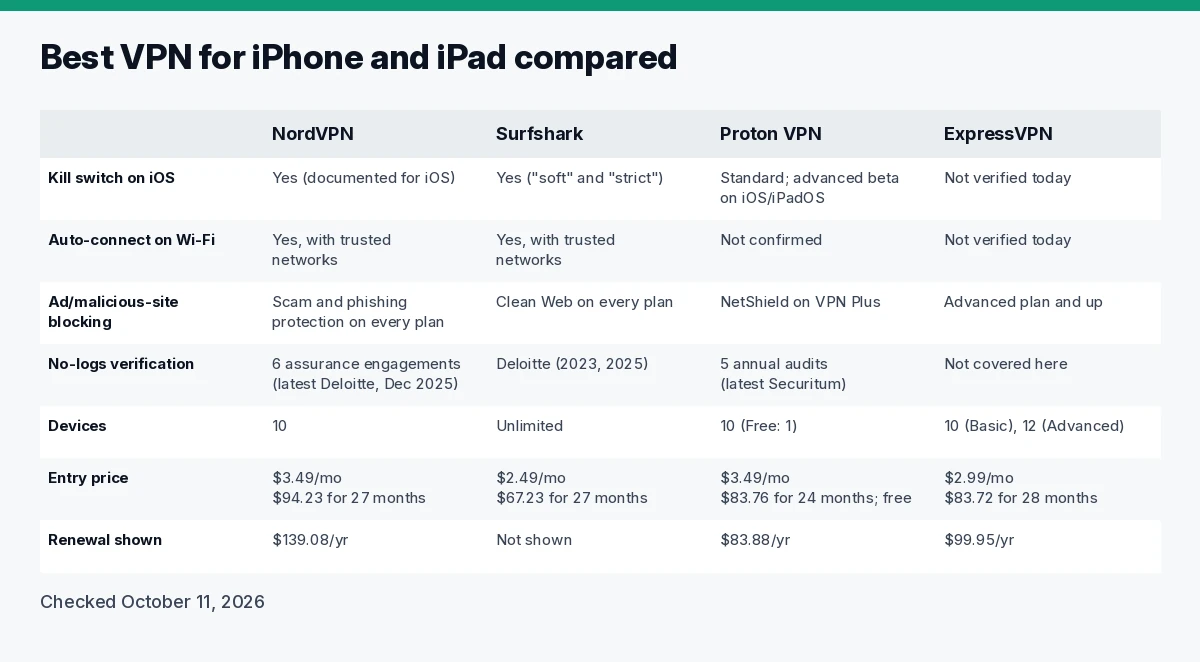
Comparison table
| NordVPN | Surfshark | Proton VPN | ExpressVPN | |
|---|---|---|---|---|
| Kill switch on iOS | Yes (documented for iOS) | Yes (“soft” and “strict” modes) | Standard; advanced mode in beta on iOS/iPadOS | Not verified today |
| Auto-connect on Wi-Fi | Yes, with trusted networks | Yes, with trusted networks | Not confirmed | Not verified today |
| Ad/malicious-site blocking | Scam and phishing protection on every plan | Clean Web on every plan | NetShield on VPN Plus | Advanced plan and up |
| No-logs verification | 6 assurance engagements (latest Deloitte, Dec 2025) | Deloitte (2023, 2025) | 5 annual audits (latest Securitum) | Not covered here |
| Devices | 10 | Unlimited | 10 (Free: 1) | 10 (Basic), 12 (Advanced) |
| Entry price | $3.49/mo, $94.23 for 27 months | $2.49/mo, $67.23 for 27 months | $3.49/mo, $83.76 for 24 months; free plan | $2.99/mo, $83.72 for 28 months |
| Renewal shown | $139.08/yr | Not shown | $83.88/yr | $99.95/yr |
All figures from the official pages linked below, checked October 11, 2026.
How we review
We compared these VPNs using only official pages, checked October 11, 2026: pricing and order pages, feature and support pages, audit announcements, and Apple’s own support documentation. We ranked on what matters on an iPhone or iPad: a documented kill switch on iOS, auto-connect on untrusted Wi-Fi, independent no-logs verification, how many Apple devices one subscription covers, and price including renewal. We haven’t run our own speed, battery or leak tests for this guide, so feature claims are the vendors’ own.
Best VPNs for iPhone and iPad
1. NordVPN: best overall
NordVPN’s kill switch is built into its iOS app, and NordVPN says the Kill Switch is not activated by default, so turn it on in the app settings (kill switch). Auto-connect can kick in on Wi-Fi, with a trusted-networks list for home (auto-connect, trusted networks). NordVPN says it uses only its own DNS servers and disables most IPv6 traffic (security), and its sixth no-logs assurance engagement was run by Deloitte in November and December 2025 (NordVPN blog).
Pricing (checked October 11, 2026): Basic is $3.49/mo, billed $94.23 for the first 27 months, then $139.08 a year. Basic includes the VPN, scam and phishing protection (DNS-based blocking of ads and malicious domains while connected) and Dark Web Monitor for up to 5 emails. Complete ($4.49/mo, $121.23 for 27 months) adds a password manager, 1 TB of encrypted storage and more; its ad and tracker blocker and anti-malware are desktop only (pricing). 10 devices, 30-day money-back guarantee.
Watch out for: 10 devices covers most people, but an iPhone, iPad and Mac for each of four family members won’t fit.
2. Surfshark: best for a whole Apple household
One Surfshark subscription covers unlimited simultaneous devices (pricing), so every iPhone, iPad and Mac in the house is covered. Its kill switch has a “soft” mode (blocks traffic only if the VPN drops unexpectedly) and a “strict” mode (blocks it whenever the VPN is off) and is listed for iOS and macOS (kill switch). Auto-connect and trusted networks are documented (auto-connect, trusted networks). Surfshark says it blocks DNS, IPv6 and WebRTC leaks (security), and Clean Web filters ads, trackers and malware while connected (Clean Web). Its trust center lists Deloitte no-logs audits in 2023 and 2025 (trust center).
Pricing (checked October 11, 2026): Starter $2.49/mo ($67.23 for the first 27 months), One $2.49/mo ($67.23), labeled a “Black Friday deal” (promo price as of October 12, 2026), One+ $4.49/mo ($121.23); VAT may apply (pricing).
Watch out for: the renewal price isn’t shown on the pricing page; check it at checkout.
3. Proton VPN: best for transparency and a free plan
Proton’s apps are open source, and it says it passed a fifth consecutive annual no-logs audit, by Securitum, with the full report public (Proton blog). On iPhone and iPad it offers a standard kill switch and an advanced kill switch in beta that allows internet access only while connected (Proton support). NetShield blocks ads, trackers and malware domains on paid plans (pricing).
Pricing (checked October 11, 2026): VPN Plus $3.49/mo, billed $83.76 for the first 24 months, then $83.88 a year, 10 devices. The free plan covers 1 device, servers in 10 countries (randomly selected) and no data limits (pricing). That makes it the free VPN we’d point iPhone users to first.
Watch out for: we couldn’t confirm auto-connect on untrusted Wi-Fi on Proton’s official pages, and the advanced kill switch on iOS is still labeled beta.
4. ExpressVPN: simple tiers, renewal shown
ExpressVPN’s order page is clear about what you’ll pay later. Basic is $2.99/mo, billed $83.72 for the first 28 months, then $99.95 a year, with 10 devices. Advanced ($4.49/mo, $125.72 for 28 months, then $119.95/yr) adds 12 devices, blocking of ads, trackers and malicious sites, a password manager and identity monitoring (order page). Its protocol is Lightway, with post-quantum protection listed on every tier.
Watch out for: we didn’t verify ExpressVPN’s iOS kill switch or no-logs audits on official pages today, so it ranks fourth. We link to it without an affiliate link because its program terms aren’t confirmed.
VPN vs iCloud Private Relay: do you need both?
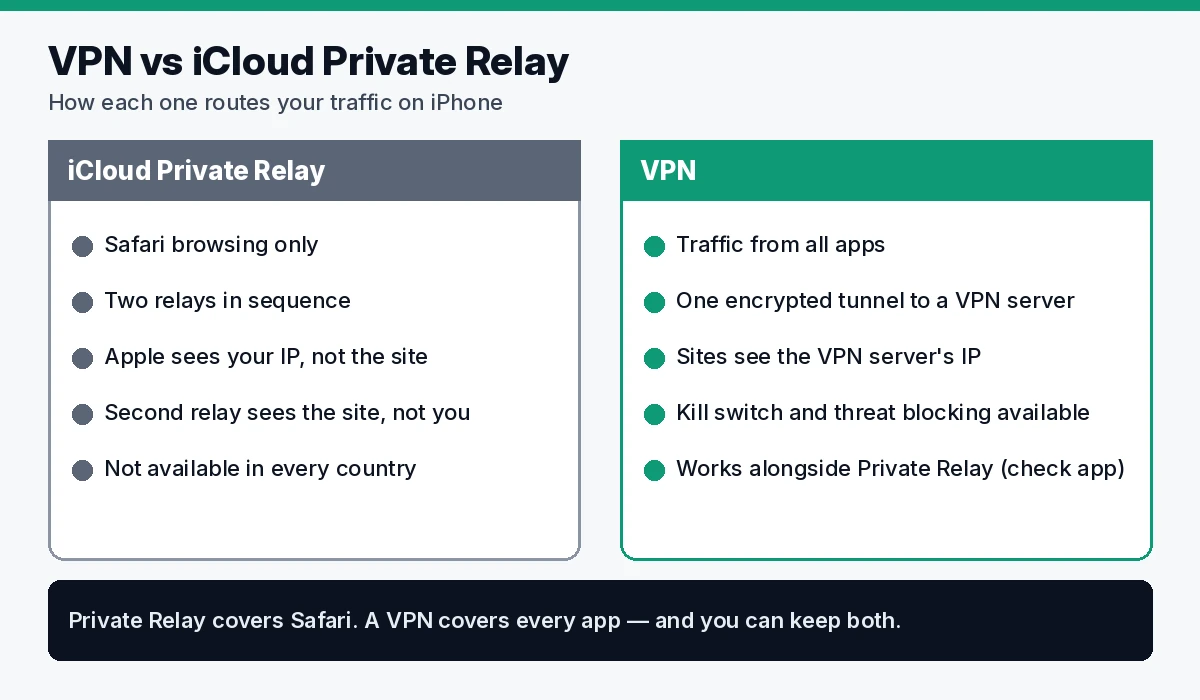
iCloud Private Relay is part of an iCloud+ subscription and protects your browsing in Safari. It sends requests through two relays: the first, run by Apple, sees your IP address but not the site; the second, run by a third-party provider, gives you a temporary IP and connects you to the site. Apple says no single party, “not even Apple,” can see both who you are and which sites you visit (Apple).
The difference: Private Relay covers Safari, while a VPN app routes traffic from your other apps too. Apple also notes Private Relay isn’t available in all countries or regions. For many people Private Relay is enough for casual browsing. A VPN adds coverage for every app, a kill switch and threat blocking. You can keep both, but check how your VPN handles Private Relay in its own support pages.
iOS settings that matter
- Private Wi-Fi Address. Your iPhone and iPad use a different Wi-Fi (MAC) address on each network by default. From iOS 18 you can choose Off, Fixed or Rotating, and the device picks Rotating by default on networks with weak or no security (Apple). Leave it on.
- Kill switch. Turn it on in your VPN app; on Proton the advanced mode is a separate choice.
- Auto-connect. Set the VPN to connect on untrusted Wi-Fi and add your home network as trusted.
Free VPNs on iPhone: what to watch
A free VPN sees all your traffic, so who runs it matters more than the price. Prefer a free plan from a provider with published audits, like Proton VPN Free, and check the App Store privacy label and the permissions the app asks for before installing.
Beyond the VPN
A VPN protects the connection, not your accounts (not part of the ranking):
- NordPass (password manager): unique passwords across your iPhone, iPad and Mac. See NordPass
- Incogni (data removal): requests removal of your details from data brokers and people-search sites. See Incogni
FAQ
Do I need a VPN on my iPhone? Not always. HTTPS already protects most sites. A VPN helps most on public Wi-Fi, and when you want to hide your browsing from the network and your IP address from the sites you visit.
Is iCloud Private Relay a VPN? No. It’s a two-relay privacy service for Safari that comes with iCloud+. A VPN covers traffic from all your apps.
Is there a good free VPN for iPhone and iPad? Proton VPN Free is our pick: no data limits, from an audited provider, but 1 device and servers in 10 countries.
Can one VPN subscription cover iPhone, iPad and Mac? Yes. NordVPN, Proton VPN Plus and ExpressVPN Basic cover 10 devices; Surfshark covers unlimited devices.
Does a VPN drain iPhone battery? Some extra use is normal because traffic is encrypted, but we haven’t measured it and won’t quote vendor figures.
Which VPN is best for iPhone according to Reddit? Opinions vary; we rank on documented iOS features, audits and price instead.
Verdict
NordVPN is the best VPN for iPhone and iPad for most people: a documented iOS kill switch, auto-connect with trusted networks, the most no-logs verifications and useful protection even on Basic. Choose Surfshark for a house full of Apple devices, Proton VPN for open-source apps or a free plan, and ExpressVPN if clear renewal pricing on a simple plan matters most.
Sources (official pages, checked on October 11, 2026)
- Apple, About iCloud Private Relay: https://support.apple.com/en-us/102602
- Apple, Use private Wi-Fi addresses: https://support.apple.com/en-us/102509
- NordVPN pricing: https://nordvpn.com/pricing/
- NordVPN kill switch: https://nordvpn.com/features/vpn-kill-switch/
- NordVPN security: https://nordvpn.com/features/vpn-security/
- NordVPN auto-connect: https://support.nordvpn.com/hc/en-us/articles/38467188541201
- NordVPN trusted networks: https://support.nordvpn.com/hc/en-us/articles/19645837296913
- NordVPN no-logs assurance 2025: https://nordvpn.com/blog/nordvpn-no-logs-assurance-engagement-2025/
- Surfshark pricing: https://surfshark.com/pricing
- Surfshark kill switch: https://surfshark.com/features/kill-switch
- Surfshark security: https://surfshark.com/features/vpn-security
- Surfshark Clean Web: https://surfshark.com/features/cleanweb
- Surfshark auto-connect: https://support.surfshark.com/hc/en-us/articles/6628420453778
- Surfshark trusted networks: https://support.surfshark.com/hc/en-us/articles/4404292160786
- Surfshark trust center: https://surfshark.com/trust-center
- Proton VPN pricing: https://protonvpn.com/pricing
- Proton VPN kill switch: https://protonvpn.com/support/what-is-kill-switch
- Proton VPN no-logs audit: https://protonvpn.com/blog/no-logs-audit
- ExpressVPN order page: https://www.expressvpn.com/order