
Disclosure: VPN Vetted is reader-supported. A few links in the “Tools we use alongside” box near the end are affiliate links (marked “sponsored”): if you buy through them we may earn a commission at no extra cost to you. The privacy guidance in this article contains no affiliate links, and nothing here was reviewed or paid for by Tesla.
Published October 17, 2026 · Tesla’s Customer Privacy Notice, privacy support page and owner’s manual checked October 17, 2026. Quotes are from those pages as they read that day.
Why the new Roadster puts car privacy back in the news
On the evening of October 15, 2026, Tesla held the unveiling of its next-generation Roadster at a SpaceX test site in McGregor, Texas. It was a prototype reveal with a live demo, not the start of sales or deliveries: Tesla has not disclosed a price, and Elon Musk said building the car would start in 2028 (Reuters via Investing.com, Car and Driver). For the full spec and software breakdown, see our sister site’s coverage of the Tesla Roadster unveiling.
The prototype drove upside down on a ramp using a fan-driven suction system and used cold-gas thrusters to leave the ground. That is a car full of sensors, actuators and software, and like current Teslas it is likely to be connected, though Tesla hasn’t published the Roadster’s connectivity details. So the useful question for anyone who owns a Tesla today, or is thinking about a reservation, is simple: what does a connected Tesla send to the company, and what can you switch off? Tesla publishes a fairly detailed answer, but none of it is specific to the Roadster yet.
What Tesla says it collects
Tesla’s Customer Privacy Notice (marked “Updated February 2026” when we checked on October 17, 2026) says: “There are four categories of data generated by your Tesla vehicle: vehicle data, diagnostic data, infotainment system data, and AI data.” Its headline promise is that “Tesla does not associate the vehicle data generated by your driving with your identity or account by default.”
“By default” is doing a lot of work in that sentence, so here is what the notice actually lists.
- Vehicle data. Tesla’s examples include “speed information, odometer readings, vehicle component signals, internet connectivity status, battery use management information, battery charging history, electrical system functions, software version information, infotainment system data, safety-related data and camera images,” plus “short video clips of accidents” and information about Summon, Sentry and other features.
- Diagnostic data. Logs about vehicle configuration, firmware, energy use and the state of electronic systems, used to find bugs. The notice also says Tesla “may remotely update vehicle settings, configurations, or operational parameters” when a condition is known and not safety-critical.
- Infotainment data. Usage analytics such as “aggregated counts of the features or apps used” and “playback and browsing metadata (such as radio listening time and channel).”
- AI data. Data from the external camera suite that runs features like Traffic-Aware Cruise Control, Summon and Autopark.
On top of that, if you own a Tesla, the notice lists account-level data such as order details, government ID used for verification (including, with automated verification, a “selfie” and a “mathematical representation of your face”), payment and financing information, service history and customer support activity.
What stays in the car by default
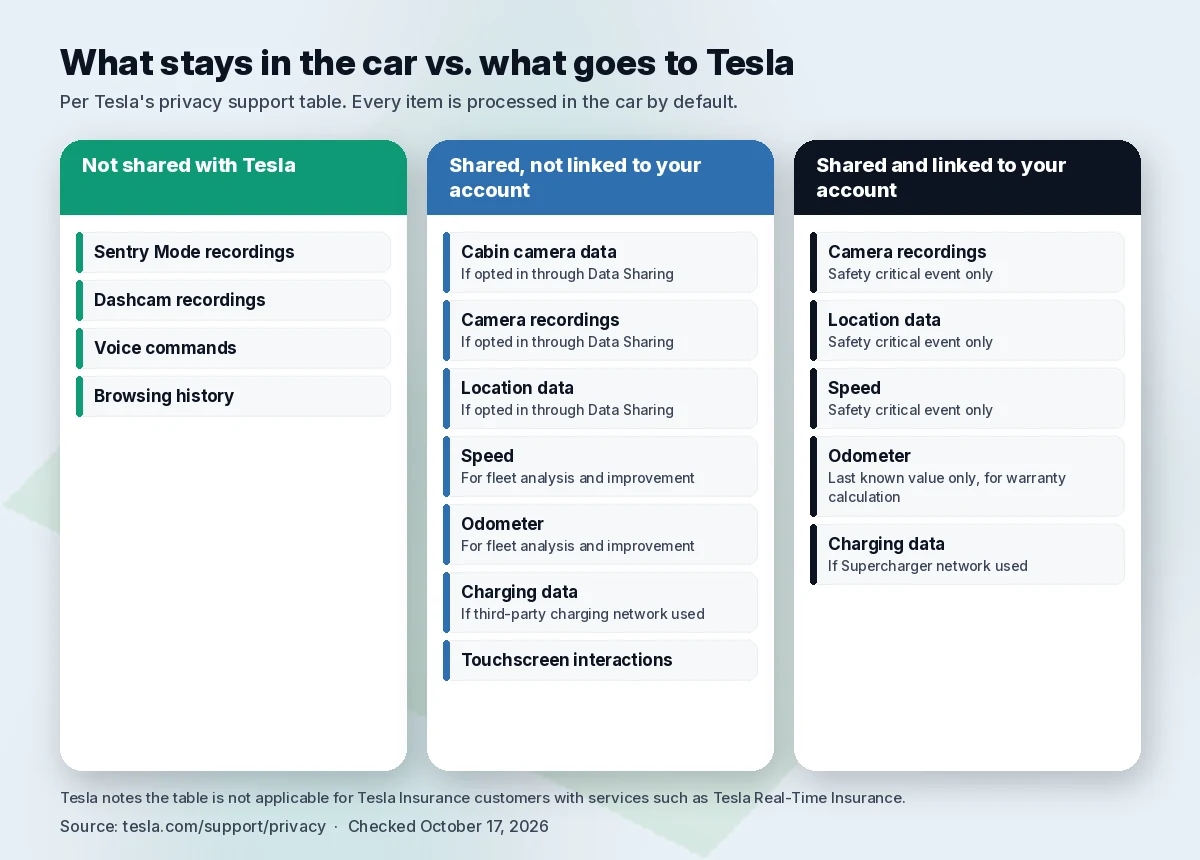
Tesla’s privacy support page has a table that is the clearest single summary of the system. Here is our condensed version of it, checked October 17, 2026:
| Data | Processed in the car by default | Shared with Tesla, not linked to your account | Shared with Tesla and linked to your account |
|---|---|---|---|
| Sentry Mode recordings | Yes | Not shared with Tesla | Not shared with Tesla |
| Dashcam recordings | Yes | Not shared with Tesla | Not shared with Tesla |
| Voice commands | Yes | Not shared with Tesla | Not shared with Tesla |
| Browsing history | Yes | Not shared with Tesla | Not shared with Tesla |
| Cabin camera data | Yes | If opted in through Data Sharing | N/A |
| Camera recordings | Yes | If opted in through Data Sharing | Safety critical event only |
| Location data | Yes | If opted in through Data Sharing | Safety critical event only |
| Speed | Yes | For fleet analysis and improvement | Safety critical event only |
| Odometer | Yes | For fleet analysis and improvement | Last known value only, for warranty calculation |
| Charging data | Yes | If third-party charging network used | If Supercharger network used |
| Touchscreen interactions | Yes | Yes | N/A |
Source: tesla.com/support/privacy, checked October 17, 2026. Tesla notes the table “is not applicable for Tesla Insurance customers with services such as Tesla Real-Time Insurance.”
There is one nuance on voice. The support table says voice commands are “Not shared with Tesla,” while the Privacy Notice says Tesla “captures and processes the transcription of the command” but does not capture audio recordings and does not link the transcription to your account or VIN. Read together, the audio stays private and anonymous text transcripts may be used for quality improvements.
The notice also says Dashcam video “is stored locally on an encrypted USB drive and not transmitted to Tesla,” and that “Sentry Mode footage is not transmitted to Tesla.” If you turn on Sentry Mode Live Camera Access, Tesla says the live view “is end-to-end encrypted and cannot be accessed by Tesla.”
What’s shared only if you opt in
Three kinds of data leave the car only with your consent, according to Tesla:
- Fleet Learning camera clips. Tesla says “your consent for Data Sharing is required” for these, and that even if you opt in, “the camera recordings are limited to 30 seconds and remain anonymous.”
- Cabin camera analytics. The notice says the cabin camera above the rearview mirror “is off by default unless enabled by you when using an associated safety or convenience feature,” and that even if you share Cabin Camera Analytics, “this camera data is not associated with your account or VIN.” The Model X owner’s manual adds that “Cabin camera does not perform facial recognition or any other method of identity verification,” and that with data sharing on, short cabin clips are sent to Tesla if a safety critical event such as a collision occurs.
- Sound detection. Microphone-based sound detection asks for permission first, processes data in the car by default, and can share clips “up to 1 minute in duration” only if you opt in. Tesla adds: “it is your responsibility to confirm consent of occupants.”
Location deserves its own line. The notice says location data “is either processed directly without leaving your vehicle, is in a form that does not personally identify you, or remains inaccessible to Tesla,” and that “Tesla does not link your location with your account or identity, or keep a history of where you’ve been.” The Road Segment Data Analytics setting controls sharing road data, which Tesla says real-time traffic and intelligent routing rely on. If enabled, Tesla says it “may share this data in a way that does not identify your account or VIN with partners,” and that “this sharing may occur even if you are not actively using a feature that needs this information.”
There are three more location details in the notice worth knowing. First, the Tesla app lets you “view the vehicle’s current location,” and Tesla says “certain general usage information associated with your account or VIN may be shared with us” from the app. Second, “when your vehicle is at a Tesla Service Center or Tesla-approved body shop for repair, vehicle location may be accessed for the duration of the on-site service visit and only while the vehicle is on the premises.” Third, the car “uses coarse location data (such as the country in which the vehicle is operating) to deliver context-aware services,” such as local radio stations and country-specific safety alerts.
What’s shared for fleet analysis and in a crash
Some data goes to Tesla without an opt-in. Per the support table, speed and odometer readings are shared “for fleet analysis and improvement” in a form not linked to your account, and touchscreen interactions are also shared with Tesla, not linked to your account. The notice also lists “safety analysis data” that “might contain information that identifies you or your vehicle’s VIN,” including data about accidents or near accidents, remote commands such as locking the doors, starting or stopping a charge and honking the horn, an “online” report with software version and “certain telematics data,” and data about each software update.
The big exception to anonymity is a safety critical event. Tesla defines it on the support page as “a severe vehicle collision, automatic emergency braking, or airbag deployment.” In that case, camera clips of “up to 30 seconds” are “associated with your VIN” and “may include timestamp and location metadata,” and your location may be used “to aid response efforts.” Vehicle data can also become linked to you if you request service, if there’s a hardware or software issue, or “if you provide your consent, or another legal basis is applicable.”
Finally, the notice says Tesla may share data with service providers, affiliates such as Tesla Insurance Services, repair estimate providers, apps you connect through Tesla’s Fleet API, and law enforcement “as required by law, or when otherwise appropriate.” It also lists sharing “with your employer or other fleet operator or the owner of the Tesla product, if you do not directly own it, as authorized by local law,” which matters if you drive a company or rental car; with government incentive programs, which may require details “such as vehicle identification number or home address”; and with a third party “in connection with any reorganization, merger, sale” of Tesla’s business. On selling data, Tesla is blunt: “We do not sell your personal data to anyone for any purpose, period.”
How to limit Tesla data sharing, step by step
These are the controls Tesla documents. Menu names can differ by model and software version, so treat them as the paths Tesla publishes, not a screenshot of your car.
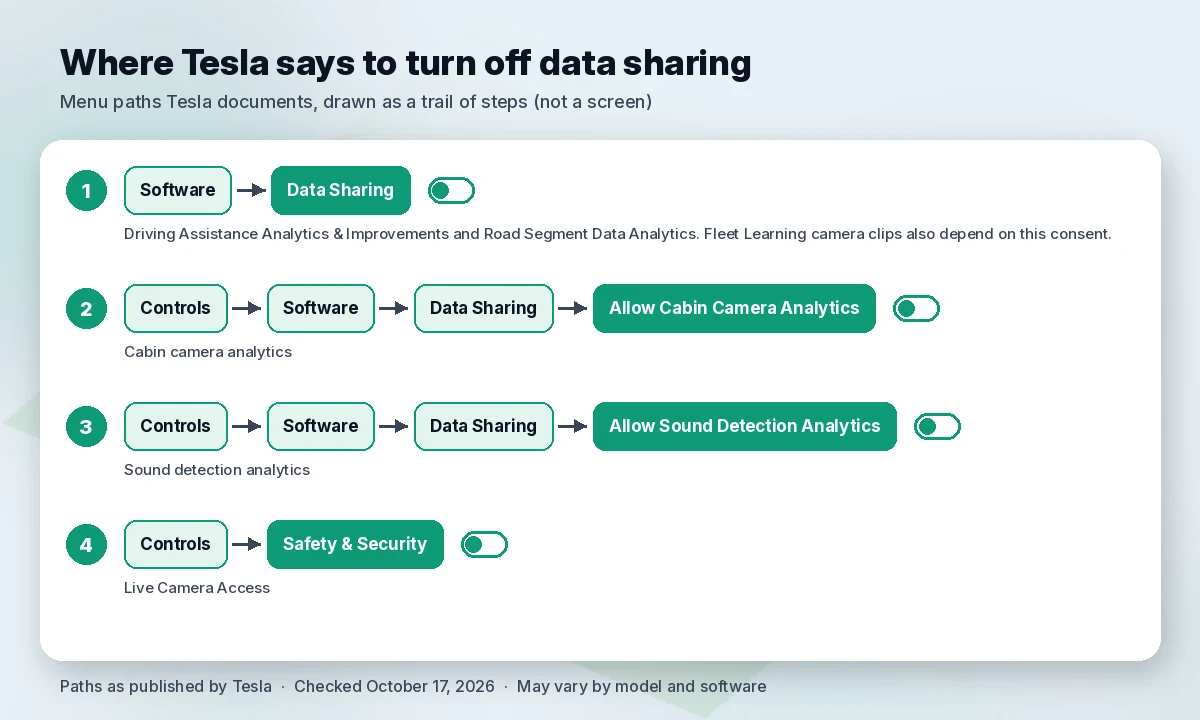
- Turn off general data sharing. On the touchscreen, go to Software > Data Sharing. Tesla says you can “enable or disable the collection of certain vehicle data” there, “including Driving Assistance Analytics & Improvements and Road Segment Data Analytics.” Fleet Learning camera clips also depend on this consent.
- Turn off cabin camera analytics. Go to Controls > Software > Data Sharing > Allow Cabin Camera Analytics. To see which features use the cabin camera, go to Controls > Software > Cabin Camera.
- Turn off sound detection analytics. Go to Controls > Software > Data Sharing > Allow Sound Detection Analytics.
- Review Live Camera Access. Tesla says to enable or disable it under Controls > Safety & Security.
- Revoke third-party apps. If you’ve connected an app through the Fleet API, Tesla says you can “manage or revoke your consent for data sharing with these applications at any time through your Tesla Account or through the third-party application itself (where available).”
- Lock down the account and the car. Tesla says it offers multi-factor authentication on the Tesla Account and Pin to Drive, a four-digit code required before driving. Use a unique password, too (see our password manager guide).
- Factory reset before you sell. Tesla points to Controls > Service > Factory Reset to remove your personal data before handing the car over.
- Opt out of marketing. Unsubscribe links and communication preferences cover promotional emails, calls and texts. Tesla says it may still send administrative messages.
What you lose when you opt out
The Data Sharing toggles do have a cost. Tesla’s notice says: “Certain features such as real-time traffic, navigation, intelligent routing, Traffic-Aware Cruise Control (TACC), and Summon, may require road segment data to function as intended.” So switching off Road Segment Data Analytics can affect those features.
Going further is a different decision. Tesla says that “if you no longer wish for us to collect vehicle data or any other data from your Tesla vehicle, please contact us to deactivate connectivity.” It then warns that over-the-air updates, remote services, the mobile app, location search, internet radio, voice commands and the web browser rely on that connectivity, and: “If you choose to opt out of vehicle data collection (with the exception of in-car Data Sharing preferences), we will not be able to know or notify you of issues applicable to your vehicle in real time. This may result in your vehicle suffering from reduced functionality, serious damage, or inoperability.”
In plain terms: the in-car toggles are the sensible privacy step for most owners. Asking Tesla to cut connectivity is a big trade-off that Tesla itself says can affect safety notifications and how the car works.
How to request a copy of your Tesla data
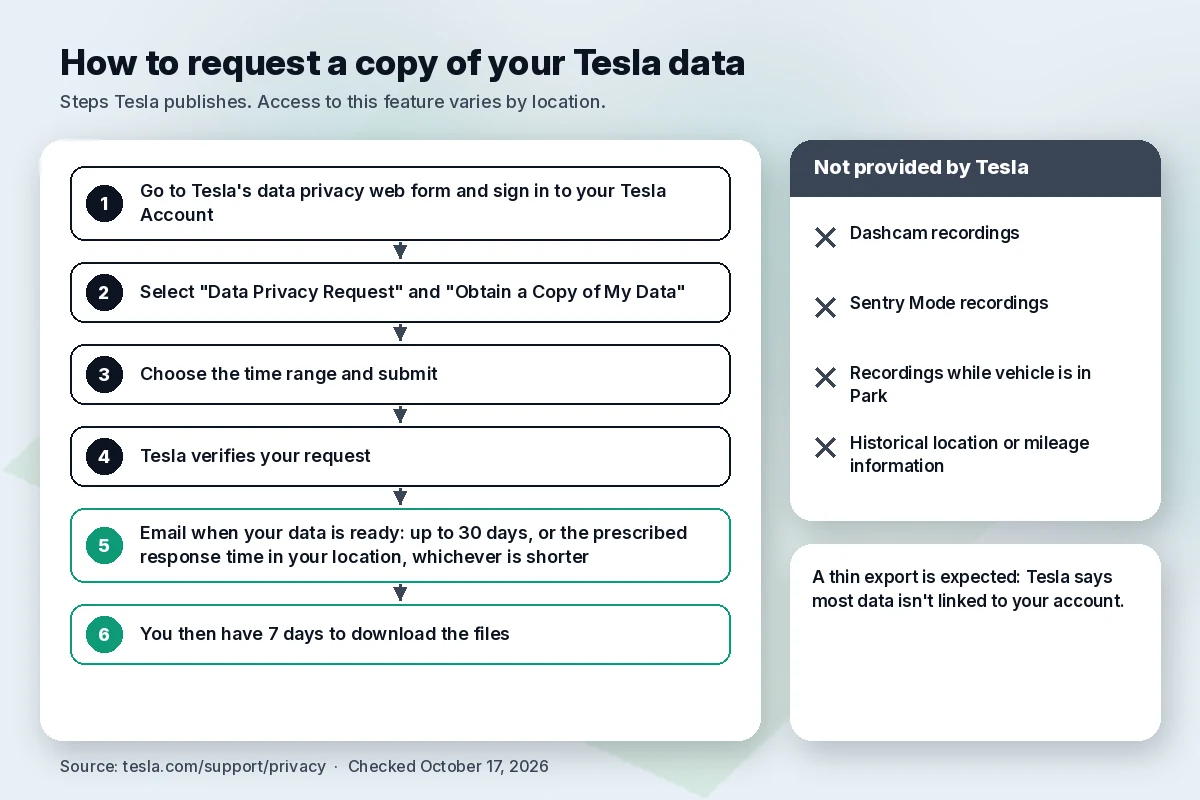
Tesla’s support page explains how to download what’s tied to your account. “Access to this feature varies by location.”
- Go to Tesla’s data privacy web form and sign in to your Tesla Account.
- Select “Data Privacy Request” and “Obtain a Copy of My Data.”
- Choose the time range and submit.
Tesla says the process “can take up to 30 days, or the prescribed response time in your location, whichever is shorter,” and that you then have 7 days to download the files. The export can include order details, account information, customer support activity, service history, vehicle usage information, safety events, infotainment settings, mobile app usage and Supercharging history. Tesla says it can’t provide Dashcam or Sentry recordings, “recordings while vehicle is in Park, historical location or mileage information.” If your request comes back thin, Tesla’s own FAQ says that is expected, because most data isn’t linked to your account.
You can also delete your Tesla Account (website: Data & Privacy > Delete Account; app: your name > Security & Privacy > Delete Account), but all active Tesla products must be removed first, and Tesla says it must keep past transaction records for financial reporting. Other routes Tesla lists: privacy@tesla.com and a postal address in Fremont, California.
Your legal rights. In California, the Attorney General’s office says the California Consumer Privacy Act gives residents the right to know, delete and correct personal information, to opt out of its sale or sharing, and to limit the use of sensitive data such as precise location (California AG, CCPA page, updated August 28, 2026). Tesla’s notice also names the Dutch Data Protection Authority for people in the EEA, UK and Switzerland, where Tesla International B.V. in Amsterdam is the controller. Elsewhere, your rights depend on local law.
What we don’t know about the Roadster yet
Tesla has published reservation details for the new Roadster but no Roadster-specific privacy notice or owner’s manual that we could find on October 17, 2026. So everything above describes Tesla’s current policy for its vehicles in general. For the Roadster specifically, these are not disclosed:
- Whether the Roadster will follow the same Customer Privacy Notice, or get model-specific terms.
- Whether it has a cabin camera, which camera and microphone features it uses, and whether the Data Sharing menu will be the same.
- What data the suction system, active aero and cold-gas thrusters generate, and whether any of it leaves the car.
- How Tesla will treat data from the Rocket’s “full flight system,” including where flight and location data go.
- Whether Tesla’s in-car AI assistant will be offered on it. On current Teslas, the notice says interactions with that assistant “are processed by xAI and subject to their privacy notice” and “remain anonymous to Tesla,” and that you can choose whether it uses your precise location.
One general point does apply. Tesla’s notice says that “unless stated otherwise when we introduce these new or additional services, they will be subject to this Notice.” Until Tesla says otherwise, the current notice is the best guide we have, but it isn’t a Roadster commitment.
Roadster at a glance
Specs are brief here; the car was shown as a prototype, and every performance figure is a Tesla claim, not an independent measurement.
| Item | What Tesla has said (checked October 17, 2026) |
|---|---|
| Event | Unveiling of a prototype with a live demo, October 15, 2026 (evening, US time), McGregor, Texas |
| Versions | Performance (two seats, active aero, suction system), Thrust (adds rear cold-gas thrusters, limited), Rocket (one seat, “full flight system,” invite only) |
| 0–60 mph | Tesla claims under 1.6 s (Performance) and under 0.59 s (Rocket). For Thrust, Tesla gives two figures: under 0.9 s in the spec list of its X post, and “under 1 second” on its Roadster page (the same post’s description also says under 1 second) |
| Top speed | Tesla claims over 230 mph (Rocket) |
| Range | Tesla claims over 300 miles |
| Power, battery | Not disclosed |
| Price | Not disclosed |
| Reservation | Performance: $5,000 due today plus $45,000 within 10 days; Thrust: $250,000 deposit (per Reuters); Rocket: invite only |
| Production / deliveries | Musk said building starts in 2028; delivery date not disclosed |
| Road use | Tesla’s Roadster page says of the Rocket: “Note: Not approved for public road use.” Road approval for the other versions not disclosed |
Sources: Tesla Roadster page, Tesla Roadster reservation page, Tesla on X, Reuters, Car and Driver and Electrek, all checked October 17, 2026.
The original Roadster has been orbiting the Sun since February 6, 2018. See the Starman section of our sister site’s coverage.
Does a VPN help with Tesla privacy?
Mostly no, and it’s worth being clear about why.
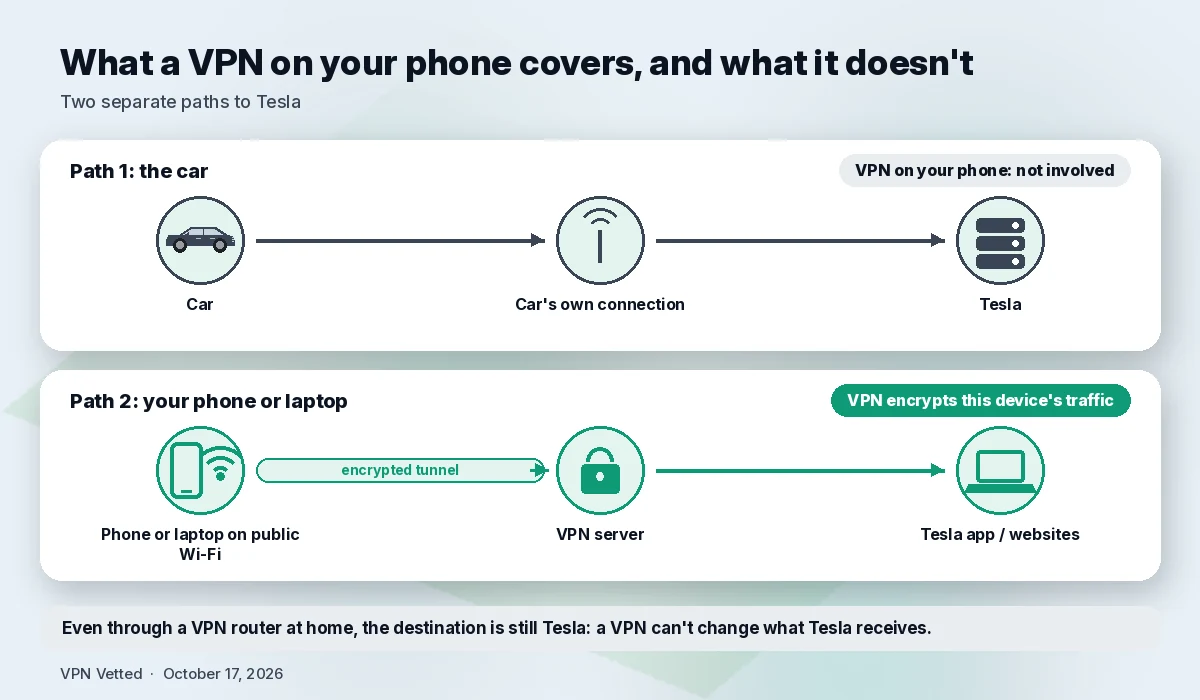
A VPN doesn’t stop the car’s own telematics. The data described above leaves the car over the car’s own connection, not through your phone, so a VPN app on your phone never touches it. And even if the car joins a home Wi-Fi network that runs through a VPN router, the destination is still Tesla. A VPN encrypts traffic on its way to the VPN server; it can’t change what Tesla receives, keeps or links to your VIN. Only the in-car settings and your account requests do that.
Where a VPN does help is your phone and laptop. If you use the Tesla app, the Tesla website or your email on hotel, airport or café Wi-Fi, a VPN encrypts that device’s traffic between you and the VPN server, so the local network operator no longer sees which sites and services you visit, though it can still see that you’re using a VPN. Most apps, likely including Tesla’s, already encrypt their own traffic, so the gain is modest, but it’s a real extra layer for the account that controls your car. See our guide to VPNs for public Wi-Fi. A VPN won’t protect a reused password or fix a leaked one; for that, see what to do after a data breach.
Tools we use alongside
These won’t change what your car sends to Tesla. They protect the accounts and devices around it.
Tools we use alongside
We left prices out on purpose; the linked guides list prices checked on official pages.
How we evaluated
We read Tesla’s Customer Privacy Notice, its privacy support page and the Model X owner’s manual page on the cabin camera on October 17, 2026, and quote them directly. For the Roadster, we used Tesla’s reservation page and Tesla’s X post, plus reporting from Reuters, Car and Driver and Electrek. For legal rights, we used the California Attorney General’s CCPA page. We did not test a car, and we did not ask Tesla’s in-car assistant for facts. This is general information, not legal advice.
FAQ
What data does a Tesla collect? Tesla’s Privacy Notice lists four categories from the car: vehicle data (such as speed, odometer, charging history and safety-related data), diagnostic data, infotainment data and AI data from the cameras. Tesla says it doesn’t link this data to your identity or account by default, with exceptions such as a safety critical event, a service request or your consent.
Can I turn off Tesla data sharing? Yes, partly. Tesla says you can switch off Driving Assistance Analytics and Road Segment Data Analytics under Software > Data Sharing, and cabin camera and sound detection analytics under Controls > Software > Data Sharing. Stopping all collection means asking Tesla to deactivate connectivity, which Tesla warns can cause “reduced functionality, serious damage, or inoperability.”
Does Tesla sell my data? Tesla says: “We do not sell your personal data to anyone for any purpose, period.” It does share data with service providers, affiliates, apps you authorize, authorities when required by law, your employer or fleet operator if you don’t own the car, and a third party in a merger or sale, as its notice describes.
Does Tesla track my location? Tesla says it “does not link your location with your account or identity, or keep a history of where you’ve been.” Location can be linked to your car in a safety critical event, and shared anonymously if you opt in through Data Sharing. The Tesla app shows “the vehicle’s current location,” service centers may access location during an on-site visit, and the car uses “coarse location data (such as the country in which the vehicle is operating).” Tesla also says historical location isn’t included in data copy requests.
Will a VPN stop my car from sending data? No. The car uses its own connection, and Tesla is the destination either way. A VPN can protect your phone or laptop on public Wi-Fi, including when you use the Tesla app.
Does the new Roadster have a different privacy policy? Not disclosed. As of October 17, 2026, we found no Roadster-specific privacy notice. Tesla’s general notice says new services fall under it unless Tesla states otherwise.
Sources
- Tesla, Customer Privacy Notice (“Updated February 2026”): https://www.tesla.com/legal/privacy (checked October 17, 2026)
- Tesla Support, Obtain a Copy of the Data Associated With Your Tesla Account: https://www.tesla.com/support/privacy (checked October 17, 2026)
- Tesla, Model X Owner’s Manual, Cabin Camera: https://www.tesla.com/ownersmanual/modelx/en_us/GUID-EDAD116F-3C73-40FA-A861-68112FF7961F.html (checked October 17, 2026)
- Tesla, Roadster page (Thrust “under 1 second”; Rocket “Not approved for public road use”): https://www.tesla.com/roadster (checked October 17, 2026)
- Tesla, Roadster reservation page: https://www.tesla.com/en_US/roadster/reserve (checked October 17, 2026)
- Tesla on X, Roadster configurations post (Oct 16, 2026, 01:28 UTC): https://x.com/Tesla/status/2110905588402295283 (checked October 17, 2026)
- Reuters via Investing.com, “Tesla’s new Roadster turns in air with SpaceX thrusters, won’t land until 2028” (Oct 15, 2026, updated Oct 16): https://www.investing.com/news/stock-market-news/tesla-set-to-unveil-next-generation-roadster-sports-ev-after-years-of-delay-4951021 (checked October 17, 2026)
- Car and Driver, “Revealed! New Tesla Roadster Takes Flight with SpaceX Thrusters” (updated Oct 16, 2026): https://www.caranddriver.com/news/a74145531/tesla-roadster-revealed/ (checked October 17, 2026)
- Electrek, “Tesla unveils Cyberfied new Roadster that can kickflip” (Oct 15, 2026): https://electrek.co/2026/10/15/tesla-unveils-cyberfied-new-roadster-kickflip/ (checked October 17, 2026)
- California Attorney General, California Consumer Privacy Act (updated August 28, 2026): https://oag.ca.gov/privacy/ccpa (checked October 17, 2026)