
Affiliate disclosure: VPN Vetted is reader-supported. Some links below are affiliate links (marked “sponsored”): if you buy through them we may earn a commission at no extra cost to you. We rank by published features, device support and price, not by what we earn. Surfshark and NordVPN both belong to Nord Security (Surfshark’s merger announcement); the two brands say they operate independently. Proton VPN is run by Proton AG in Switzerland. We hold all three to the same criteria.
Prices and features checked October 24, 2026, between 01:07 and 01:16 BRT, on the official US pages, in USD, before sales tax.
Short answer: on a Chromebook, install the provider’s Android app from Google Play if your model supports it. That covers the whole device. A Chrome extension only covers the browser. Our pick for most people is Surfshark (unlimited devices, kill switch in the Chromebook app, $67.23 for the first 27 months). Pick NordVPN for a bigger security bundle, or Proton VPN if you want a free plan from a provider with open-source apps.
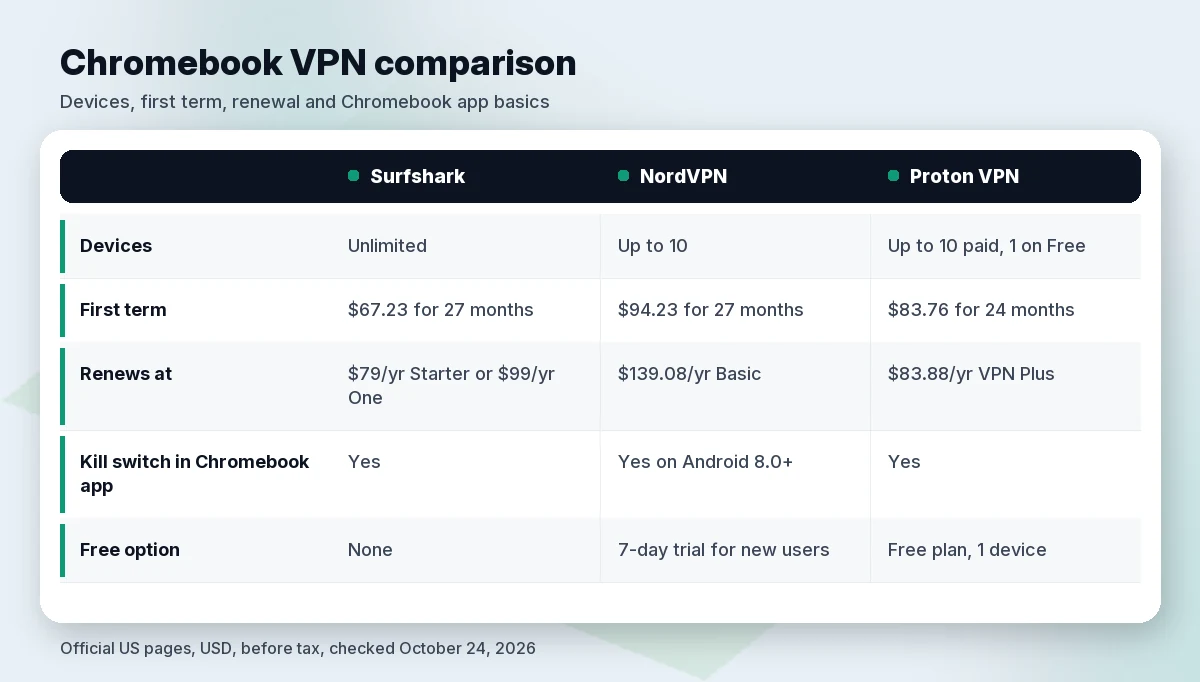
Quick comparison table
| Surfshark | NordVPN | Proton VPN | |
|---|---|---|---|
| Chromebook method (official page) | Android app (“all Chromebooks that run Android apps”) + Chrome extension | Android app + Chrome extension + router | Android app (“officially supports Google Chromebooks”) + Chrome extension |
| Kill switch on Chromebook app | Yes (listed on Chromebook page) | Android app: system-wide on Android 8.0+ (support article) | Yes (listed on Chromebook page) |
| Devices | Unlimited | Up to 10 | Up to 10 on paid plans; 1 on Free |
| Lowest long-term entry price | Starter or One: $2.49/mo, $67.23 for 27 months | Basic: $3.49/mo, $94.23 for 27 months | VPN Plus: $3.49/mo, $83.76 for 24 months |
| Renews at | Starter $79/yr · One $99/yr | Basic $139.08/yr | VPN Plus $83.88/yr |
| Free option | No free plan | 7-day trial for new users (Chromebook page) | Free plan: 1 device, servers in 10 countries |
| Money-back | 30 days | 30 days | 30 days |
| Link | Check Surfshark price | Check NordVPN price | Check Proton price |
Best VPNs for Chromebook
1. Surfshark: best for most Chromebook owners
Surfshark’s Chromebook page says its app “supports all Chromebooks that run Android apps.” You install it from Google Play, sign in and connect. The Chromebook page lists a kill switch that cuts your internet if the VPN connection drops, plus Bypasser (split tunneling), Clean Web, Multi Hop and auto-connect.
- Unlimited devices. Surfshark lists unlimited simultaneous connections on every plan. NordVPN and Proton cap paid plans at 10.
- Lowest entry price of the three. Starter and One are both $2.49/mo, billed $67.23 for the first 27 months. After that, Starter renews at $79 a year and One at $99 a year, before tax. The renewal table also says Surfshark may run A/B price tests, so check the price at checkout.
- The extension does more than a proxy. Surfshark’s Chrome extension page says the extension “only affects Chrome traffic.” It still covers DNS lookups in Chrome and has an option to block WebRTC leaks (Settings > VPN Settings > WebRTC).
Watch out for: there’s no free plan. Renewal costs more than the first term: Starter goes from about $29.88 a year on the intro deal ($67.23 ÷ 27 × 12, our math) to $79 a year.
2. NordVPN: best if you want security extras
NordVPN gives you three Chromebook options on its download page: the Android app from Google Play, the Chrome extension, or a router setup. Its support article spells out the difference: “the Android app protects your entire device, while the Chrome extension’s security is limited to the Chrome browser.” The same article warns that “some older Chromebook models may not support the NordVPN Android application.”
- Documented kill switch. NordVPN’s support page says its kill switch “on Android version 8.0 or later works just like a system-wide Kill Switch, blocking any internet access when there is no VPN connection.”
- Security bundle. Every plan includes scam and phishing protection. Complete and Prime add antivirus and an ad and tracker blocker, but NordVPN’s page marks both as desktop only, so don’t count on them on a Chromebook.
- Try before you pay. The Chromebook page says “NordVPN offers new users a 7-day trial,” on top of the 30-day money-back guarantee.
Watch out for: price. Basic is $94.23 for the first 27 months, then renews at $139.08 a year. The device limit is 10. We also skip part of NordVPN’s Chromebook page that pitches getting around school and workplace restrictions. That isn’t advice we give (see the FAQ).
3. Proton VPN: best free and open-source option
Proton says it “officially supports Google Chromebooks using our open source and fully-featured Android app.” You can get it from Google Play, and Proton also offers F-Droid and GitHub builds. Its Chromebook page lists a kill switch, Always-on VPN, DNS and IPv6 leak protection, split tunneling and Secure Core servers. NetShield, Proton’s ad and malware blocker, comes with VPN Plus and Unlimited.
- A real free plan. Proton Free is $0, with 1 device, servers in 10 countries chosen at random and medium speed. No credit card is needed, and Proton’s pricing FAQ says the free plan has no data limits.
- Simple renewal math. VPN Plus is $83.76 for the first 24 months, then renews at $83.88 every 12 months. The renewal is almost the same per year as the first term ($41.88 per year, our math), so there’s no big jump later.
- The extension shares your device count. Proton’s extension page says “each browser using the browser extension counts as one of your ten VPN connections.”
Watch out for: the free plan is limited to one device and a small server list. Paid plans start higher than Surfshark’s intro price.
Want to compare these brands in more depth? Read our Proton VPN review, NordVPN vs Surfshark and Is NordVPN worth it?
Android app vs Chrome extension vs built-in VPN
ChromeOS gives you three ways to run a VPN. According to Google’s Chromebook help page, they differ like this:
- Android VPN app (from Google Play). This is the best choice for most people. Google says Android VPN apps work on Chromebooks that can install Android apps, and a full-tunnel VPN covers “all traffic from all Chrome windows, Chrome apps, and Android apps.” Google also notes that the Play Store “is available for only some Chromebooks.”
- Chrome extension. It’s quick to install, but it only covers browser traffic. Proton puts it plainly: the extension protects “just your browser traffic without affecting speeds or the IP address of the other apps on your device.”
- Built-in ChromeOS VPN. Google lists native support for IKEv2, L2TP/IPsec and basic OpenVPN, plus WireGuard on some Chromebooks. You enter server details by hand. You lose app extras such as split tunneling.
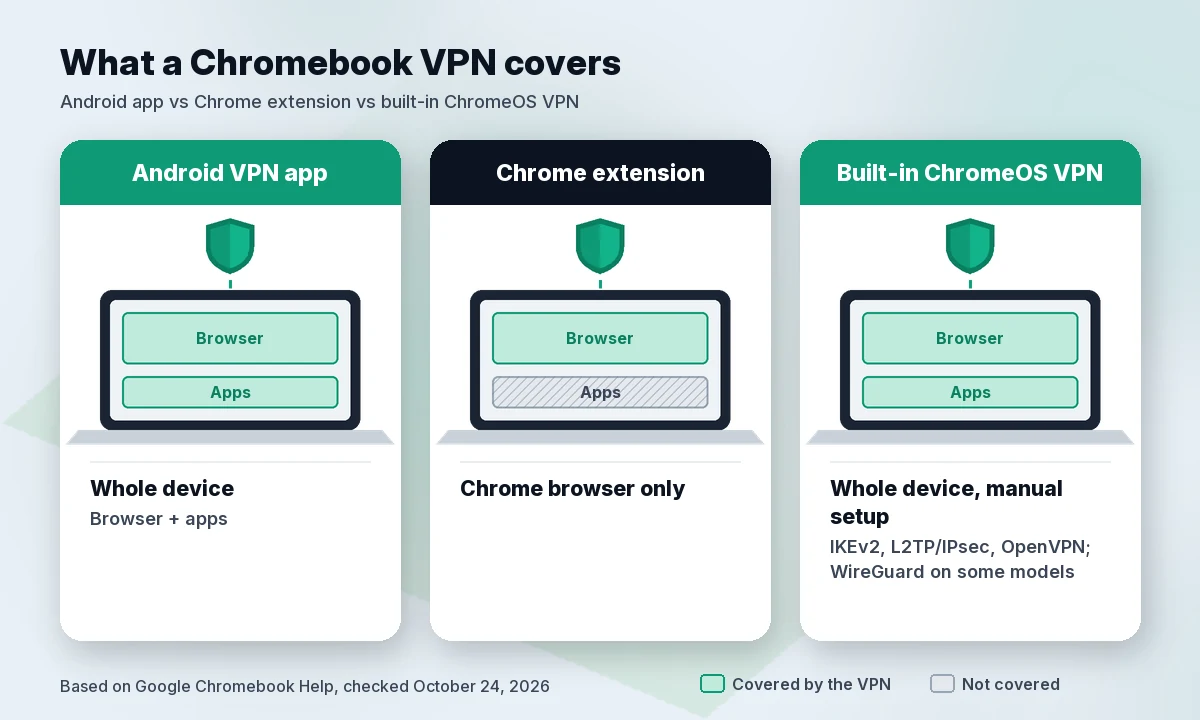
Our rule of thumb: use the Android app if Google Play works on your Chromebook. Use the extension only as a browser-only extra, or on a model without Play Store support.
How to set up a VPN on ChromeOS
These steps follow Google’s help page and the providers’ own setup guides:
- Check for Google Play. Google’s help page says to go to Settings → Apps → Manage Google Play preferences. “If you can’t find this option, your Chromebook doesn’t work with Android apps.” In that case, use the extension or the built-in VPN.
- Install the provider’s Android app from Google Play, sign in and connect. Surfshark’s support guide notes that the VPN status then shows in the system tray.
- Turn on the kill switch in the app’s settings. Surfshark and Proton list it on their Chromebook pages, and NordVPN documents it for Android 8.0 and later.
- Optional: make the VPN always-on. Google’s help page says you can set an Android VPN to Always-on in the Android settings (Network & internet → VPN), with an option to block connections without VPN.
- Add the Chrome extension only if you want it. Remember that it uses up a device slot: Proton says so outright, and NordVPN and Proton both cap paid plans at 10 devices.
Using an iPhone or Mac too? See our guides to the best VPN for iPhone and iPad and the best VPN for Mac. For a household full of devices, read best VPN for multiple devices.
Free VPNs on Chromebook: what to watch
A free VPN can be fine for light use. Check three things first:
- Who runs it and how it makes money. A free plan from a provider that sells paid plans (like Proton Free) has a clear business model. A free extension with no visible owner doesn’t.
- Limits. Proton Free lists 1 device, servers in 10 countries chosen at random, and medium speed. That’s enough for occasional public Wi-Fi use, but not for a busy household.
- Extension vs app. Many free VPNs for Chromebook are browser extensions. As covered above, those don’t protect Android apps or other system traffic.
On a budget but want the whole device covered? Our best cheap VPN list compares paid plans by first-term and renewal price.
How we evaluated
We didn’t run lab tests for this guide. We compared the three providers on what they publish:
- Official Chromebook support: a dedicated Chromebook page or support article, and whether the Android app is named as supported.
- Whole-device protection: whether the Android app has a documented kill switch, and how each provider describes extension-only coverage.
- Price over time: first-term price and renewal price from the official US pricing pages, in USD, before tax, checked October 24, 2026.
- Device limits, free options and refund terms, as published.
Rankings follow those published facts. Claims we couldn’t confirm in a provider’s own documentation were left out.
FAQ
Can you use a VPN on a Chromebook?
Yes. Google’s Chromebook help lists three routes: VPN apps from Google Play (on Chromebooks that support Android apps), VPN extensions from the Chrome Web Store, and built-in VPN support for IKEv2, L2TP/IPsec, OpenVPN and, on some Chromebooks, WireGuard.
Is a Chrome VPN extension enough?
Only for browser traffic. NordVPN’s support article says its extension “will not protect other apps or services running on your Chromebook,” and Surfshark says its extension “only affects Chrome traffic.” For whole-device protection, use the Android app.
Is there a good free VPN for Chromebook?
Proton VPN Free is the free option among our three picks. It costs $0 with no credit card and covers 1 device, with servers in 10 countries chosen at random. NordVPN offers new users a 7-day trial, and Surfshark has no free plan; both have a 30-day money-back guarantee.
Do school Chromebooks allow VPNs?
Usually only the ones the school approves. Google says that on a work or school Chromebook you “might not be able to add the Google Play Store or download Android apps,” and points you to your administrator. Surfshark says school-managed Chromebooks “typically restrict installations, so only VPNs approved and enabled by the school’s administrator will function properly.” If you need a VPN on a managed device, ask your IT team. Don’t try to get around their settings.
Verdict
Surfshark is our pick for most Chromebook owners: an Android app for any Chromebook that runs Android apps, a kill switch, unlimited devices and the lowest first-term price here ($67.23 for 27 months). Choose NordVPN if you’ll use its extra security tools and can live with the $139.08 yearly renewal on Basic. Choose Proton VPN if you want to start free or prefer open-source apps with flat renewal pricing.
Check Surfshark price · Check NordVPN price
Sources (official pages, checked on October 24, 2026)
- Google Chromebook Help, set up a VPN: https://support.google.com/chromebook/answer/1282338 (~01:10 BRT)
- Google Chromebook Help, install Android apps: https://support.google.com/chromebook/answer/7021273 (~01:16 BRT)
- Surfshark pricing (US view): https://surfshark.com/pricing (~01:07 BRT)
- Surfshark renewal prices: https://surfshark.com/terms-of-service/pricing (~01:10 BRT)
- Surfshark Chromebook app: https://surfshark.com/download/chromebook-vpn (~01:12 BRT)
- Surfshark Chrome extension: https://surfshark.com/download/chrome (~01:11 BRT)
- Surfshark Support, set up on Chromebook: https://support.surfshark.com/hc/en-us/articles/360011973460-How-to-set-up-Surfshark-VPN-on-Chromebook (~01:16 BRT)
- Surfshark and Nord Security merger: https://surfshark.com/blog/surfshark-merges-with-nord-security
- NordVPN pricing (US/USD): https://nordvpn.com/pricing/ (~01:07 BRT)
- NordVPN Chromebook: https://nordvpn.com/download/chromebook/ (~01:11 BRT)
- NordVPN Support, Chromebook setup: https://support.nordvpn.com/hc/en-us/articles/19474957393169-How-to-set-up-NordVPN-on-Chromebook (~01:11 BRT)
- NordVPN Support, Kill Switch: https://support.nordvpn.com/hc/en-us/articles/19509682644369-NordVPN-Kill-Switch-how-does-it-work (~01:12 BRT)
- Proton VPN pricing: https://protonvpn.com/pricing (~01:07 BRT)
- Proton VPN for Chromebook: https://protonvpn.com/download-chromebook (~01:11 BRT)
- Proton VPN Chrome extension: https://protonvpn.com/download-chrome-extension (~01:11 BRT)