Affiliate disclosure: VPN Vetted earns a commission if you buy through some links on this page, at no extra cost to you. Surfshark and NordVPN both belong to Nord Security, and we flag that where it matters. We compare on facts (prices, kill switch, split tunneling, audits, device limits), not on what we earn. Prices are US prices in USD before tax, read from official pages on October 25, 2026. Surfshark’s and NordVPN’s pages show Black Friday promotions that day, so their intro prices are promotional and may change.
Most “best VPN for Android” lists tell you which app to buy. A better question is which settings still protect you when Wi-Fi drops, or when you want one banking app outside the tunnel. This guide compares NordVPN, Proton VPN and Surfshark on what matters on a phone. We read each company’s official pricing, download, support and audit pages, plus Google’s Android help page, and we say plainly where a page did not answer the question.
Quick picks
- Lowest price and most devices: Surfshark. Starter is $67.23 for the first 27 months, then $79 a year, with no device cap on its Android page.
- Most open about code and audits: Proton VPN. Open-source apps, a public audit report per Proton and a free plan for one device.
- Clearest system-wide kill switch statement: NordVPN. Its support page says Kill Switch on Android 8.0 or later works like a system-wide Kill Switch. It also has the highest renewal of the three.
No single winner fits everyone, so pick by the criterion that matters to you.
Comparison at a glance
| Surfshark (Starter) | Proton VPN (Plus) | NordVPN (Basic) | |
|---|---|---|---|
| Intro price | $2.49/mo; $67.23 for 27 months | $3.49/mo; $83.76 for 24 months | $3.49/mo; $94.23 for 27 months |
| Renewal | $79/year | $83.88 every 12 months | $139.08/year |
| Devices | Unlimited | 10 at a time | 10 |
| Minimum Android | 7.0 (Google Play); 6.0 via APK | 8.0 | 9.0 |
| Kill switch | In-app Kill Switch | Android Always-on VPN + Block connections without VPN | In-app Kill Switch, system-wide on 8.0+ |
| Split tunneling | Bypasser (apps and websites) | Exclude or inverse mode | Exclude chosen apps |
| Latest no-logs audit it names | Deloitte, announced June 16, 2025 | Securitum, 2026 report | Deloitte, report issued December 12, 2025 |
| Money-back | 30 days | 30 days | 30 days |
Check Surfshark price Check Proton price Check NordVPN price
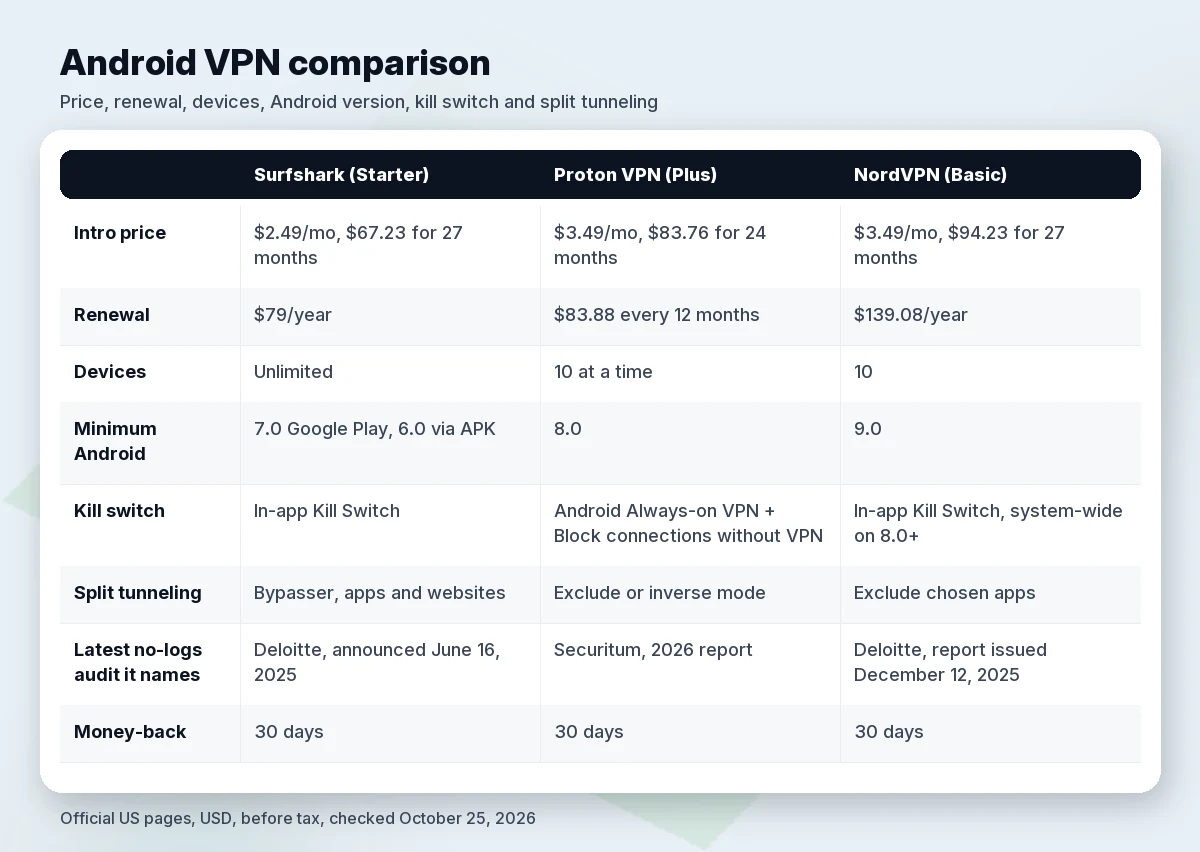
Our own math on the intro totals: the first twelve months cost about $29.88 on Surfshark and about $41.88 on both Proton Plus and NordVPN Basic. The renewal is where they separate. Surfshark’s yearly renewal is about 2.6 times that first-year rate, Proton’s about 2.0 times and NordVPN’s about 3.3 times. The Surfshark and NordVPN pricing pages both show Black Friday banners today, so those intro totals may change; Proton’s page showed no promotion banner. For more low-cost options, see best cheap VPN.
Surfshark for Android
Surfshark’s Android page lists unlimited devices, a built-in Kill Switch and split tunneling (the feature Surfshark calls Bypasser). Its Android page says the Google Play app needs Android 7.0 or newer and that phones on 6.0 can use the company’s APK. Starter costs $2.49 a month on the 27-month deal and renews at $79 a year, per its pricing terms page. Surfshark One costs the same $67.23 up front but renews at $99 a year.
Audits: Surfshark announced a Deloitte assurance report on June 16, 2025 and an earlier one on January 25, 2023; in its words, the 2025 work assesses compliance with its privacy policy. Its Trust Center also lists a SecuRing infrastructure audit completed in December 2025 and a 2026 Cure53 audit of its infrastructure and new Dausos protocol. We could confirm only the year of the Cure53 audit, not the month.
Pros: lowest first-year cost here; unlimited devices; split tunneling can exclude chosen apps and websites or route only those through the VPN.
Cons: renewal is more than double the intro rate; the Play app needs Android 7.0; it shares an owner with NordVPN (see NordVPN vs Surfshark).
Proton VPN for Android
Proton’s Android page says the app is open source and available on Google Play, F-Droid and GitHub. Its support page says it runs on Android 8.0 and above. Plus costs $3.49 a month, billed at $83.76 for the first 24 months, then $83.88 every 12 months, for 10 devices at once. The Free plan covers 1 device at “Medium” speed with servers in 10 randomly selected countries. Compare it with Surfshark in Surfshark vs Proton VPN.
Audits: Proton says Securitum has audited its no-logs policy five years in a row and that the latest report is public. The post was last updated June 16, 2026. We could not find the 2026 report’s exact date, so we cite the year only.
Pros: open-source apps and public audit reports, per Proton; the smallest jump at renewal; a free plan for trying the app.
Cons: Proton says its kill switch is not compatible with split tunneling on most platforms, with Windows as the exception, and Android is not listed as an exception. On Android the kill switch relies on system settings you turn on yourself. The intro price is higher than Surfshark’s.
NordVPN for Android
NordVPN’s Android page lists support for Android 9.0 and newer. Basic costs $3.49 a month, billed at $94.23 for the first 27 months, then $139.08 a year, with up to 10 devices. For a closer look at pricing and value, see is NordVPN worth it.
Audits: Nord says Deloitte Lithuania carried out its sixth no-logs assurance engagement between November 10 and December 12, 2025, with the final report issued December 12, 2025. Nord says the full report is available to logged-in users, not as public excerpts.
Pros: its support article describes a Kill Switch that works system-wide on Android 8.0 and newer; Android split tunneling is documented step by step; auto-connect can stay on or run only on unknown Wi-Fi, per its Google Play listing.
Cons: the highest renewal here; the newest Android floor; and its article on using Kill Switch with split tunneling does not name Android, so we cannot say how the two behave together on a phone. If excluded apps stop loading after you switch Kill Switch on, start there.
Kill switch and Always-on VPN on Android
A kill switch blocks traffic if the VPN connection drops. On Android there are two layers: the setting inside the VPN app and the system’s Always-on VPN. Google’s support page places the system one under Settings > Network & internet > VPN: tap the settings icon next to the VPN and turn Always-on VPN on or off. Google adds that “if you’ve set up a VPN through an app, you won’t have the always-on option” and that some of its steps only work on Android 14 and up. The page does not mention a “Block connections without VPN” switch; that wording comes from Proton’s support page.
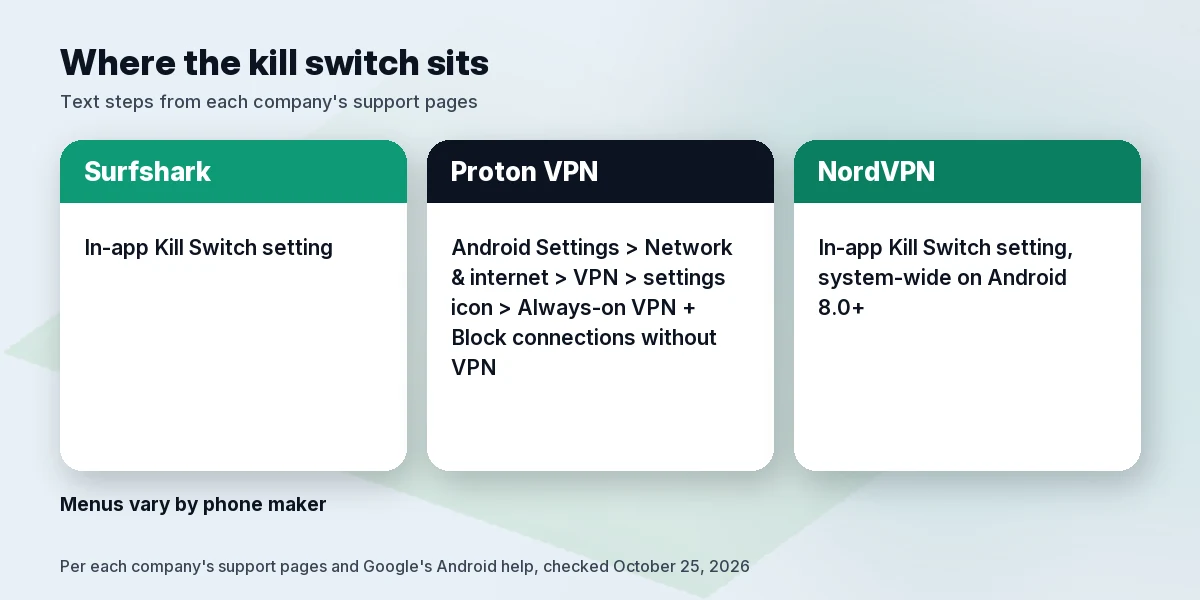
- Proton VPN: turn on Android’s Always-on VPN and Block connections without VPN, which Proton describes as closer to an advanced kill switch.
- NordVPN: a Kill Switch setting in the app, described as system-wide on Android 8.0 and newer.
- Surfshark: a Kill Switch toggle in the app. Its features page describes soft and strict modes and lists Android among supported systems, but we could not confirm which mode the Android app offers.
Menus vary by phone maker, and Google’s page and the VPN companies’ pages do not describe every option the same way. We did not install the apps for this guide, so check your own phone: connect, switch Wi-Fi off and on, and see whether apps stay offline until the VPN returns.
Split tunneling on Android
Split tunneling lets chosen apps skip the VPN, for example a local banking app or a smart-home controller.
- Surfshark: per its Android article, one mode keeps selected apps and websites outside the tunnel, while “Route via VPN” sends only the selected ones through it. Path: Settings > VPN Settings > Bypasser.
- Proton VPN: exclude mode and inverse mode, per its split tunneling support page.
- NordVPN: its Android article describes choosing apps to exclude. It does not describe an include-only mode.
The catch is the kill switch. Proton states the two conflict on most platforms; Nord’s article on the combination does not name Android; we found no statement from Surfshark. Decide which risk matters more before you rely on both.
Public Wi-Fi
A VPN encrypts traffic between your phone and the VPN server, which is why people switch one on at airports and cafés. It does not make a fake login page or a malicious app safe. The useful features are auto-connect, a kill switch and one-tap connection. NordVPN’s Play listing describes auto-connect that can stay on or trigger on unknown Wi-Fi networks. Surfshark’s listing describes auto-connect and “public Wi-Fi protection”. Proton’s listing says one-tap connect keeps the connection secure on public Wi-Fi, but we did not find an auto-connect option described, so check the app. These are company claims, not independent results.
Speed: what we can and cannot say
We publish no speed numbers because we ran no measurements and will not borrow anyone else’s. Proton’s pricing page labels Free “Medium” speed and Plus “Highest”. Surfshark’s Play listing mentions post-quantum WireGuard and a proprietary protocol for fast connections. Those are marketing statements. If speed matters, compare on your own network inside the 30-day money-back window, which all three list.
Install from Google Play, not a random APK
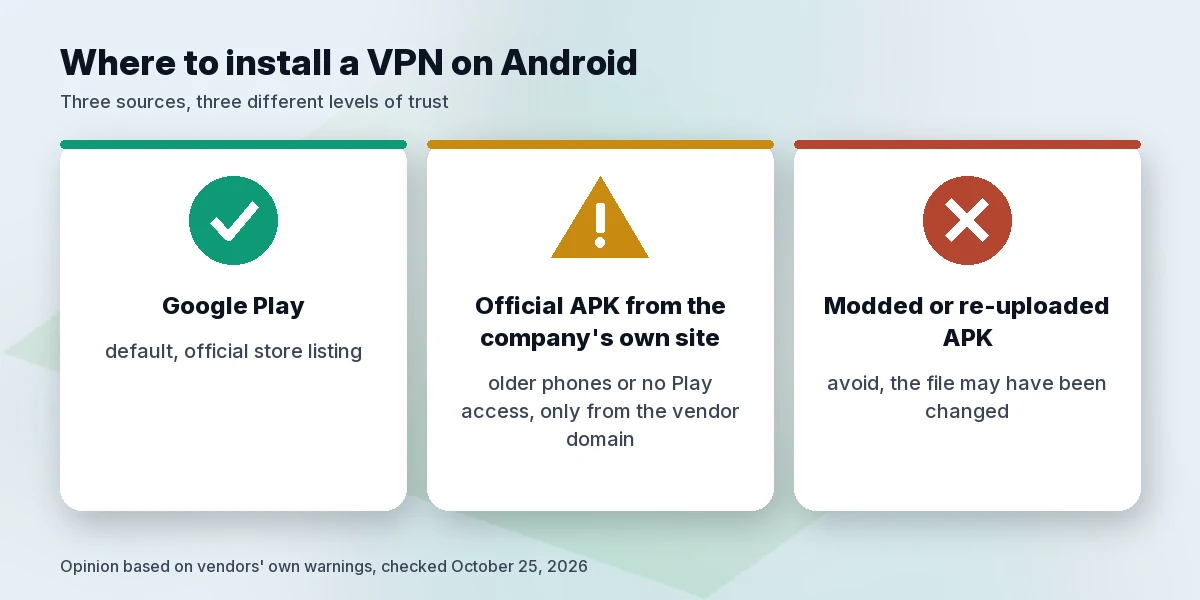
Google Play is the default place to install, and all three have a Play app. Proton’s page says its open-source app is also on F-Droid and GitHub. Surfshark’s page warns that modded Surfshark APKs are risky because whoever modified the file could intercept your data. If you need an APK, for example for Android 6.0 on Surfshark, take it only from the company’s own site.
Who should skip these
- Pixel 7 or newer owners who only want a basic tunnel. Google’s page says these phones have a built-in VPN by Google at no extra cost in countries where it is available.
- Anyone on a phone older than Android 6.0, or below the minimum for the plan they want.
- Anyone who needs a kill switch and split tunneling together. Proton says they conflict, and Nord’s page is unclear on Android.
- People who dislike renewal jumps. All three charge more after the intro, NordVPN the most.
- People who expect a VPN to fix everything. It will not stop phishing or make a bad app safe.
- Work phones. Ask your IT team first.
For more devices, see best VPN for multiple devices. Other platforms: best VPN for iPhone and iPad and best VPN for Mac.
How we evaluated
We did not install or run these apps for this guide. We read each company’s official US pricing, download, support and audit pages, the Google Play listings and Google’s Android help page, and recorded the date of each reading on October 25, 2026. We compared the same fields everywhere: intro and renewal price, devices, minimum Android version, kill switch, split tunneling, audits and refund terms. Where a page did not say, we say so. Audit conclusions are the companies’ own descriptions of reports we did not review ourselves.
FAQ
What is the best VPN for Android in 2026?
It depends on your priority. Surfshark has the lowest price and no device cap, Proton VPN has open-source apps and a public audit report, per Proton, and NordVPN has a support page stating its Kill Switch works system-wide on Android 8.0 and newer.
Do I need a kill switch on Android, and where is it?
It helps if the connection drops on public Wi-Fi. Look in the VPN app first, then at Settings > Network & internet > VPN and the settings icon next to the VPN for Always-on VPN. Google’s page says that if you’ve set up a VPN through an app, you won’t have the always-on option, while Proton’s and NordVPN’s support pages describe turning on Android’s Always-on VPN for their apps. Menus vary by phone, so check on yours.
Does every VPN app on Android have split tunneling?
Not every app. These three do: Surfshark’s split tunneling, Proton’s exclude and inverse modes, and NordVPN’s app exclusions.
Is it safe to install a VPN APK from outside Google Play?
Only from the company’s own site. Surfshark warns that modded APKs can be used to intercept your data.
Which Android versions do these apps support?
Per each company: Proton VPN 8.0 and above, NordVPN 9.0 and newer, Surfshark 7.0 from Google Play or 6.0 via its APK.
Does a VPN make public Wi-Fi safe?
It helps, but it is not a full fix. A VPN encrypts traffic between your phone and the VPN server, and it does not make a fake login page or a malicious app safe. NordVPN’s Play listing describes auto-connect that can stay on or trigger on unknown Wi-Fi networks, Surfshark’s listing describes auto-connect and “public Wi-Fi protection”, and Proton’s listing says one-tap connect keeps the connection secure on public Wi-Fi. These are company claims, not independent results.
How many devices can I use?
Surfshark lists unlimited devices. Proton VPN Plus allows 10 at a time. NordVPN Basic allows up to 10.
Is a free VPN enough on Android?
Proton Free covers 1 device at “Medium” speed with servers in 10 randomly selected countries. That may do for trying the app, but it is not a match for the paid plans above.
How much will I pay after the first term?
Surfshark Starter $79 a year, Proton Plus $83.88 every 12 months, NordVPN Basic $139.08 a year, before tax.
Verdict
Choose Surfshark if price and device count matter most, and plan for the $79 renewal. Choose Proton VPN for open-source apps, a public audit report (per Proton) and a free plan, accepting that its kill switch and split tunneling do not work together. Choose NordVPN for its documented system-wide Kill Switch and Android split tunneling if you can live with a $139.08 renewal. Whichever you pick, set up the kill switch first, then use the 30-day money-back window to check it on your own phone.
Check Surfshark price Check Proton price Check NordVPN price
Sources
All sources checked October 25, 2026 (America/Sao_Paulo). Prices are USD before tax.
- Google, “Connect to a virtual private network (VPN) on Android”: https://support.google.com/android/answer/9089766
- NordVPN pricing: https://nordvpn.com/pricing/
- NordVPN for Android: https://nordvpn.com/download/android/
- NordVPN support (Kill Switch, split tunneling, Android setup): https://support.nordvpn.com/
- NordVPN, sixth no-logs assurance engagement: https://nordvpn.com/blog/nordvpn-no-logs-assurance-engagement-2025/
- Surfshark pricing: https://surfshark.com/pricing and https://surfshark.com/terms-of-service/pricing
- Surfshark for Android: https://surfshark.com/download/android
- Surfshark Kill Switch: https://surfshark.com/features/kill-switch
- Surfshark Bypasser for Android: https://support.surfshark.com/hc/en-us/articles/360008068220-How-to-use-Bypasser-for-Android
- Surfshark Trust Center: https://surfshark.com/trust-center
- Surfshark and Nord Security: https://surfshark.com/blog/surfshark-merges-with-nord-security
- Proton VPN pricing: https://protonvpn.com/pricing
- Proton VPN for Android: https://protonvpn.com/download-android
- Proton VPN support: https://protonvpn.com/support/best-android-vpn-app, https://protonvpn.com/support/what-is-kill-switch, https://protonvpn.com/support/protonvpn-split-tunneling
- Proton VPN no-logs audits: https://protonvpn.com/blog/no-logs-audit
- Google Play listings: ch.protonvpn.android, com.nordvpn.android, com.surfshark.vpnclient.android