

Disclosure: VPN Vetted is reader-supported. Some links below are affiliate links (marked “sponsored”): if you buy through them we may earn a commission at no extra cost to you. Our ranking follows the macOS facts below, not commissions. Surfshark and NordVPN both belong to Nord Security; we disclose that and still rank them on the same criteria as everyone else.
Last updated October 17, 2026 · Prices and features checked October 17, 2026 on each provider’s official pages (USD).
Our picks
A MacBook spends a lot of time on networks you don’t control: cafés, airports, hotels. A good Mac VPN encrypts that traffic, keeps it in the tunnel if the connection drops, and comes from a company that let an outside firm check its no-logs claims. We compare five services on those points, using each provider’s official macOS pages. If you also need coverage for your phone, see our best VPN for iPhone and iPad guide.
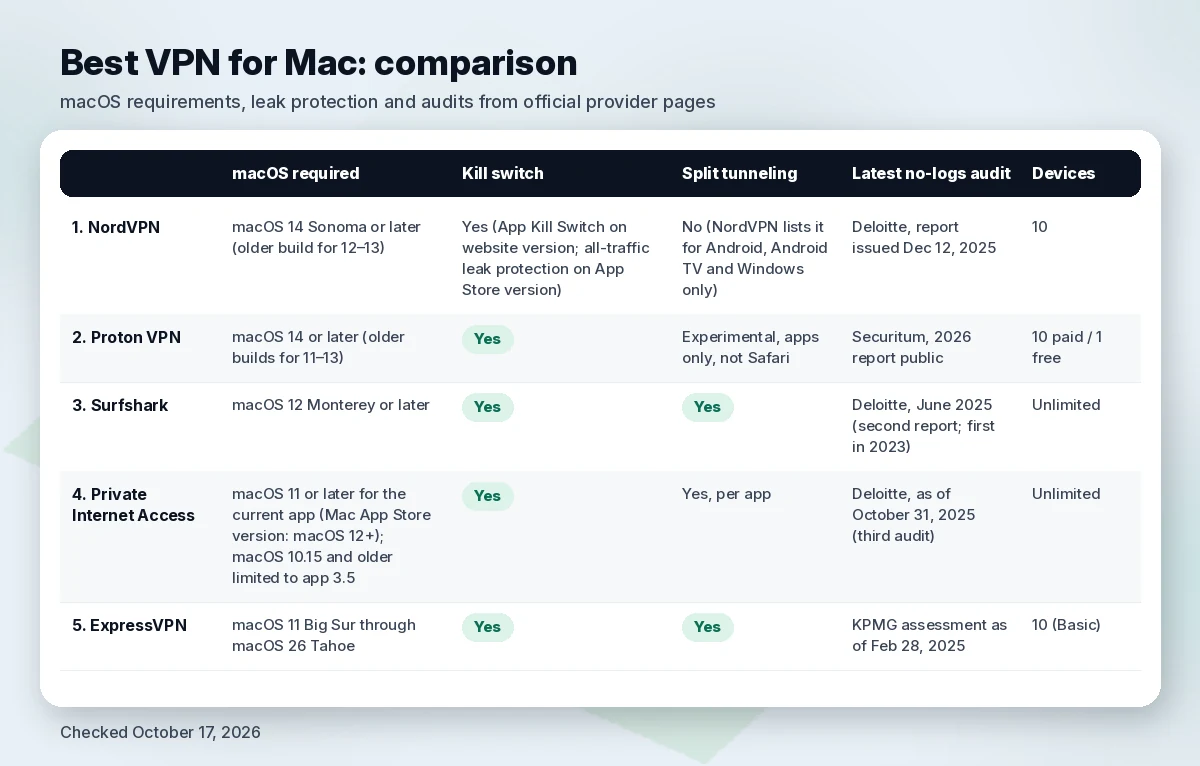
Comparison table
| VPN | macOS required (official) | Kill switch on Mac | Protocols on Mac | Split tunneling on Mac | Latest no-logs audit stated | Devices | Entry price (checked Oct 17, 2026) |
|---|---|---|---|---|---|---|---|
| NordVPN | macOS 14 Sonoma or later (older build for 12–13) | Yes (App Kill Switch on website version; all-traffic leak protection on App Store version) | NordLynx, OpenVPN, NordWhisper | No (NordVPN lists it for Android, Android TV and Windows only) | Deloitte, report issued Dec 12, 2025 | 10 | $3.49/mo ($94.23 first 27 months), renews $139.08/yr |
| Proton VPN | macOS 14 or later (older builds for 11–13) | Yes | WireGuard, WireGuard TCP, Stealth (plus OpenVPN) | Experimental, apps only, not Safari | Securitum, 2026 report public | 10 paid / 1 free | $3.49/mo ($83.76 first 24 months), then $83.88/yr |
| Surfshark | macOS 12 Monterey or later | Yes | Dausos, WireGuard, OpenVPN, IKEv2 | Yes | Deloitte, June 2025 (second report; first in 2023) | Unlimited | $2.49/mo ($67.23 first 27 months) |
| Private Internet Access | macOS 11 or later for the current app (Mac App Store version: macOS 12+); macOS 10.15 and older limited to app 3.5 | Yes | WireGuard, OpenVPN | Yes, per app | Deloitte, as of October 31, 2025 (third audit) | Unlimited | $2.03/mo (3 years + 3 months), renews $79 every 3 years |
| ExpressVPN | macOS 11 Big Sur through macOS 26 Tahoe | Yes | Lightway | Yes | KPMG assessment as of Feb 28, 2025 | 10 (Basic) | $2.99/mo ($83.72 first 28 months), then $99.95/yr |
Requirements, features and prices come from each provider’s official Mac download pages, support articles and pricing pages, checked October 17, 2026. PIA’s Mac page banner says macOS 10.15+, but its specifications table says the current app needs macOS 11.0 and that version 3.5 is the last for 10.15 and below; its Mac App Store version needs macOS 12 or later. Intro prices change often; confirm the total and the renewal line at checkout.
Best VPNs for Mac
1. NordVPN: best overall for Mac
NordVPN’s Mac app requires macOS 14 Sonoma or later, with an older build available for macOS 12 and 13 (NordVPN for Mac). It ships NordLynx (NordVPN’s WireGuard-based protocol), OpenVPN and NordWhisper, and NordVPN’s support documentation says both Mac versions include post-quantum encryption, Double VPN, Onion Over VPN and auto-connect with trusted Wi-Fi settings (website vs App Store versions).
The kill switch works differently depending on where you got the app. On the App Store version, a leak-prevention setting forces all traffic through the tunnel. On the version downloaded from NordVPN’s site, the App Kill Switch closes the apps you choose if the VPN drops (NordVPN kill switch support).
NordVPN completed its sixth no-logs assurance engagement with Deloitte Lithuania under the ISAE 3000 (Revised) standard; fieldwork ran November 10 to December 12, 2025, and the report was issued December 12, 2025 (NordVPN audit announcement). The full report is available to customers through Nord Account, not publicly.
Pricing (checked October 17, 2026, US view): Basic 2-year from $3.49/mo ($94.23 for the first 27 months), renewing at $139.08/year; 1-year Basic $5.49/mo ($65.88 for the first 12 months). Up to 10 devices at once and a 30-day money-back guarantee; if you pay through the App Store, refunds go through Apple (NordVPN pricing).
Watch out for: no split tunneling on macOS. NordVPN’s own split-tunneling page lists Android, Android TV and Windows only (NordVPN split tunneling). Older Macs stuck below macOS 14 get the legacy build.
2. Proton VPN: best for transparency
Proton VPN says all of its apps are open source and audited, and the company is based in Switzerland (Proton VPN for Mac). Its Mac support article lists macOS 14 or later (older builds for macOS 11 to 13), installation from a DMG download, a kill switch, always-on DNS leak protection, and the WireGuard, WireGuard TCP and Stealth protocols. WireGuard needs you to allow Proton’s network extension in System Settings (Proton Mac app guide). Proton’s product-lifecycle page marks macOS Sonoma as deprecated and lists IKEv2 on macOS as reaching end of life in January 2027 (Proton product lifecycle), so plan on running a current macOS.
Proton publishes its audit reports. Its no-logs page (updated June 16, 2026) describes a fifth consecutive annual no-logs audit by Securitum, with reports from 2022 through 2026 available to read (Proton no-logs audit). For the long version, read our Proton VPN review.
Pricing (checked October 17, 2026): VPN Plus from $3.49/mo, billed $83.76 for the first 24 months, then $83.88 every 12 months; 10 devices; Proton Unlimited from $7.99/mo. Proton Free covers 1 device with servers in 10 countries. 30-day money-back on paid plans (Proton VPN pricing).
Watch out for: split tunneling on macOS is labeled experimental, excludes apps only, does not work with WebKit apps such as Safari, needs WireGuard or Stealth, and on macOS cannot run at the same time as the kill switch (Proton split tunneling).
3. Surfshark: best value for many devices
Surfshark’s Mac app supports macOS 12 Monterey and later, with legacy builds for older versions, and Surfshark states native support for both Apple silicon and Intel Macs (Surfshark for macOS). The Mac app offers Dausos (Surfshark’s own protocol, currently macOS-only, per the page), WireGuard with post-quantum protection, OpenVPN and IKEv2, plus a kill switch, split tunneling and RAM-only servers. Surfshark says it operates under Netherlands jurisdiction. Deloitte issued Surfshark’s second no-logs assurance report (ISAE 3000) in June 2025; the first was in 2023 (Surfshark blog, June 16, 2025; Surfshark no-logs page). You can install it from the App Store or Surfshark’s website.
Split tunneling on macOS needs you to allow Surfshark’s system extension, and Surfshark says it doesn’t work on macOS Big Sur (Surfshark split tunneling on macOS).
Pricing (checked October 17, 2026): Starter/One from $2.49/mo ($67.23 for the first 27 months); One+ $4.49/mo ($121.23 for the first 27 months). Unlimited simultaneous devices (the free trial is limited to 3). 30-day money-back. The renewal price was not shown on the page we loaded, so check it at checkout (Surfshark pricing).
Watch out for: Surfshark and NordVPN share an owner, Nord Security. The full Deloitte report is only available inside your Surfshark account. For how the two siblings differ, see NordVPN vs Surfshark.
4. Private Internet Access: open source, unlimited devices
PIA’s Mac page lists WireGuard and OpenVPN, a kill switch, per-app split tunneling, multi-hop, obfuscation and DNS leak protection, and says the Mac app is open source (PIA for Mac). Its current Mac app needs macOS 11 or later (the Mac App Store version needs macOS 12 or later); macOS 10.15 and older are limited to PIA app version 3.5, per the specifications table on the same page. PIA’s most recent no-logs audit is its third by Deloitte (Deloitte Audit Romania, ISAE 3000), performed as of October 31, 2025, with the report signed December 19, 2025 (PIA audit announcement, Deloitte report). PIA’s Mac page still mentions only the 2024 audit.
Pricing (checked October 17, 2026): monthly $11.95; 1-year $3.99/mo billed $47.88 (renews at $47.88/year); 3 years + 3 months at $2.03/mo, autorenewing at $79 every 3 years. Unlimited devices. 30-day money-back for new subscribers; App Store purchases follow Apple’s terms (PIA).
Watch out for: the Mac page’s top banner still says macOS 10.15+, but the current app needs macOS 11 or later; on 10.15 or older you’re limited to app version 3.5.
5. ExpressVPN: Lightway and RAM-only servers
ExpressVPN’s Mac page lists support from macOS 11 Big Sur through macOS 26 Tahoe. That’s the same minimum as PIA’s current Mac app (macOS 11), and Surfshark still offers legacy apps for macOS 10.12 to 10.15. It also lists the Lightway protocol, an Internet Kill Switch, split tunneling, DNS leak protection and RAM-only TrustedServer technology (ExpressVPN for Mac). KPMG assessed TrustedServer under ISAE (UK) 3000 as of February 28, 2025, and ExpressVPN says it has published 23 third-party audits (ExpressVPN KPMG audit).
Pricing (checked October 17, 2026): Basic $2.99/mo for 2 years + 4 months ($83.72 for the first 28 months), then $99.95/year, 10 devices; Advanced $4.49/mo raises the cap to 12 devices. 30-day money-back for new users (ExpressVPN order page).
Watch out for: the Mac page we checked names only Lightway, so confirm other protocol options if you need them. Renewal after the intro term is $99.95/year on Basic.
Apple silicon and macOS notes
Chip vs macOS version. None of the five sells a separate MacBook Air or MacBook Pro plan; all publish requirements by macOS version, not chip. NordVPN lists MacBook Air, MacBook Pro, iMac, Mac mini, Mac Studio and Mac Pro, and only Surfshark explicitly states native Apple silicon support. Check your macOS version in System Settings and compare it with the table.
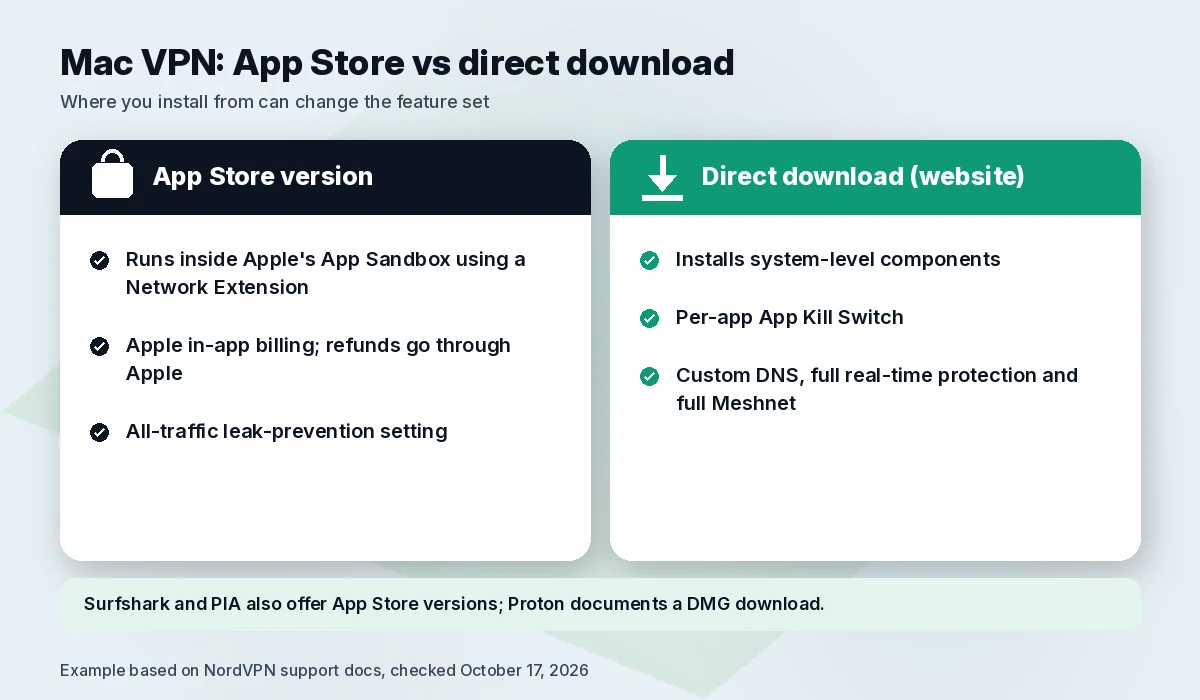
App Store vs direct download. Where you install from can change the feature set. NordVPN explains that its App Store version runs inside Apple’s App Sandbox using a Network Extension, while the website version installs system-level components. The website version adds the per-app App Kill Switch, custom DNS, full real-time protection and full Meshnet; the App Store version adds Apple in-app billing and the all-traffic leak-prevention setting (NordVPN support). Surfshark and PIA also offer App Store versions; Proton documents a DMG download.
Permissions. Expect macOS to ask you to approve a network or system extension the first time you connect or turn on split tunneling. Proton requires it for WireGuard; Surfshark requires it for split tunneling. That prompt is expected.
Built-in client. macOS can connect to IKEv2, IPSec and L2TP VPNs from System Settings > Network with settings from your provider (Apple: set up a VPN on Mac). We’d still use the provider’s app for its kill switch and leak protection.
Using one VPN on Mac and iPhone
Every service here covers both with one subscription: 10 devices at once on NordVPN, Proton VPN Plus and ExpressVPN Basic, unlimited on Surfshark and PIA. ExpressVPN and PIA list iOS 15 or later for their iPhone apps. One caution: if you subscribe inside the App Store, billing and refunds run through Apple, not the VPN company (NordVPN and PIA both say so on their pricing pages). If you’re covering a whole household, our best VPN for multiple devices guide goes deeper.
VPN vs iCloud Private Relay on Mac
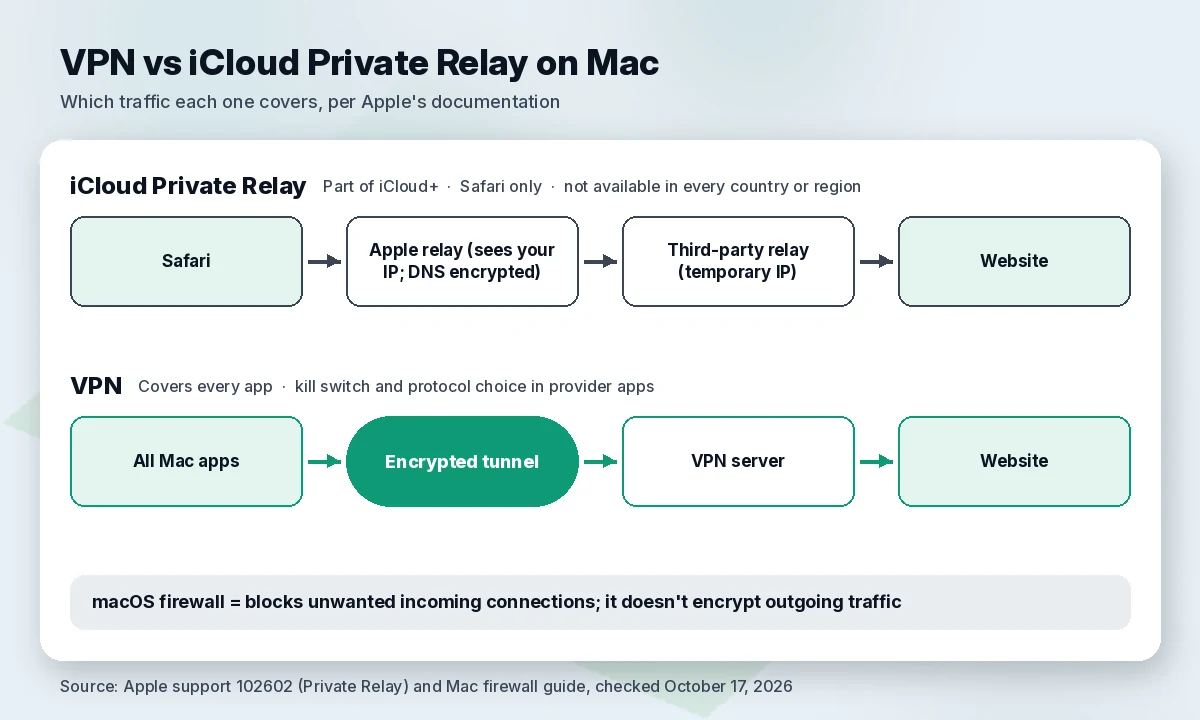
iCloud Private Relay is part of an iCloud+ subscription and protects browsing in Safari. Apple sends that traffic through two relays: Apple’s first relay sees your IP address while your DNS request is encrypted, and a second relay run by a third-party content provider assigns a temporary IP address. Apple also says Private Relay isn’t available in every country or region (Apple Private Relay).
So Private Relay is a solid privacy layer for Safari, not a full VPN: other apps and browsers fall outside it, with no kill switch or protocol choice. The macOS firewall is a different tool again: it blocks unwanted incoming connections to your Mac and lets you allow or deny specific apps, but it doesn’t encrypt your outgoing traffic (Apple: Mac firewall). You can use all three together: the firewall, Private Relay for Safari, and a VPN on public Wi-Fi. For more on that last case, see best VPN for public Wi-Fi.
Beyond the VPN
These extras sit outside the ranking and weren’t scored:
- NordPass for passwords across your Mac and iPhone: See NordPass (families should also read best password manager for families)
- Incogni for removing your details from data brokers, something a VPN can’t do: See Incogni
How we evaluated
We ranked on six criteria, in this order: leak protection on macOS (kill switch and how it behaves on each Mac version), modern protocols, the most recent independent no-logs audit and whether the report is public, macOS version support, device limits, and current intro and renewal pricing. Every fact comes from official provider and Apple pages checked October 17, 2026. We did not run our own speed or leak tests, and we don’t repeat other sites’ test numbers. Commission rates play no part; ExpressVPN and PIA get plain links because we have no confirmed affiliate terms with them.
Our opinion: NordVPN and Proton are close. NordVPN gets first place for leak protection on both Mac versions and three protocols. Proton wins on public audit reports and a usable free plan. If split tunneling on your Mac matters to you, Surfshark, PIA or ExpressVPN fit better than either. PIA ranks above ExpressVPN on our criteria: two protocols versus one, a newer no-logs audit (as of October 31, 2025, vs February 28, 2025) and unlimited devices, with the same macOS 11 minimum for the current app.
FAQ
Do I need a VPN on a Mac? The macOS firewall and Private Relay (iCloud+) don’t encrypt all of your Mac’s traffic. A VPN helps most on public or shared Wi-Fi, or when you want every app covered.
Is there a good free VPN for Mac? Proton VPN has a free plan for one device with servers in 10 countries (pricing). The other four are paid, with 30-day money-back guarantees.
Does the App Store version of a VPN have fewer features on macOS? It can. NordVPN’s website version adds a per-app kill switch, custom DNS and full Meshnet; the App Store version uses Apple billing and all-traffic leak prevention. Check each provider’s support page.
Which VPN works on MacBook Air with Apple silicon? All five publish requirements by macOS version, not by model, and NordVPN lists MacBook Air among supported Macs. Surfshark explicitly states native Apple silicon support. Match your macOS version to the table above.
Can one VPN cover my Mac and iPhone? Yes. Every service here allows at least 10 simultaneous devices on paid plans, and Surfshark and PIA allow unlimited. See our iPhone and iPad guide.
Is iCloud Private Relay enough instead of a VPN? For Safari browsing it adds real privacy, but it covers Safari only and isn’t available in every region. If you want every app on your Mac in an encrypted tunnel, use a VPN.
Which VPN is best for Mac according to Reddit? Forum threads mix anecdotes with outdated prices, so we don’t use them as a source. Compare the dated, official facts in our table instead.
Verdict
NordVPN is our pick for most Mac users: leak protection on both Mac versions, three protocols and a December 2025 no-logs assurance report. Pick Proton VPN for open-source apps, public audit reports or a free plan, and Surfshark for split tunneling or unlimited devices at the lowest intro price. PIA is the budget open-source option with unlimited devices, and ExpressVPN suits anyone who wants its Lightway protocol. Want something cheaper still? See our best cheap VPN roundup.
Get NordVPN · Or check Surfshark (unlimited devices)
Sources (official pages, checked on October 17, 2026)
- NordVPN pricing (US view, USD): https://nordvpn.com/pricing/ (checked October 17, 2026)
- NordVPN for Mac: https://nordvpn.com/download/mac/ (checked October 17, 2026)
- NordVPN support, website vs App Store versions on macOS: https://support.nordvpn.com/hc/en-us/articles/19445793501585 (checked October 17, 2026)
- NordVPN support, kill switch: https://support.nordvpn.com/hc/en-us/articles/19509682644369 (checked October 17, 2026)
- NordVPN split tunneling: https://nordvpn.com/features/split-tunneling/ (checked October 17, 2026)
- NordVPN no-logs assurance engagement 2025: https://nordvpn.com/blog/nordvpn-no-logs-assurance-engagement-2025/ (checked October 17, 2026)
- Proton VPN pricing: https://protonvpn.com/pricing (checked October 17, 2026)
- Proton VPN for Mac: https://protonvpn.com/download-macos (checked October 17, 2026)
- Proton VPN Mac app guide: https://protonvpn.com/support/protonvpn-mac-vpn-application (checked October 17, 2026)
- Proton VPN product lifecycle: https://protonvpn.com/support/product-lifecycle (checked October 17, 2026)
- Proton VPN split tunneling: https://protonvpn.com/support/protonvpn-split-tunneling (checked October 17, 2026)
- Proton VPN no-logs audit: https://protonvpn.com/blog/no-logs-audit (checked October 17, 2026)
- Surfshark pricing: https://surfshark.com/pricing (checked October 17, 2026)
- Surfshark for macOS: https://surfshark.com/download/macos (checked October 17, 2026)
- Surfshark support, split tunneling on macOS: https://support.surfshark.com/hc/en-us/articles/24914664935442 (checked October 17, 2026)
- Surfshark blog, Deloitte no-logs verification (June 16, 2025): https://surfshark.com/blog/deloitte-nologs-policy-verified-again (checked October 17, 2026)
- Surfshark no-logs page: https://surfshark.com/features/no-logs (checked October 17, 2026)
- ExpressVPN order page: https://www.expressvpn.com/order (checked October 17, 2026)
- ExpressVPN for Mac: https://www.expressvpn.com/vpn-software/vpn-mac (checked October 17, 2026)
- ExpressVPN KPMG 2025 audit: https://www.expressvpn.com/blog/kpmg-2025-no-logs-policy-audit/ (checked October 17, 2026)
- Private Internet Access home / pricing: https://www.privateinternetaccess.com/ (checked October 17, 2026)
- Private Internet Access for Mac: https://www.privateinternetaccess.com/download/mac-vpn (checked October 17, 2026)
- PIA third Deloitte audit announcement: https://www.privateinternetaccess.com/blog/security-audit-2025/ (checked October 17, 2026)
- PIA Deloitte report page (CON-003, as of October 31, 2025): https://www.privateinternetaccess.com/deloitte-privacy-policy/ (checked October 17, 2026)
- Apple, About iCloud Private Relay: https://support.apple.com/en-us/102602 (checked October 17, 2026)
- Apple, Set up a VPN connection on Mac: https://support.apple.com/guide/mac-help/set-up-a-vpn-connection-on-mac-mchlp2963/mac (checked October 17, 2026)
- Apple, Block connections to your Mac with a firewall: https://support.apple.com/guide/mac-help/block-connections-to-your-mac-with-a-firewall-mh34041/mac (checked October 17, 2026)