

Affiliate disclosure: VPN Vetted is reader-supported. Some links below are affiliate links (marked “sponsored”): if you buy through them we may earn a commission at no extra cost to you. We rank by published prices, kill switch, split tunneling, auto-connect rules and audits, never by commission. ExpressVPN is owned by Kape, which also owns PIA and CyberGhost. NordVPN and Surfshark (mentioned below) both belong to Nord Security after their 2022 merger. This guide is general information, not IT, legal or compliance advice.
Prices checked November 1, 2026, between 01:02 and 01:05 BRT, on the official US pages, in USD, before sales tax or VAT. NordVPN showed a Black Friday offer and ExpressVPN a Halloween banner that day, so intro prices may change.
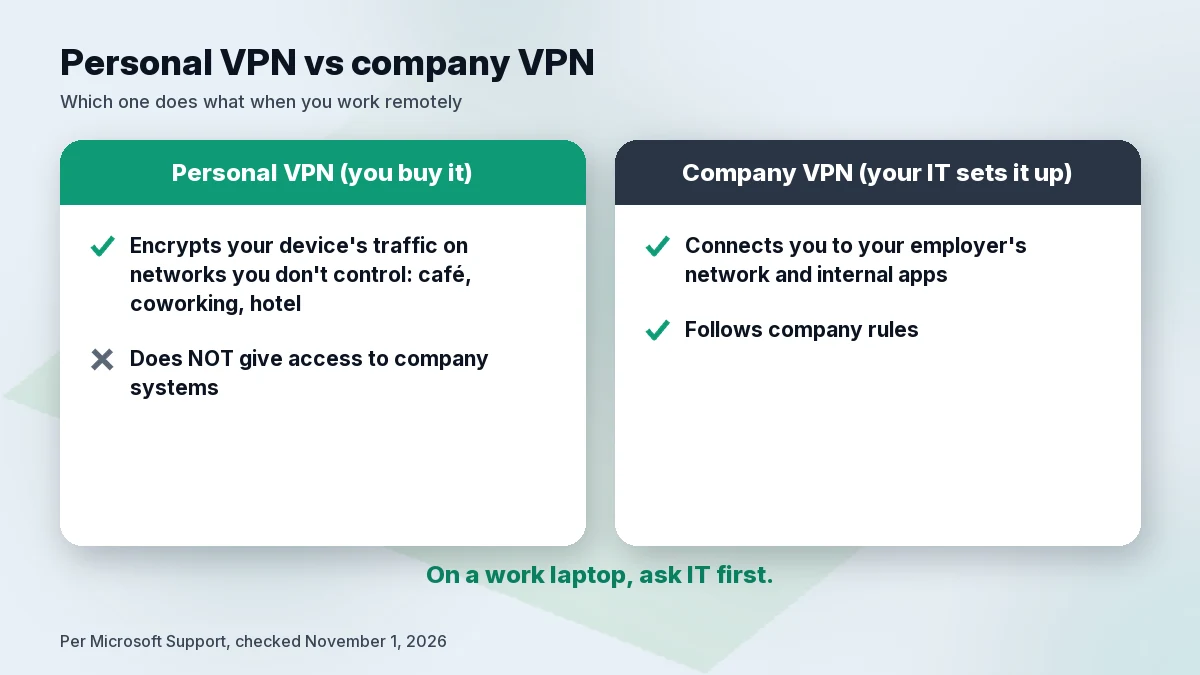
A personal VPN is useful for remote work in one specific way: it encrypts traffic from your own laptop or phone on networks you do not control, such as a café, coworking space or hotel. It does not give you access to your employer’s internal systems, and it does not replace the VPN or access tool your company provides. If your employer gave you one, use theirs for work and ask IT before adding your own. With that settled, NordVPN, ExpressVPN and Proton VPN are the three personal VPNs we compare here.
Quick answer
- NordVPN for auto-connect on unknown Wi-Fi and the most detailed Windows feature list; renewal is $139.08 a year.
- ExpressVPN for Wi-Fi rules that connect on public networks and stay idle on trusted home or office networks, and up to 14 devices on its top plan; Basic renews at $99.95 a year.
- Proton VPN for the lowest renewal of the three ($83.88 every 12 months) and a kill switch that Proton says works with split tunneling on Windows.
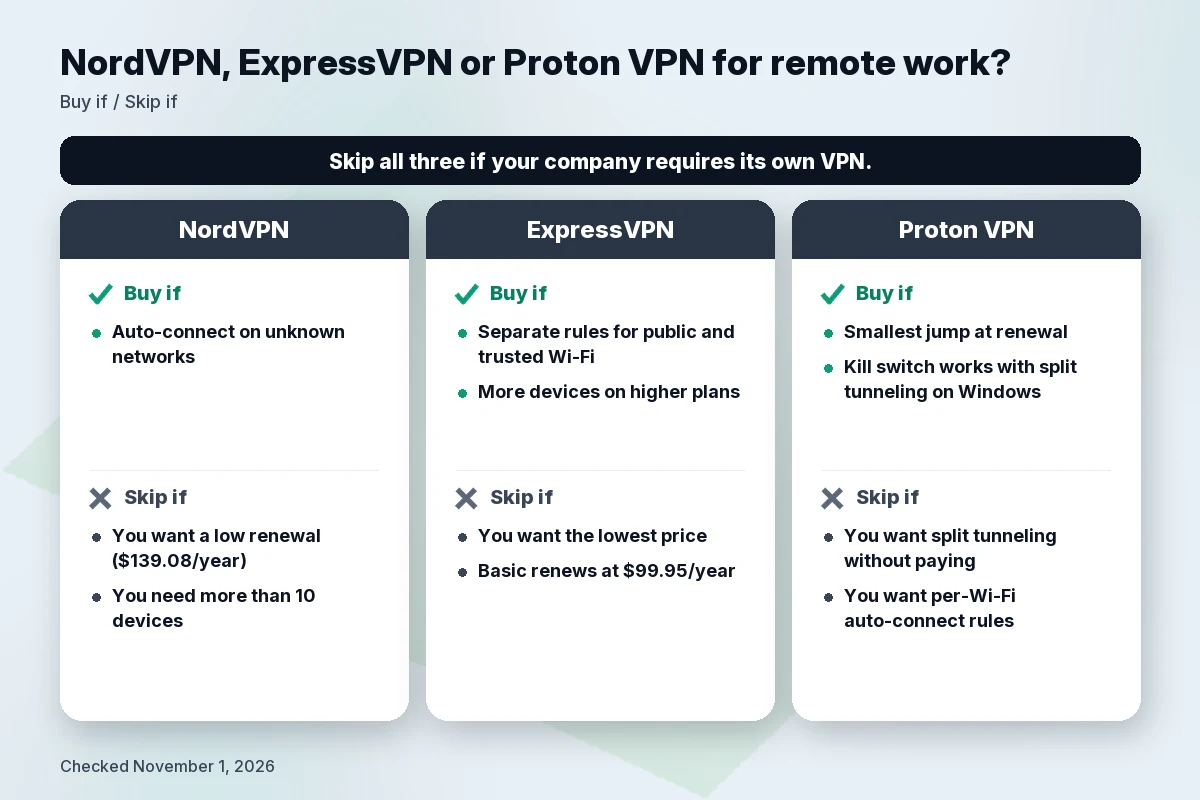
None of them replaces your company’s VPN. If your employer requires its own VPN or bans personal ones, follow that policy.
What a personal VPN does and does not do for remote work
What it protects
A VPN encrypts traffic between your device and the VPN server. On a café, coworking or hotel network, that keeps other people on the same network and the network operator from reading or tampering with that traffic in transit. Microsoft’s own support page describes the use case: a VPN “can help provide a more secure connection and access to your company’s network and the internet, for example, when you’re working from a coffee shop or similar public place.” For more on that risk, see our best VPN for public Wi-Fi guide.
What it does not do
- It does not connect you to your company’s network. That access comes from the VPN profile or app your employer sets up. Microsoft’s page says that for work you should look for VPN settings or a VPN app on your company’s intranet, or contact your company’s support person.
- It does not stop phishing or a stolen password. A fake login page works the same with or without a VPN. Two-step verification and updates matter more here.
Ask your IT team first
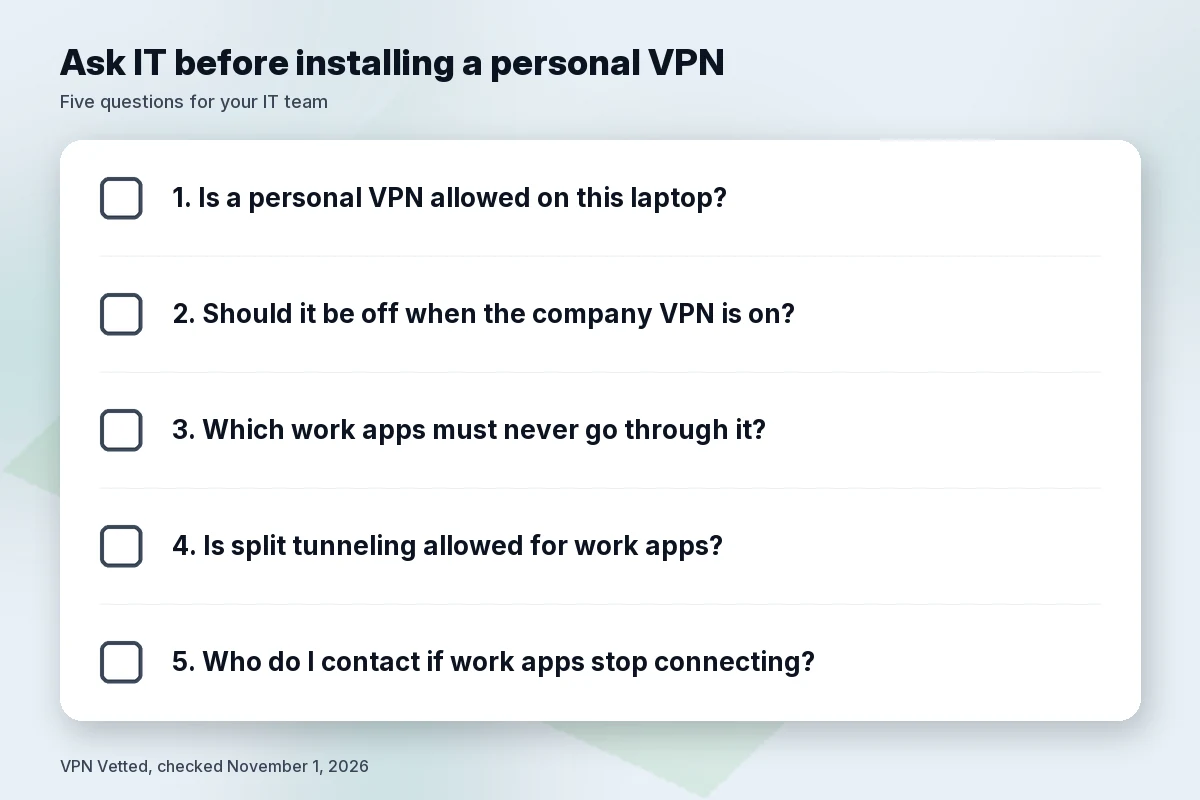
Company policies differ. Some employers want all work traffic on their own VPN; some do not allow other VPN software on work laptops. We cannot give one rule that fits every company, so ask before installing a personal VPN on a work-managed device. Useful questions: Do you allow a personal VPN on this laptop? Should it be off when the company VPN is on? Which work apps should never go through it?
What to look for in a VPN for remote work
Kill switch
A kill switch blocks traffic if the VPN drops, so a work call or file upload does not continue on the open café network without you noticing. NordVPN, ExpressVPN and Proton VPN all list one on Windows. Proton also offers an advanced mode on Windows that “only allows internet access when connected to Proton VPN” and stays on after a restart.
Split tunneling
Split tunneling sends chosen apps outside the VPN, for example a video-call app that your company asks you to run directly, or a local printer. The catch is that anything outside the tunnel is not protected by the VPN, so this is a question for IT if work apps are involved. ExpressVPN’s Trust Center lists an April 2024 audit of its Windows app that confirmed remediation of a DNS issue related to split tunneling. Proton says that on Windows its kill switch works with split tunneling, while on most other platforms you must turn split tunneling off to use the kill switch.
Auto-connect on networks you don’t trust
The VPN should switch itself on when you join an unknown network. NordVPN’s Windows page lists auto-connect rules for unknown Wi-Fi networks and for when Windows boots up. ExpressVPN’s Windows page describes rules to “automatically connect on public Wi-Fi and stay idle on trusted home or office networks.” Proton’s Windows page lists “Always-on VPN”; we did not find a per-network Wi-Fi rule on the pages we read, so check the app.
Devices
Remote workers often protect a laptop, a phone and a tablet. NordVPN and Proton VPN Plus allow 10 devices. ExpressVPN allows 10 on Basic, 12 on Advanced and 14 on Express Pro. For larger households, see best VPN for multiple devices.
Renewal price
All three charge more after the intro term. The table shows the renewal each company publishes.
Comparison table
| NordVPN (Basic) | ExpressVPN (Basic) | Proton VPN (Plus) | |
|---|---|---|---|
| Intro price | $3.49/mo; $94.23 for the first 27 months | $4.99/mo; $74.85 for the first 15 months | $3.49/mo; $83.76 for the first 24 months |
| Renewal | $139.08/year | $99.95/year | $83.88 every 12 months |
| Devices | 10 | 10 (Advanced 12, Pro 14) | 10 |
| Kill switch (Windows) | Yes, in app settings | Yes (“Internet Kill Switch”) | Standard and advanced |
| Split tunneling (Windows) | Apps, programs and URLs | Choose which apps use the VPN | Paid plans; works with kill switch on Windows |
| Wi-Fi auto-connect | Unknown Wi-Fi and Windows startup | Connect on public Wi-Fi, idle on trusted networks | “Always-on VPN” listed |
| Latest no-logs check named | Deloitte Lithuania, report issued Dec 12, 2025 | KPMG LLP, position as of Feb 28, 2025 | Securitum, 2026 report |
| Business product | NordLayer (separate) | ExpressVPN for Teams | Proton VPN for Business |
| Money-back | 30 days | 30 days (new users) | 30 days |
Check NordVPN price Check ExpressVPN price Check Proton price
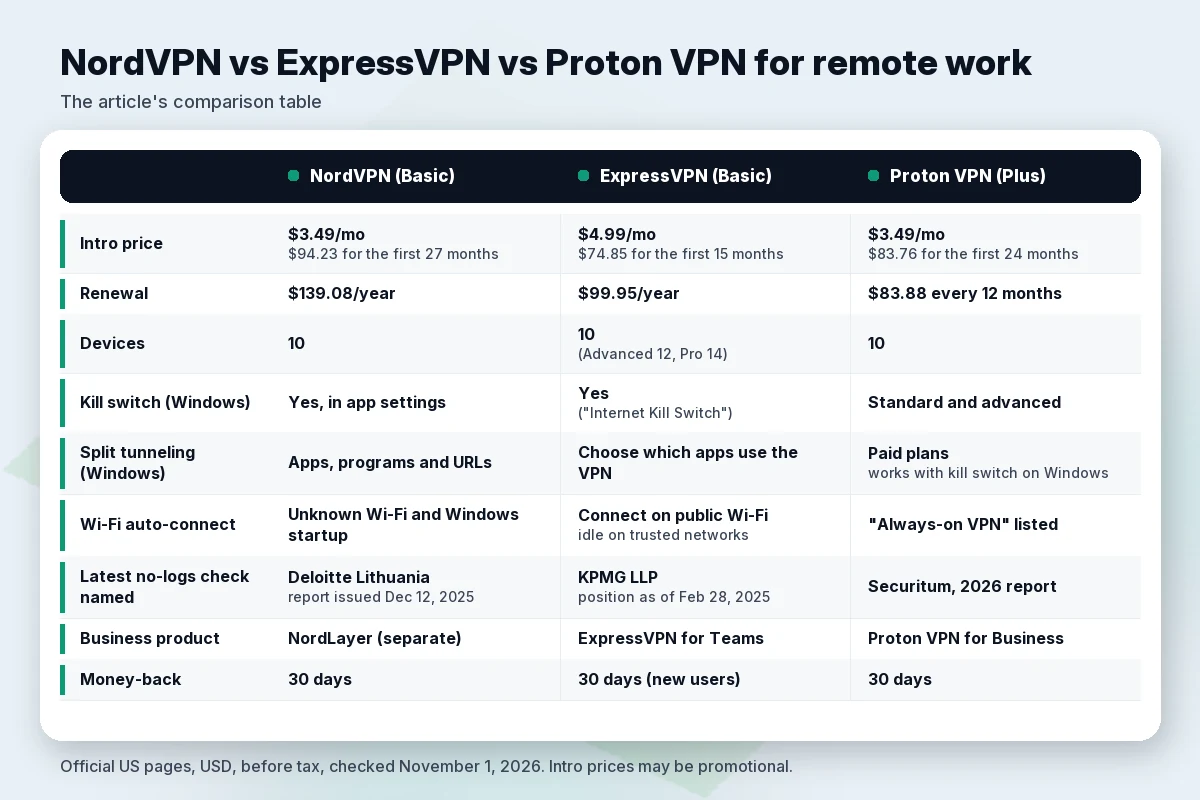
Our arithmetic on the intro terms: the first 12 months work out to about $41.88 on both NordVPN Basic and Proton Plus, and about $59.88 on ExpressVPN Basic. At renewal the order flips: Proton is the cheapest at $83.88, ExpressVPN is next at $99.95 and NordVPN costs the most at $139.08. If your budget is tight, our best cheap VPN guide covers lower-cost options.
NordVPN for remote work
Facts from NordVPN’s pages: Basic costs $3.49 a month, “$94.23 for the first 27 months,” then “renews at $139.08/year,” for up to 10 devices. The Windows app runs on Windows 10 (64-bit) and 11, x64 and ARM64. It lists a Kill Switch, IP and DNS leak protection, split tunneling for apps, programs and URLs, and auto-connect rules for unknown Wi-Fi and Windows startup.
Audit: NordVPN says Deloitte Lithuania carried out its sixth no-logs assurance engagement from November 10 to December 12, 2025, under ISAE 3000 (Revised), with the final report issued December 12, 2025. The full report is for logged-in users.
- Buy if you want the VPN to turn on by itself whenever you join an unknown network.
- Skip if you want a low renewal ($139.08 a year) or need more than 10 devices, or if your company requires its own VPN.
Compare it in NordVPN vs Proton VPN and NordVPN vs ExpressVPN, or read is NordVPN worth it.
ExpressVPN for remote work
Facts from ExpressVPN’s pages: On the day we checked, the order page showed only 12-month plans. Basic is $4.99 a month, “$74.85 for the first 15 Months. Then autorenews at $99.95 annually,” for 10 devices. Advanced is $89.85 for 15 months, then $119.95 a year, for 12 devices; Express Pro is $134.85, then $199.95 a year, for 14 devices. The Windows page lists the Internet Kill Switch, split tunneling that “lets you choose which Windows apps use the VPN and which connect directly,” auto-connect on startup and the Wi-Fi rules described above.
One caution: the same page says ExpressVPN’s automatic obfuscation activates when it detects VPN blocks on school or work networks. If your employer’s network blocks VPNs, treat that as a policy to discuss with IT, not something to route around.
Audits: ExpressVPN says KPMG LLP examined its TrustedServer system and no-logs claims as of February 28, 2025, under ISAE (UK) 3000 Type 1, in a post dated June 25, 2025. Its Trust Center also lists the April 2024 Windows app audit on the split tunneling DNS issue. TrustedServer, per ExpressVPN, runs servers on RAM only so data is wiped on every reboot.
- Buy if you want separate rules for public Wi-Fi and trusted home or office networks, or more than 10 devices on a higher plan.
- Skip if you want the lowest intro or renewal price ($99.95 a year on Basic), or you need more than 10 devices without paying for a bigger plan.
More in our ExpressVPN review and Surfshark vs ExpressVPN.
Proton VPN for remote work
Facts from Proton’s pages: VPN Plus is $3.49 a month, “billed at $83.76 for the first 24 months, then renews at $83.88 every 12 months,” for up to 10 devices. On Windows, Proton lists the kill switch as a free feature and split tunneling as a premium feature, and says both kill switch modes work with split tunneling on Windows. The Free plan covers 1 device at “Medium” speed with servers in 10 randomly selected countries.
Audit: Proton says Securitum has audited its no-logs policy five years in a row, with the latest report from 2026. The article was last updated June 16, 2026.
- Buy if you want the smallest jump at renewal and a kill switch that, per Proton, works alongside split tunneling on Windows.
- Skip if you need split tunneling without paying (it is premium), or you want per-Wi-Fi auto-connect rules, which we could not confirm on Proton’s pages.
See our Proton VPN review.
Also consider Surfshark if you want unlimited devices; it shares an owner with NordVPN. See NordVPN vs Surfshark.
When you need a business VPN instead
If you run a small team, or you need people to reach shared company resources, a personal subscription is the wrong tool. All three companies sell or point to separate business products. We list them for context; none is an affiliate link.
- Proton VPN for Business: Proton’s business page lists single sign-on through Okta or Microsoft Entra ID, deployment through MDM tools such as Intune and Jamf, fixed IP addresses in 20+ countries for allowlisting company resources, monitoring, and always-on VPN, kill switch and split tunneling.
- NordLayer: a separate Nord Security product. Its pricing page lists a 5-user minimum on its standard plans and a 14-day money-back guarantee.
- ExpressVPN for Teams: ExpressVPN’s order page describes it as an enterprise VPN with “admin controls and bulk licensing discounts.”
A business VPN does not make you compliant with any law or industry standard on its own. If your work involves regulated data, that decision belongs to your IT, security or legal team.
Router VPN for a home office
A VPN on the home router covers every device at home, including ones that cannot run an app, but a laptop you take to a café still needs its own app. Our best VPN for router guide covers setup and which routers are supported.
How we evaluated
We did not install or run these apps for this guide, and we publish no speed numbers. On November 1, 2026, we read each company’s official US pricing page, Windows download page, support articles, audit or trust pages and business pages, plus Microsoft’s support page on Windows VPN connections, and recorded the time of each reading. We compared intro and renewal price, devices, kill switch, split tunneling, Wi-Fi auto-connect, named audits and business options. Feature details come from each company’s Windows pages; Mac and mobile apps may differ (see best VPN for Mac).
FAQ
Do I need a VPN for remote work?
It helps when you work on networks you don’t control, such as a café, coworking space or hotel, because it encrypts your device’s traffic to the VPN server. If your employer provides its own VPN, use that for work and ask IT before adding a personal one.
Can a personal VPN replace my company VPN?
No. A personal VPN does not give you access to your employer’s internal network or apps. That access comes from the VPN profile or app your company sets up.
Is a VPN enough to secure remote work?
No. It does not stop phishing pages or stolen passwords. Keep your system updated and use two-step verification on work accounts.
Should I use split tunneling for work apps?
It is a trade-off: excluded apps leave the VPN tunnel. If work apps are involved, ask IT which ones may run outside it.
Should the kill switch be on on my work laptop?
On networks you don’t control, it stops traffic from continuing without the VPN if the connection drops. If it interferes with your company VPN, ask IT.
Can I run a personal VPN and my company VPN at the same time?
Ask your IT team. Policies differ, and running two VPNs together can cause connection problems.
How many devices can I use?
NordVPN Basic and Proton VPN Plus allow 10. ExpressVPN allows 10 on Basic, 12 on Advanced and 14 on Express Pro.
Is a VPN worth it on café or hotel Wi-Fi?
Yes, for encrypting traffic on a shared network, as long as you also watch for fake login pages. See best VPN for public Wi-Fi.
Can I use a free VPN for work?
Proton VPN Free covers 1 device at “Medium” speed with servers in 10 randomly selected countries, and split tunneling is not included. For work, check your company’s rules first. See best free VPN.
How much will I pay after the first term?
Before tax: NordVPN Basic $139.08 a year, ExpressVPN Basic $99.95 a year, Proton VPN Plus $83.88 every 12 months.
Related guides
- Best VPN for public Wi-Fi
- Best VPN for multiple devices
- Best VPN for router
- Best VPN for Mac
- Best free VPN
Verdict
Start with your employer: if it requires its own VPN, that comes first. For your own devices on networks you don’t control, pick NordVPN for auto-connect on unknown Wi-Fi if a $139.08 renewal is acceptable. Pick ExpressVPN for separate rules for public and trusted networks and more devices on higher plans. Pick Proton VPN for the lowest renewal and a kill switch that works with split tunneling on Windows. Use the 30-day money-back window to check that the VPN does not break the work apps you rely on.
Check NordVPN price Check ExpressVPN price Check Proton price
Sources
All checked November 1, 2026, 01:02–01:06 BRT (America/Sao_Paulo). Prices in USD before tax.
- Microsoft Support, “Connect to a VPN in Windows”: https://support.microsoft.com/en-us/windows/experience/connectivity-networking/connect-to-a-vpn-in-windows (01:06 BRT)
- NordVPN pricing: https://nordvpn.com/pricing/ (01:03 BRT)
- NordVPN for Windows: https://nordvpn.com/download/windows/ (01:03 BRT)
- NordVPN sixth no-logs assurance engagement: https://nordvpn.com/blog/nordvpn-no-logs-assurance-engagement-2025/ (01:05 BRT)
- NordLayer pricing: https://nordlayer.com/pricing/ (01:03 BRT)
- ExpressVPN plans: https://www.expressvpn.com/order (01:03 BRT)
- ExpressVPN for Windows: https://www.expressvpn.com/vpn-download/vpn-windows (01:02 BRT)
- ExpressVPN Trust Center: https://www.expressvpn.com/trust (01:02 BRT)
- ExpressVPN, KPMG no-logs assurance: https://www.expressvpn.com/blog/kpmg-2025-no-logs-policy-audit/ (01:02 BRT)
- Kape brands: https://www.kape.com/our-brands/ (01:03 BRT)
- Proton VPN pricing: https://protonvpn.com/pricing (01:02 BRT)
- Proton VPN for Windows: https://protonvpn.com/download-windows (01:02 BRT)
- Proton VPN kill switch and split tunneling support: https://protonvpn.com/support/what-is-kill-switch and https://protonvpn.com/support/protonvpn-split-tunneling (01:02 BRT)
- Proton VPN no-logs audits: https://protonvpn.com/blog/no-logs-audit (01:02 BRT)
- Proton VPN for Business: https://protonvpn.com/business (01:03 BRT)
- Surfshark and Nord Security merger: https://surfshark.com/blog/surfshark-merges-with-nord-security (01:02 BRT)