

Affiliate disclosure: VPN Vetted is reader-supported. Some links below are affiliate links (marked “sponsored”): if you buy through them we may earn a commission at no extra cost to you. We rank by published features, documentation and price, not by what we earn. NordVPN and Surfshark both belong to Nord Security (Surfshark’s merger announcement); the two brands say they operate independently. Proton VPN is run by Proton AG in Switzerland. We hold all three to the same criteria.
Prices and features checked October 24, 2026, between 01:07 and 01:17 BRT, on the official US pages, in USD, before sales tax.
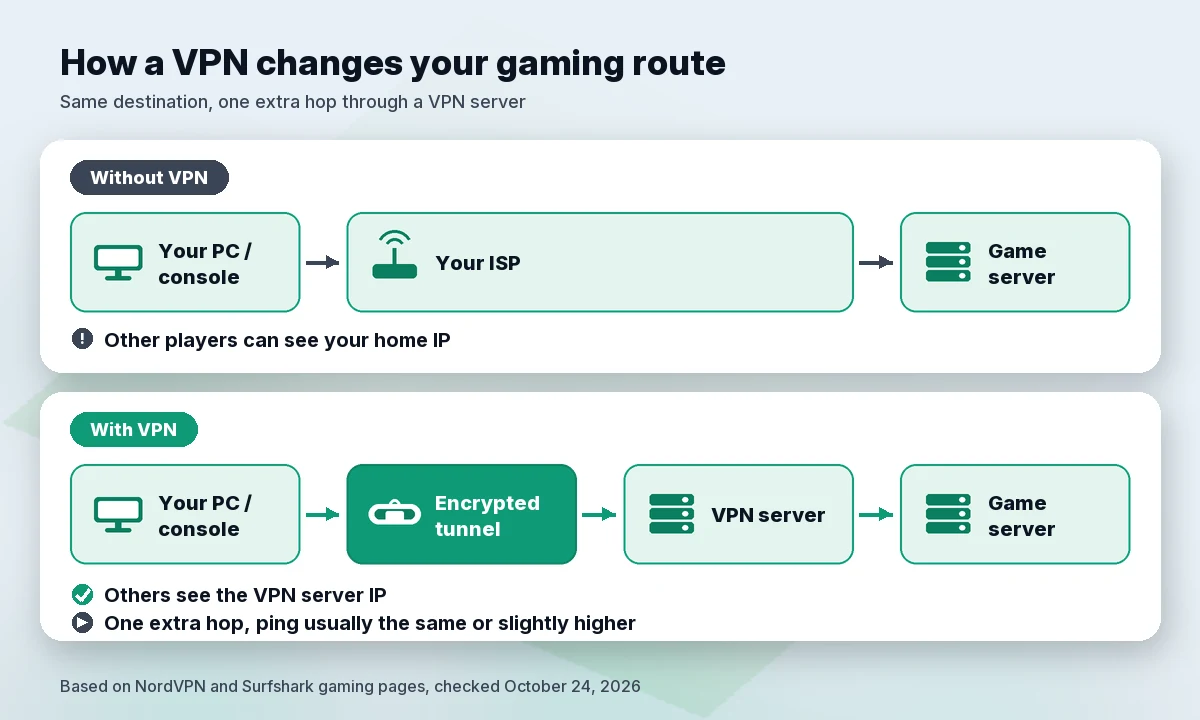
Short answer: a gaming VPN is a privacy tool, not a speed boost. It hides your home IP address from other players, which makes you harder to target with DDoS attacks, and it encrypts your traffic on public Wi-Fi. It usually adds a little latency. Our pick is NordVPN for its gaming documentation and a dedicated IP that works on up to 10 devices. Surfshark is cheaper and has no device limit. Proton VPN is the one to look at if strict NAT is your problem.
Does a VPN lower ping?
Usually not, and the providers say so themselves:
- Surfshark: “There is a caveat — all VPNs may increase ping,” because your data “has to take an additional step.” Its gaming page also calls “no lag” either “a marketing term or an outright lie.”
- NordVPN: “Keep in mind that a VPN can add some latency.” On whether a VPN can reduce ping: “Yes, but it’s uncommon. If your ISP’s route to the game server is unstable or the network is congested, a VPN might find a cleaner path and reduce your ping a little.”
So expect the same ping or slightly higher. NordVPN’s gaming page cites “only 3ms latency overhead,” based on West Coast Labs testing (October 2025). That’s NordVPN’s claim about lab conditions. We didn’t run speed tests, and your result depends on your connection, the VPN server and the game server.
Quick comparison table
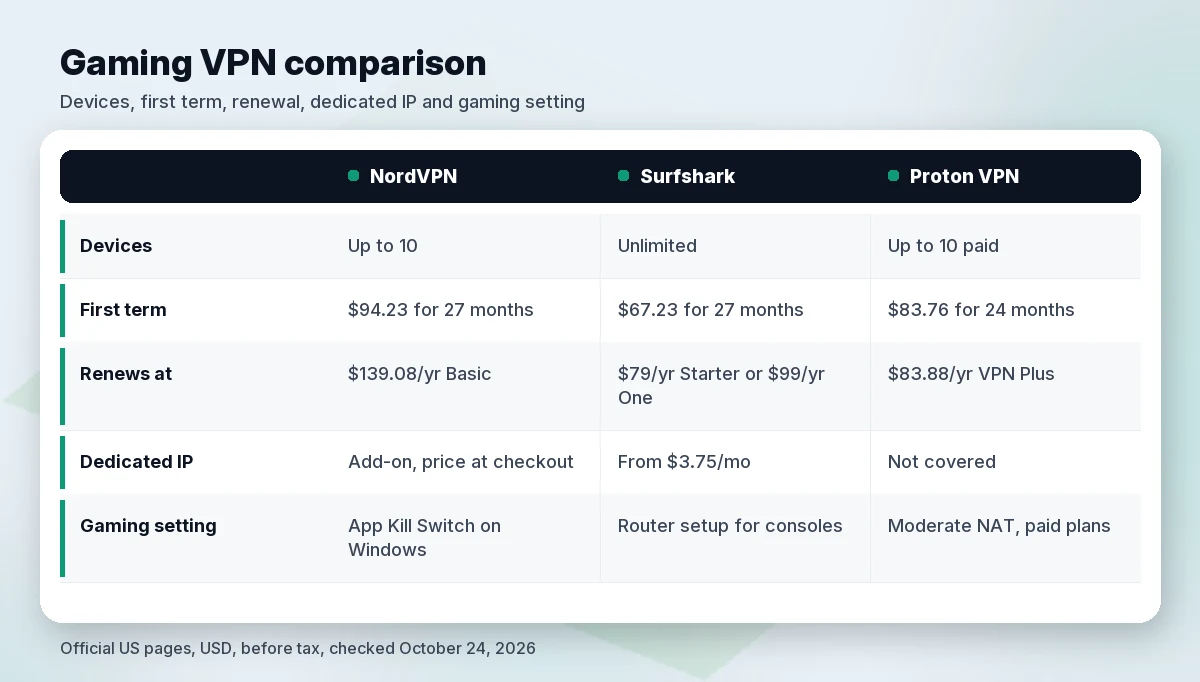
| NordVPN | Surfshark | Proton VPN | |
|---|---|---|---|
| Devices | Up to 10 | Unlimited | Up to 10 on paid plans |
| Lowest long-term entry price | Basic: $3.49/mo, $94.23 for 27 months | Starter or One: $2.49/mo, $67.23 for 27 months | VPN Plus: $3.49/mo, $83.76 for 24 months |
| Renews at | Basic $139.08/yr | Starter $79/yr · One $99/yr | VPN Plus $83.88/yr |
| Dedicated IP add-on | Yes; usable on up to 10 devices via OpenVPN; price not shown on the pages we checked | Yes; from $3.75/mo; 1 per account | Not covered in this guide |
| Gaming-specific setting | App Kill Switch on Windows (can close an app such as Steam on disconnect) | Router setup for consoles | Moderate NAT (paid plans) |
| Console route | Router or manual setup guides | Router setup | Router (all plans, including Free) |
| Money-back | 30 days | 30 days | 30 days |
| Link | Check NordVPN price | Check Surfshark price | Check Proton price |
Best VPNs for gaming
1. NordVPN: best overall for gamers
NordVPN has the most gaming-relevant documentation of the three, and it’s careful about ping: its gaming FAQ calls lower ping “uncommon.”
- Dedicated IP that fits a multi-device setup. NordVPN’s dedicated IP page says you can use the same dedicated IP “on up to 10 devices at once if you connect via OpenVPN (TCP or UDP).” With NordLynx it’s one device at a time, and it isn’t available on browser extensions or with IKEv2. NordVPN also says that “for everyday browsing, shopping, or gaming, a regular VPN connection is just enough.” The add-on is bought at checkout, and the pricing page we checked didn’t show its price.
- App Kill Switch. On Windows you can add a specific app to the kill switch list. NordVPN’s support page uses Steam as the example: NordVPN will close it whenever you disconnect.
- Consoles. NordVPN’s setup page points console players to router or manual setup.
Price: Basic is $94.23 for the first 27 months, then $139.08 a year. Monthly is $14.99. Up to 10 devices, 30-day money-back guarantee.
2. Surfshark: best value and no device limit
Surfshark is the cheapest of the three and lists unlimited devices on every plan. That helps if your PC, console router, phone and laptop all need cover.
- Plain-spoken about ping. Surfshark says all VPNs may increase ping, and it limits possible gains to edge cases such as crowded servers or poor ISP routing.
- Dedicated IP add-on. Surfshark’s dedicated IP page lists it “from $3.75/mo”, and its renewal table shows $45.00 a year. Support says only one dedicated IP can be bought per account. Surfshark’s gaming page warns that when you log in from a different IP, “most game providers flag that as suspicious,” and suggests a static or dedicated IP.
- Console setup through a router. Surfshark’s router guide is upfront about the trade-offs: you “lose access to most of the Surfshark features available on the apps,” and “the connection speed might decrease.”
Price: Starter and One are $67.23 for the first 27 months ($2.49/mo), then $79 a year (Starter) or $99 a year (One), before tax. 30-day money-back guarantee.
3. Proton VPN: best for NAT problems
Proton’s standout gaming feature is documented in its support pages, not just its landing page. By default, Proton uses strict NAT, which Proton says can cause “High ping rates (resulting in lag)” and “Problems joining or hosting multiplayer games.” On paid plans you can switch to Moderate NAT, which Xbox shows as “NAT Type Moderate” and PlayStation as “NAT Type 2.” Proton says Moderate NAT “slightly reduces your privacy,” and you can’t use it together with port forwarding.
- Router support on every plan. Proton’s router guide says router connections work on all plans, including Free, and a router counts as one connection on Free.
- No DDoS claim. Proton’s gaming page doesn’t make a DDoS-protection claim. Any VPN hides your home IP from other players, but we won’t credit Proton with a feature it doesn’t advertise.
Price: VPN Plus is $83.76 for the first 24 months, then $83.88 every 12 months. Up to 10 devices, 30-day money-back guarantee. Proton’s gaming page asks for VPN Plus or Unlimited.
More detail on each brand: Proton VPN review, NordVPN vs Surfshark, NordVPN vs ProtonVPN.
Protecting your IP from DDoS
A DDoS attack against a player floods their home connection until it drops. To do that, the attacker needs your IP address. Surfshark explains that through a VPN, attackers “can only get the VPN server’s IP.” NordVPN says a VPN “might help you protect your real IP address, which makes it hard for attackers to target you with DDoS attacks.” Note the “might.” Neither provider promises full immunity.
What a VPN changes:
- Other players see the VPN server’s IP, not your home IP.
- Your traffic is encrypted on networks you don’t control. If you play on hotel, dorm or café Wi-Fi, see our best VPN for public Wi-Fi guide.
What it doesn’t change:
- Swatting and doxxing risk from other sources. Surfshark’s gaming FAQ lists “stopping possible SWATing attempts” among the reasons pro players use VPNs. Hiding your IP removes one clue, but a reused username, public social profiles or location details in voice chat can still give you away. (Our opinion: treat the VPN as one layer, not the whole plan.)
- Your account security. Use a unique password and two-factor authentication on game accounts.
Some players want a fixed address for their own servers or to avoid repeated login checks. A dedicated IP fits that case. Our dedicated IP guide is publishing soon.
Console and router setup
Most consoles don’t run VPN apps, so all three providers point you to a VPN router. NordVPN says a router setup can protect consoles and other devices “that might not support a VPN app.” Before you start:
- Your router needs an OpenVPN or WireGuard client. Surfshark and Proton both say this. Proton adds that most routers supplied by ISPs “do not support VPN configurations.”
- Expect fewer features. Proton warns that NetShield or split tunneling may not be available on a router, and that speed depends on the router’s processor.
- Changing servers is slower. Proton notes that you can’t switch servers instantly as you can in the app.
We make no performance promises here. A router adds encryption work to a small processor, and both Surfshark and Proton say speed may drop. For router picks and setup, read our best VPN for router guide. For a home with many devices, see best VPN for multiple devices.
How we evaluated
We didn’t run speed or ping tests for this guide. We compared what each provider publishes:
- Honesty about latency: whether the provider admits a VPN can add ping.
- IP protection features: documented IP masking, dedicated IP options and kill switch behavior.
- Gamer-relevant settings: NAT type, app-level kill switch, router and console guides.
- Price over time: first-term and renewal prices on the official US pages, in USD, before tax, checked October 24, 2026.
Any speed or latency figure in this article is the provider’s own claim and is labeled as one.
FAQ
Does a VPN reduce lag?
Usually not. Surfshark says “all VPNs may increase ping,” and NordVPN says a lower ping is possible but “uncommon,” mainly when your ISP’s route is unstable or congested. Use a VPN for privacy, not speed.
Can a VPN stop DDoS attacks in games?
It can make them much harder by hiding your home IP. Through a VPN, attackers “can only get the VPN server’s IP,” according to Surfshark. NordVPN says a VPN “might help” protect your IP. Neither promises complete protection.
Is using a VPN for gaming against the rules?
It depends on the platform, so read its terms. Valve’s Steam Subscriber Agreement (section 3.A, updated September 10, 2026) says you “will not use IP proxying or other methods to disguise the place of your residence,” and that Valve “may terminate your access to your Account” if you do. Surfshark adds that some games “explicitly prohibit the use of VPNs” and that breaking those terms can lead to suspension.
Free VPN for gaming: good idea?
Mostly no. Proton Free, the free plan among our picks, covers 1 device with servers in 10 countries chosen at random and medium speed. Moderate NAT is for paid plans only. It’s fine for basic privacy on public Wi-Fi, but not for regular gaming.
Verdict
NordVPN is our pick for most gamers: clear documentation, a dedicated IP that works on up to 10 devices over OpenVPN, and an App Kill Switch on Windows. Choose Surfshark for the lowest first-term price ($67.23 for 27 months) and unlimited devices. Choose Proton VPN if strict NAT is breaking your multiplayer sessions and you want a documented Moderate NAT setting. None of them will lower your ping on demand. Buy one for privacy and IP protection.
Check NordVPN price · Check Surfshark price
Sources (official pages, checked on October 24, 2026)
- NordVPN pricing (US/USD): https://nordvpn.com/pricing/ (~01:07 BRT)
- NordVPN gaming VPN: https://nordvpn.com/gaming/ (~01:13 BRT)
- NordVPN dedicated IP: https://nordvpn.com/features/dedicated-ip/ (~01:15 BRT)
- NordVPN devices without app support: https://nordvpn.com/download/other/ (~01:16 BRT)
- NordVPN Support, Kill Switch: https://support.nordvpn.com/hc/en-us/articles/19509682644369-NordVPN-Kill-Switch-how-does-it-work (~01:12 BRT)
- Surfshark pricing (US view): https://surfshark.com/pricing (~01:07 BRT)
- Surfshark renewal prices: https://surfshark.com/terms-of-service/pricing (~01:10 BRT)
- Surfshark VPN for gaming: https://surfshark.com/vpn-for-gaming (~01:17 BRT)
- Surfshark dedicated IP: https://surfshark.com/dedicated-ip (~01:12 BRT)
- Surfshark Support, router setup: https://support.surfshark.com/hc/en-us/articles/360003103833-How-to-set-up-a-router-with-Surfshark (~01:16 BRT)
- Surfshark and Nord Security merger: https://surfshark.com/blog/surfshark-merges-with-nord-security
- Proton VPN pricing: https://protonvpn.com/pricing (~01:07 BRT)
- Proton VPN gaming: https://protonvpn.com/gaming (~01:13 BRT)
- Proton VPN Support, Moderate NAT: https://protonvpn.com/support/moderate-nat (~01:17 BRT)
- Proton VPN Support, router setup: https://protonvpn.com/support/installing-protonvpn-on-a-router (~01:15 BRT)
- Steam Subscriber Agreement: https://store.steampowered.com/subscriber_agreement/ (~01:14 BRT)