

Affiliate disclosure: VPN Vetted is reader-supported. Some links below are affiliate links (marked “sponsored”): if you buy through them we may earn a commission at no extra cost to you. We rank by documented features and published prices, never by commission. NordVPN and Surfshark belong to the same group, Nord Security (Surfshark announced the merger on February 1, 2022). We apply the same criteria to both.
Prices and features checked October 30, 2026, between 09:18 and 09:20 BRT, on the official US pages and support centers, in USD, before sales tax or VAT. NordVPN and Surfshark are showing Black Friday banners, so intro prices may change before December.
Last updated: October 30, 2026
Quick answer
On the road, the VPN that helps most is the one that turns itself on when you join a hotel or airport network and handles the hotel’s login page without a fight.
- NordVPN is our pick for most travelers. Its support center documents auto-connect on Wi-Fi, trusted networks, and a step-by-step guide for logging in to captive portals (the “accept terms” pages hotels and airports use). Basic costs $94.23 for the first 27 months, then $139.08 a year.
- Surfshark fits families and people who carry many devices. It documents auto-connect, trusted networks and a kill switch, and every plan covers unlimited devices. Starter costs $67.23 for 27 months, then $79 a year. We found no official Surfshark guide for captive portals.
- Proton VPN fits travelers who want a lower renewal on a 10-device plan or a free plan for one device. Its kill switch is on all free and paid plans, and it documents Always-on VPN for iOS and Android. We found no official per-Wi-Fi auto-connect rule or captive-portal guide.
What a VPN does (and doesn’t do) on hotel and airport Wi-Fi
Hotel, airport and café networks are shared. You don’t control who else is connected, and you can’t check how the network is set up. A VPN encrypts the traffic between your device and the VPN server, so other people on that Wi-Fi can’t read it in transit.
It won’t make you anonymous, it won’t fix a slow hotel connection, and it can’t protect you if you type your password into a fake login page. Keep your apps updated, use multi-factor authentication, and prefer sites that load over HTTPS. Our best VPN for public Wi-Fi guide covers the general case; this page focuses on what changes when you’re moving between networks every day.
The three features that matter for travelers
- Auto-connect on untrusted Wi-Fi. You’ll join a new network at the airport, another at the hotel, another at a conference center. If you have to remember to open the VPN each time, sooner or later you won’t.
- A kill switch. Hotel Wi-Fi drops often. A kill switch blocks internet traffic while the VPN reconnects, so nothing slips out unprotected.
- A clear way through captive portals. Many hotel and airport networks show a login or “accept terms” page before they let you online. An always-on VPN can block that page. The fix is simple, but it helps when the provider documents it.
We also looked at device limits (a traveler often carries a phone, a laptop and a tablet) and at renewal price.
The picks
1. NordVPN: best documented for hotel and airport Wi-Fi
- Auto-connect: NordVPN’s support center explains auto-connect options, including connecting automatically on Wi-Fi networks or on all networks. Its apps also support a Trusted Network list, so the VPN can stay off on your home Wi-Fi and turn on elsewhere.
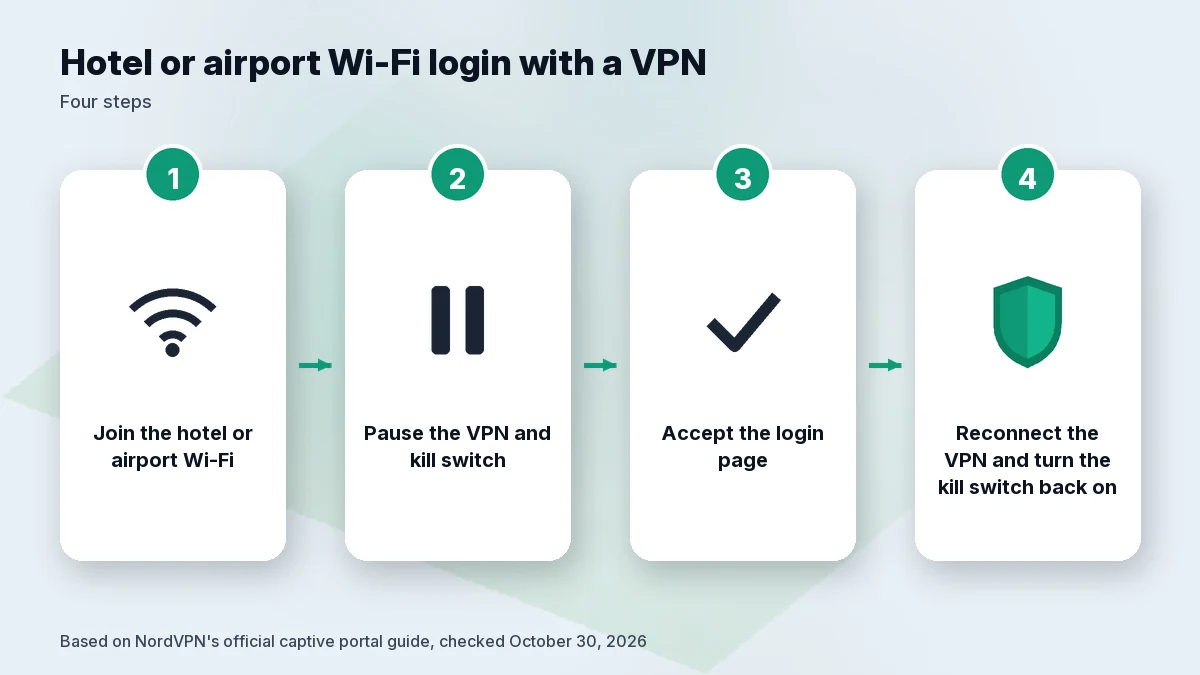
- Captive portals: NordVPN publishes an official guide, “How to log in to a captive portal Wi-Fi network while using NordVPN.” It tells you to temporarily turn off Auto-connect and Kill Switch, complete the login page with the VPN off, then reconnect and turn both back on. If the login page doesn’t appear, it suggests opening a plain HTTP site such as example.com to trigger it.
- Price: Basic is $3.49 a month, $94.23 for the first 27 months, then $139.08 a year. Complete is $107.73 for 27 months, then $219.48 a year. A Black Friday banner was on the pricing page.
- Devices: 10 at once.
- Audit: NordVPN says Deloitte Lithuania issued its sixth no-logs assurance report on December 12, 2025 (ISAE 3000 Revised; NordVPN calls it a point-in-time assessment).
Pick it if you want written, official steps for the exact problem hotel Wi-Fi creates. Skip it if renewal price matters most: $139.08 a year is the highest of the three. Read more in Is NordVPN worth it?.
2. Surfshark: best for many devices on one trip
- Auto-connect: Surfshark’s support article “What is auto-connect” says the app can connect to the VPN as soon as it finds a Wi-Fi or ethernet connection. Its trusted networks feature (support article updated September 11, 2026) is part of Auto-connect: on Windows and macOS you can trust Wi-Fi networks; on iOS and Android, Wi-Fi and mobile networks.
- Kill switch: Surfshark’s official feature page says the kill switch blocks traffic until the VPN connection is restored, and mentions public Wi-Fi as a use case.
- Captive portals: we didn’t find an official Surfshark guide on October 30, 2026. In general, pausing the VPN to accept the login page and reconnecting afterward is the usual approach, but we can’t point you to Surfshark’s own instructions.
- Price: Starter is $2.49 a month, $67.23 for the first 27 months, then $79 a year. The page shows a “Black Friday deal” label without a separate promo price.
- Devices: unlimited, per Surfshark.
- Audit: Surfshark published a Deloitte no-logs assurance on June 16, 2025.
Pick it if you travel with a partner or kids and several phones, tablets and laptops. Skip it if you want official captive portal steps, or prefer not to buy two services from the same group. See best VPN for multiple devices.
3. Proton VPN: best if you want a lower renewal or a free plan
- Kill switch: Proton says its kill switch is available on all free and paid plans, on Windows, macOS, iOS and iPadOS, Android and Linux. Proton’s own page notes limitations on macOS and iOS: some Apple system traffic, such as DNS for Apple services, may travel outside the VPN tunnel.
- Always-on VPN: Proton documents an Always-on VPN mode that reconnects automatically after a drop. On iOS it’s permanently on; on Android you enable it in the system settings.
- Auto-connect per network / captive portals: we found no official Proton page for a per-Wi-Fi auto-connect rule or a captive portal guide on October 30, 2026.
- Price: Plus is $3.49 a month on the 2-year plan, $83.76 for the first 24 months, then $83.88 a year. Proton Free covers 1 device.
- Devices: 10 on Plus.
- Audit: Proton’s no-logs audit page (updated June 16, 2026) says Securitum completed its fifth consecutive annual audit.
Pick it if you want the lower renewal of a 10-device plan, or a free plan for one phone. Skip it if you want the VPN to switch on by itself whenever you join a new Wi-Fi network: Proton documents always-on behavior, not per-network rules. Full details in our Proton VPN review.
Also considered: ExpressVPN
ExpressVPN Basic costs $83.72 for the first 28 months, then $99.95 a year, and covers 10 devices. We didn’t re-check its auto-connect and captive portal documentation on October 30, 2026, so we’re not ranking it here. Our ExpressVPN review covers its apps.
Comparison table
| NordVPN Basic | Surfshark Starter | Proton VPN Plus | |
|---|---|---|---|
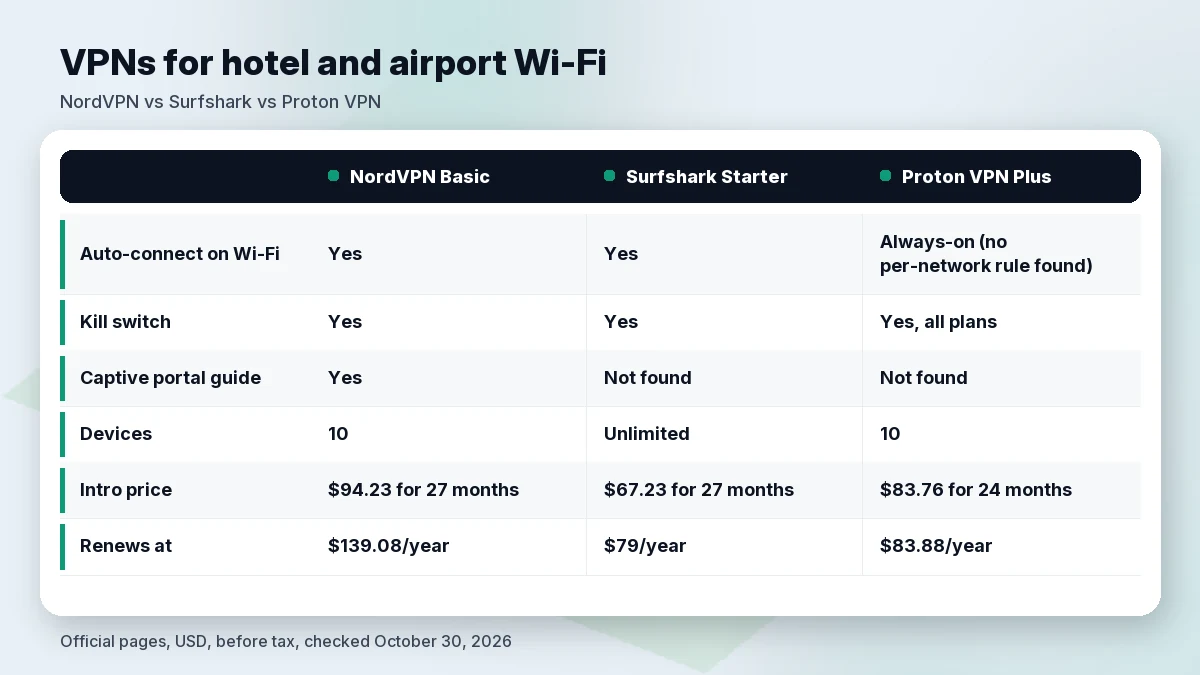
| Auto-connect on Wi-Fi (official doc) | Yes | Yes | Always-on (no per-network rule found) |
| Trusted networks | Yes | Yes (Wi-Fi on Windows/macOS; Wi-Fi + mobile on iOS/Android) | Not found |
| Kill switch (official page) | Yes | Yes | Yes, all plans (macOS/iOS limits noted) |
| Captive portal guide (official) | Yes | Not found | Not found |
| Devices | 10 | Unlimited | 10 (Free: 1) |
| Intro price | $94.23 for 27 months | $67.23 for 27 months | $83.76 for 24 months |
| Renews at | $139.08/year | $79/year | $83.88/year |
| Latest named audit | Deloitte Lithuania, Dec 12, 2025 | Deloitte, June 16, 2025 | Securitum, page updated June 16, 2026 |
Official US pages and support centers, USD, before tax, checked October 30, 2026 (09:18–09:20 BRT). Surfshark’s $79 renewal comes from its renewal-terms page captured the same day at 01:05 BRT. “Not found” means we didn’t find an official page that day, not that the feature can’t exist.
How to set up a VPN before your trip
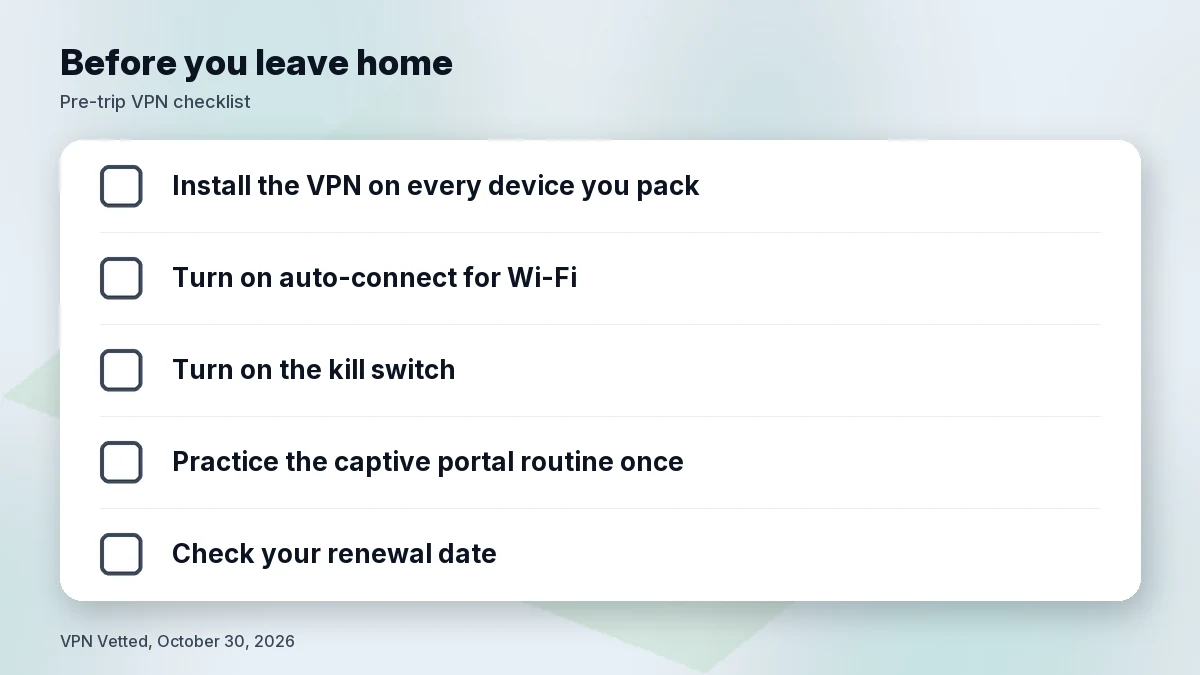
Do this at home, on a network you trust, the day before you leave:
- Install the app on every device you’re taking and sign in. Hotel Wi-Fi is a bad place to reset a password.
- Turn on auto-connect for Wi-Fi (or all networks), and add your home Wi-Fi as a trusted network if the app supports it.
- Turn on the kill switch. Know where the toggle is, because you’ll pause it for captive portals.
- Test the captive portal routine once. Pause the VPN and kill switch, open a site, reconnect, and turn the kill switch back on. On the road it’ll take seconds.
- Check your renewal date so a trip doesn’t coincide with a surprise charge.
If you’re unsure whether VPN use is allowed where you are in the US, our is using a VPN legal in the US explainer covers the basics. For Mac laptops specifically, see best VPN for Mac.
Hotel and airport Wi-Fi habits that help
A VPN is one layer. These habits cover the gaps it leaves:
- Confirm the network name with the front desk or airport signs. Two networks with near-identical names is a warning sign.
- Don’t install anything a login page asks you to install. A real captive portal asks you to accept terms or enter a room number, not to download software.
- Turn off auto-join for public networks on your phone after you leave, so it doesn’t reconnect to “Hotel_Guest” in another city without you noticing.
- Use your phone’s hotspot for sensitive tasks if you have a good cellular signal and the data to spare.
- Log out of shared hotel business-center computers, and don’t use them for banking.
How we evaluated
We read the official pricing pages, feature pages and support centers of NordVPN, Surfshark and Proton VPN on October 30, 2026, between 09:18 and 09:20 BRT, using a US view in USD. NordVPN’s site blocked our plain server request, so we read it through a US browser-style fetch. Surfshark’s renewal table didn’t load that way, so the $79 figure comes from the same official page captured earlier that day (01:05 BRT). We ranked by what each provider documents for auto-connect, kill switch and captive portals, then by devices and renewal price. We did not run our own tests on hotel or airport networks and don’t claim any. Where we couldn’t find an official page, we say so. Audit details are attributed to the company and auditor named, with dates; an audit covers a point in time.
FAQ
What is the best VPN for travelers?
For most travelers, NordVPN, because it officially documents auto-connect, trusted networks and a captive portal routine. Surfshark is the better fit if you carry many devices; Proton VPN if you want a lower renewal or a free plan.
Should I use a VPN on hotel Wi-Fi?
It’s a reasonable precaution. Hotel Wi-Fi is shared with strangers and you can’t check how it’s configured. A VPN encrypts your traffic between your device and the VPN server; it doesn’t protect you from fake login pages or outdated apps.
Why won’t hotel Wi-Fi load with my VPN on?
Most likely a captive portal (the login or “accept terms” page) is blocked by the VPN. NordVPN’s official fix: turn off auto-connect and the kill switch, log in with the VPN off, then reconnect and turn both back on.
Do I need a VPN at the airport?
Airport Wi-Fi is open to everyone at the gate, so the same logic as hotel Wi-Fi applies. Setting auto-connect before you leave means you don’t have to remember at boarding time.
Can I use one VPN on my phone, laptop and tablet?
Yes. NordVPN and Proton VPN Plus cover 10 devices at once; Surfshark says its plans cover unlimited devices.
Is there a free VPN for travelers?
Proton Free covers 1 device and, per Proton, includes the kill switch. Paid plans add more devices. See our best free VPN guide for the trade-offs.
Verdict
If you want the fewest surprises at the hotel front desk, NordVPN has the most complete official documentation for auto-connect and captive portals, at the highest renewal price ($139.08 a year). Surfshark suits travelers carrying many devices and renews for less ($79 a year). Proton VPN suits travelers who want a lower renewal on a 10-device plan or a free option, as long as you’re fine turning the VPN on yourself or using Always-on. Set it up at home before you go.
Check NordVPN price · Check Surfshark price
Sources (official pages, checked on October 30, 2026)
- NordVPN, pricing (US/USD): nordvpn.com/pricing (~09:19 BRT)
- NordVPN, captive portal guide: support.nordvpn.com (article 48557553837969) (~09:20 BRT)
- NordVPN, auto-connect: support.nordvpn.com (article 38467188541201) (~09:20 BRT)
- NordVPN, Trusted Network: support.nordvpn.com (article 19645837296913) (~09:20 BRT)
- NordVPN, sixth no-logs assurance (report issued December 12, 2025): nordvpn.com/blog/nordvpn-no-logs-assurance-engagement-2025 (~09:20 BRT)
- Surfshark, pricing (US/USD): surfshark.com/pricing (~09:19 BRT)
- Surfshark, renewal prices: surfshark.com/terms-of-service/pricing (table captured ~01:05 BRT; page re-read ~09:20 BRT)
- Surfshark, kill switch: surfshark.com/features/kill-switch (~09:19 BRT)
- Surfshark, what is auto-connect: support.surfshark.com (article 6628420453778) (~09:20 BRT)
- Surfshark, trusted networks (updated September 11, 2026): support.surfshark.com (article 4404292160786) (~09:20 BRT)
- Surfshark, Deloitte no-logs assurance (June 16, 2025): surfshark.com/blog/surfshark-audit (~09:18 BRT)
- Proton VPN, pricing (US/USD): protonvpn.com/pricing (~09:18 BRT)
- Proton VPN, kill switch: protonvpn.com/support/what-is-kill-switch (~09:20 BRT)
- Proton VPN, Always-on VPN: protonvpn.com/support/always-on-vpn (~09:20 BRT)
- Proton VPN, no-logs audit (updated June 16, 2026): protonvpn.com/blog/no-logs-audit (~09:18 BRT)
- ExpressVPN, order page (US/USD): expressvpn.com/order (~09:19 BRT)