

Affiliate disclosure: VPN Vetted is reader-supported. Some links below are affiliate links (marked “sponsored”): if you buy through them we may earn a commission at no extra cost to you. Our NordVPN and Surfshark links are affiliate links. Our PureVPN link is a plain link, not an affiliate link: we don’t earn anything if you buy PureVPN. We rank by published features, documentation and price, not by what we earn. NordVPN and Surfshark both belong to Nord Security (Surfshark’s merger announcement); the two brands say they operate independently. PureVPN is a separate company. We hold all of them to the same criteria.
Prices and features checked October 25, 2026, between 01:08 and 01:12 BRT, on the official US pages, in USD, before sales tax. NordVPN’s location list and PureVPN’s prices were re-read the same night, between 01:35 and 01:37 BRT.
Short answer: most people don’t need a dedicated IP. You need one when something on the other end only trusts a fixed address: a company server with an IP allowlist, a remote desktop you lock down by IP, or an account that keeps flagging shared VPN addresses. Our pick is NordVPN (one dedicated IP on up to 10 devices over OpenVPN). Surfshark has the clearest published price (from $3.75/mo, renewing at $45/year). PureVPN suits you if you also want port forwarding.
What a dedicated IP is (and the privacy trade-off)
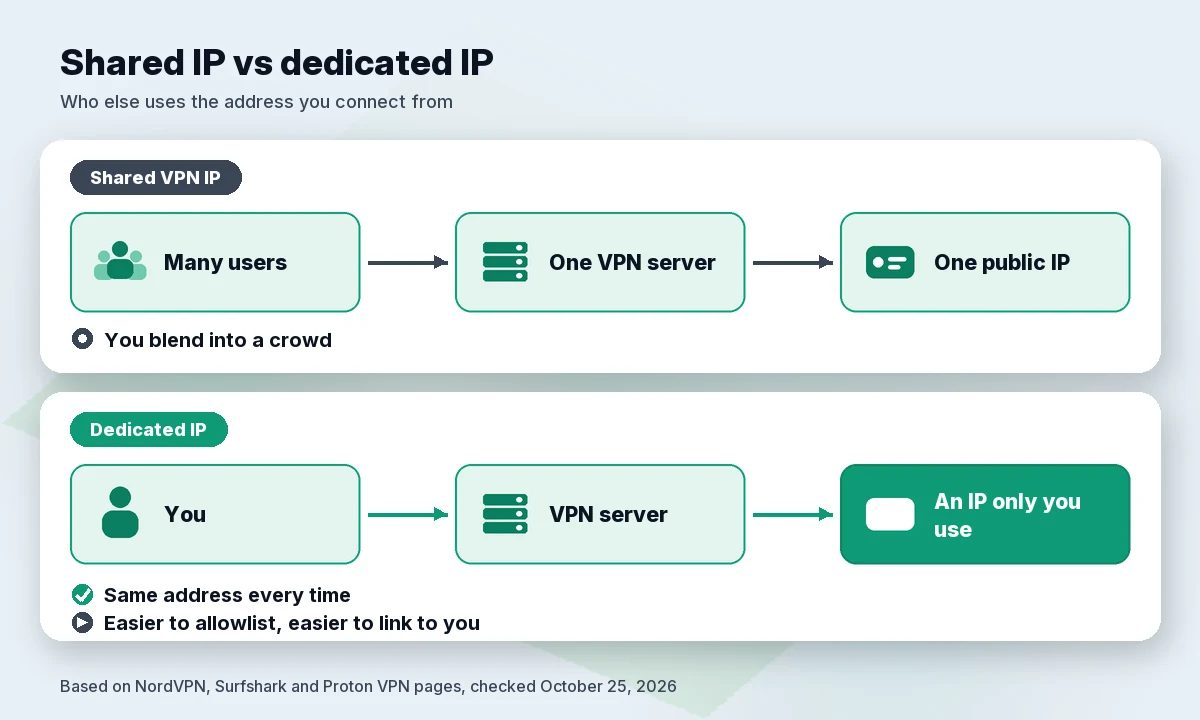
On a normal VPN server, you share one public IP address with everyone else connected to it. Websites can’t easily tell users apart, and that crowd is a big part of a VPN’s privacy.
A dedicated IP flips that: one address that only you use, every time you connect. The providers are upfront about the cost:
- NordVPN: “because a dedicated IP is tied only to you, it’s easier to link specific online activity to a single user.”
- Surfshark: a dedicated IP “may offer less privacy than with a shared IP.”
- Proton VPN (business support page): a dedicated address “belongs to your company and your company alone. This makes it less private than using a regular Proton VPN server.”
Two myths, cleared up by the providers themselves: NordVPN says “No, a dedicated IP isn’t faster,” and PureVPN agrees it “doesn’t increase raw speed.” NordVPN also notes that websites “can still detect a dedicated IP as coming from a VPN.”
What it’s good for:
- IP allowlisting. Many business systems, cloud admin panels and private servers only accept logins from approved addresses. A fixed VPN IP can go on that list, and you still get an encrypted tunnel on hotel or café Wi-Fi.
- Fewer CAPTCHAs. Shared addresses can pick up a bad reputation from other users; yours won’t.
- A consistent login location. Banks and work accounts sometimes add friction when your IP changes on every connection. A dedicated IP keeps it the same.
Comparison table: add-on price and locations
| NordVPN | Surfshark | PureVPN | |
|---|---|---|---|
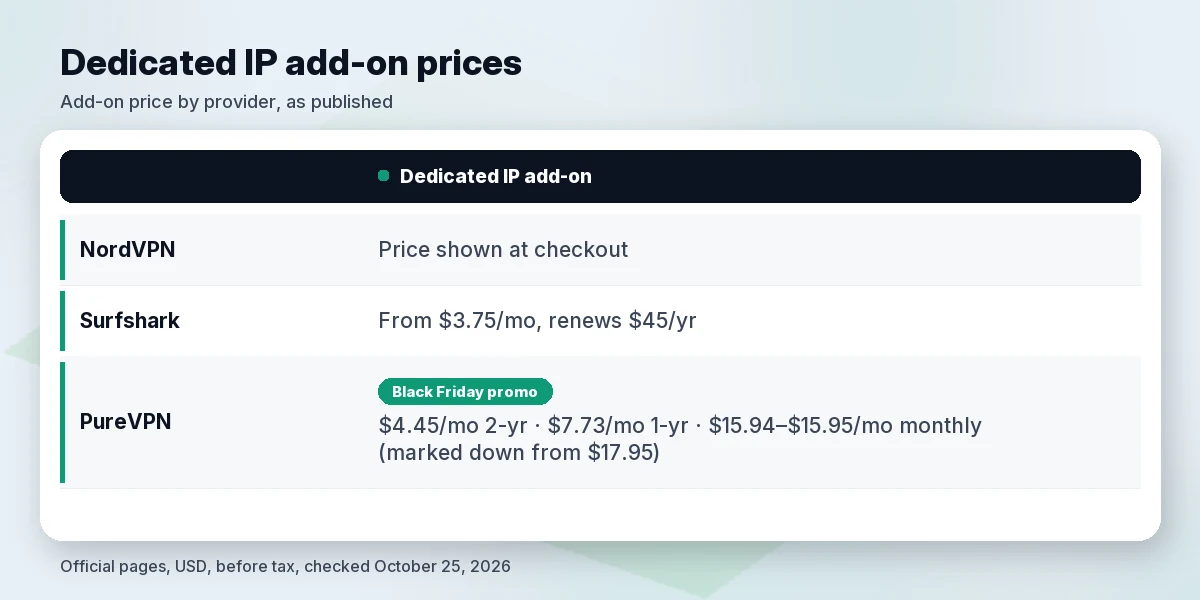
| Dedicated IP price | Shown at checkout (not on the pages we checked) | From $3.75/mo; renews at $45.00/year | Black Friday promo prices, marked down from $17.95/mo: $4.45/mo (2-year), $7.73/mo (1-year), $15.94–$15.95/mo (monthly). Add-on renewal price not published on the pages we checked |
| Base VPN, longest plan | Basic $94.23 for 27 months, then $139.08/year | Starter $67.23 for 27 months, then $79.00/year | Standard $101.55 for 5 years (Black Friday deal: $1.69/mo, marked down from $12.95/mo) |
| Locations listed | 46 cities in 30 countries (page counted October 25, 2026), incl. 11 US cities, 3 in Canada, Mexico City | 15 cities listed (its FAQ says 20), incl. Dallas, New York, San Jose, London, Frankfurt, Sydney | “US, UK, Singapore, Germany, and others” |
| Devices per dedicated IP | Up to 10 at once on OpenVPN; 1 at a time on NordLynx | Multiple devices; “unlimited connections” | 1 (Dedicated IP); 5 on its Dedicated Server product |
| Change location later? | Pick country and city in Nord Account at setup | No, location can’t be changed after purchase | No, “fixed once assigned” |
| Money-back guarantee | 30 days | 30 days | 31 days |
| Link | Check NordVPN price | Check Surfshark price | Visit PureVPN |
Base VPN prices are first-term prices on the official pricing pages. Add-on prices are on top of a VPN plan unless the provider says otherwise. PureVPN’s prices are promotional (its pages carry a Black Friday banner) and can end at any time.
Best VPNs with a dedicated IP
1. NordVPN: best for using one IP on several devices
NordVPN sells its dedicated IP as an “Add at checkout” option on all three plans (Basic, Complete and Prime). After you buy it, you pick a country and city in your Nord Account. The pricing and feature pages we checked don’t show the add-on price, and the only figure on the feature page is a general “$2-5 per month range” for the market, not a NordVPN quote. We won’t guess: check the line item at checkout before you pay.
What sets it apart is device use. NordVPN says you can “use the same dedicated IP on up to 10 devices at once if you connect via OpenVPN (TCP or UDP).” With its own NordLynx protocol it’s one device at a time, and dedicated IPs “aren’t available on tvOS, browser extensions, or with the IKEv2 protocol.”
NordVPN’s dedicated IP page lists 46 cities in 30 countries (we counted it on October 25, 2026, at 01:35 BRT): 15 in the Americas (11 US cities, including New York, Chicago, Dallas and Los Angeles, three Canadian cities and Mexico City), 22 in Europe, 7 in Asia-Pacific, plus Johannesburg and Istanbul. That is roughly three times the 15 Surfshark lists.
Base plans: Basic is $94.23 for the first 27 months ($3.49/mo), then $139.08 a year. All plans cover 10 devices with a 30-day money-back guarantee.
- Pros: works on up to 10 devices over OpenVPN; 46 cities in 30 countries; you choose the city yourself.
- Cons: add-on price not published on the pages we checked; not on IKEv2, tvOS or browser extensions; one device at a time on NordLynx.
2. Surfshark: best published price
Surfshark is the easiest to budget for. Its dedicated IP page says “From $3.75 /mo,” and the official renewal table lists the add-on at $3.75 for 1 month and $45.00 for a year, with 2-year add-ons renewing on a 1-year term. It’s available on every Surfshark VPN plan, and you can have one dedicated IP per subscription.
The page lists 15 locations, including London, Frankfurt, Amsterdam, Toronto, New York, Dallas, San Jose, Sao Paulo and Sydney. (The same page’s FAQ says “one of 20 locations”; we only list the 15 shown, as of October 25, 2026.) It works over WireGuard, IKEv2 and OpenVPN, on Windows, macOS, Android, iOS, Linux, Apple TV and the browser extensions, and Surfshark offers config files for manual setup.
The catch: you can’t change the location after you buy it, so pick the city closest to the servers you’ll log in to. Starter costs $67.23 for the first 27 months, then $79.00 a year, with unlimited devices.
- Pros: clear price and renewal; all three main protocols; unlimited devices on the base plan.
- Cons: location is locked after purchase; one dedicated IP per subscription; page and FAQ disagree on the location count.
3. PureVPN: best if you also need port forwarding
PureVPN publishes the most price points, but they are promotional. On October 25, 2026, its pages carried a Black Friday banner, and its dedicated IP page showed each option marked down from $17.95/mo: $4.45/mo on the 2-year option (75% off), $7.73/mo on the 1-year option (57% off) and $15.94–$15.95/mo monthly (the page shows both: $15.94 on the monthly tile and $15.95 in the FAQ). PureVPN does not publish a renewal price for the dedicated IP add-on on the pages we checked, so expect the price to change when the promotion or your term ends. The page sells this as “a PureVPN plan with the Dedicated IP,” so confirm at checkout what the total covers.
Locations are described as “the US, UK, Singapore, Germany, and others.” A Dedicated IP is for one device; PureVPN’s separate Dedicated Server product allows 5. Like Surfshark, the address is “fixed once assigned,” and you’d add a new one to change location.
PureVPN also sells port forwarding as an add-on; its order page shows a “Dedicated IP + Port Forwarding” option. Base plans start at $1.69/mo on the 5-year Standard plan, a Black Friday deal marked down from $12.95/mo (87% off) and billed $101.55 up front, with a 31-day money-back guarantee and up to 10 devices per account. For that base plan, PureVPN’s order page says “Renews at $1.69/mo after 60 months,” but its separate renewal-price page says subscriptions “renew automatically at full price” and has no 5-year row, so confirm the renewal rate before you pay.
- Pros: several published price points; port forwarding add-on available; 31-day refund window.
- Cons: one device per dedicated IP; vague location list; the lowest prices are Black Friday promos on long (2-year and 5-year) terms, and the add-on renewal price isn’t published.
What about Proton VPN?
Its support page offers dedicated IPs only through Proton VPN for Business, where companies can lease as many as they like. For personal plans, see our Proton VPN review.
Dedicated IP vs port forwarding
These two get mixed up, but they solve different problems.
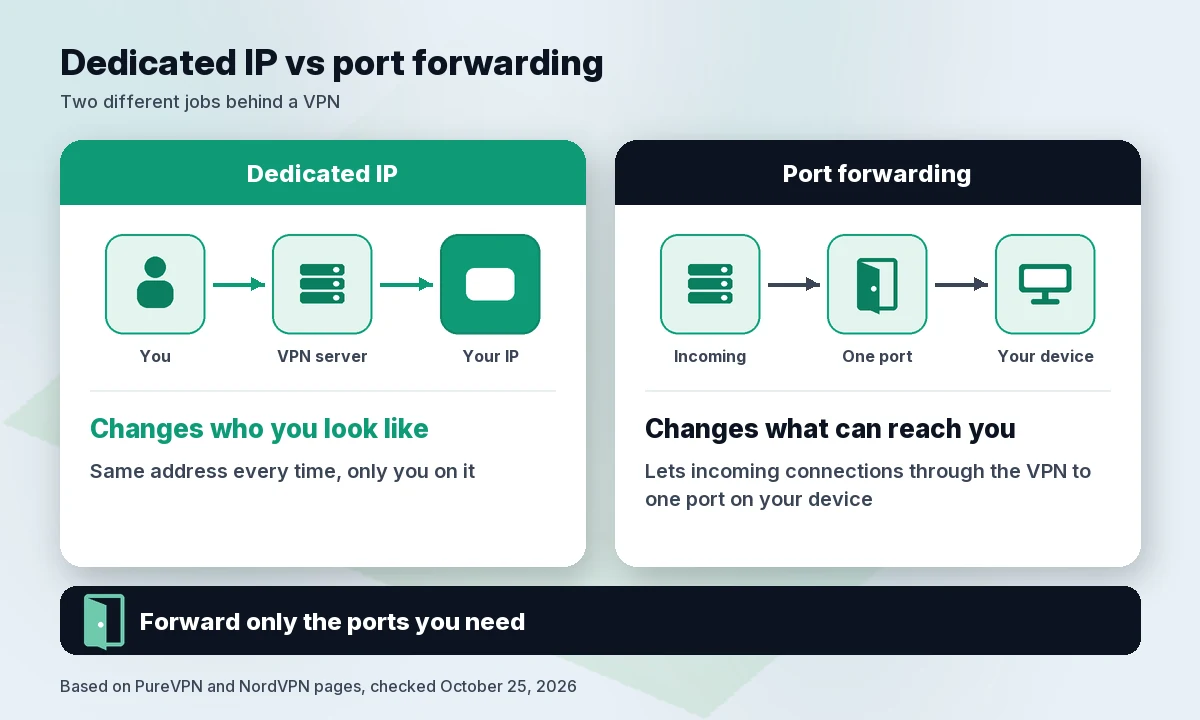
- A dedicated IP changes who you look like to the outside: always the same address, and only you on it.
- Port forwarding changes what can reach you: it lets incoming connections through the VPN to a specific port on your device. PureVPN describes it as a way to “access an internet-connected device/service from anywhere,” such as your own PC, server or remote desktop.
You might want both for a self-hosted app or remote access to a home machine. Opening ports also opens a door, so forward only what you need. For logging in to work tools, a dedicated IP alone is enough.
Who should skip it
Skip the add-on if you mainly use a VPN to protect yourself on public Wi-Fi, keep your ISP out of your browsing or stop trackers from tying your activity to your home IP. Shared IPs are better for that. NordVPN’s own page says that “for everyday browsing, shopping, or gaming, a regular VPN connection is just enough.”
For everyday protection, see our guides to the best VPN for public Wi-Fi, the best VPN for multiple devices and the best VPN for router. Our gaming VPN guide is publishing soon.
How we evaluated
We didn’t run lab tests. We compared what each provider officially publishes (checked October 25, 2026, 01:08–01:12 BRT; NordVPN’s locations and PureVPN’s prices re-read at 01:35–01:37 BRT):
- Price transparency: is the add-on price shown before checkout, and is the renewal price published?
- Device rules: how many devices can use one dedicated IP, and on which protocols.
- Locations: the cities and countries listed on the official page.
- Flexibility: can you choose or change the location, and how setup works.
- Privacy honesty: whether the provider explains the trade-off of an IP tied to one user.
- Base plan value: first-term and renewal price of the VPN plan you need underneath.
Prices are USD before sales tax; promotions change often, and PureVPN’s Black Friday prices can end at any time.
FAQ
What is a dedicated IP VPN?
It’s a VPN subscription with an extra IP address that only you use. Every time you connect to it, websites and services see the same address. Normal VPN servers give you a shared address that many users have at once.
Is a dedicated IP less private?
Yes, a bit. NordVPN says an IP tied only to you makes it “easier to link specific online activity to a single user,” and Surfshark says it “may offer less privacy than with a shared IP.” Your traffic is still encrypted, but you lose the crowd. You can switch back to a shared server when you don’t need the fixed address.
How much does a dedicated IP cost?
On the official pages we checked on October 25, 2026: Surfshark from $3.75/mo, renewing at $45.00/year; PureVPN, in its Black Friday promotion, $4.45/mo on its 2-year option (marked down from $17.95/mo), $7.73/mo on 1-year and $15.94–$15.95/mo monthly, with no add-on renewal price published; NordVPN shows its price at checkout. You also need a base VPN plan, which starts at $67.23 for 27 months at Surfshark and $94.23 for 27 months at NordVPN.
Static IP vs dedicated IP: same thing?
Close, but not always. “Static” means the address doesn’t change. “Dedicated” means nobody else uses it. VPN dedicated IPs are both. A shared server address can change, since providers retire servers.
Verdict
NordVPN is our pick for most people who need a dedicated IP: one address on up to 10 devices over OpenVPN and you choose the city. Check the add-on price at checkout. Choose Surfshark if you want a clear, published price (from $3.75/mo, then $45/year) and unlimited devices on the base plan. Choose PureVPN if you also need port forwarding. If you don’t have an allowlist or a login problem to solve, skip the add-on and keep the privacy of a shared IP.
Check NordVPN price · Check Surfshark price
Sources (official pages, checked on October 25, 2026)
- NordVPN pricing (US/USD): https://nordvpn.com/pricing/ (~01:09 BRT)
- NordVPN dedicated IP: https://nordvpn.com/features/dedicated-ip/ (~01:09 BRT; locations re-counted ~01:35 BRT)
- Surfshark pricing: https://surfshark.com/pricing (~01:09 BRT)
- Surfshark renewal prices: https://surfshark.com/terms-of-service/pricing (~01:10 BRT)
- Surfshark dedicated IP: https://surfshark.com/dedicated-ip (~01:09 BRT; re-read ~01:37 BRT: 15 locations listed, FAQ says 20)
- Surfshark and Nord Security merger: https://surfshark.com/blog/surfshark-merges-with-nord-security
- PureVPN dedicated IP: https://www.purevpn.com/dedicated-ip (~01:09 BRT; re-read ~01:36 BRT)
- PureVPN order page: https://www.purevpn.com/order (~01:09 BRT; re-read ~01:36 BRT)
- PureVPN renewal prices: https://www.purevpn.com/subscription-renewal-plan (~01:36 BRT)
- PureVPN port forwarding: https://www.purevpn.com/port-forwarding (~01:11 BRT)
- Proton VPN Support, dedicated IPs for business: https://protonvpn.com/support/dedicated-ips (~01:11 BRT)