

Affiliate disclosure: VPN Vetted is reader-supported. Some links below are affiliate links (marked “sponsored”): if you buy through them we may earn a commission at no extra cost to you. We rank by published prices, Windows support, kill switch, split tunneling and audits, never by commission. NordVPN and Surfshark both belong to Nord Security (the two companies merged in 2022), so two of our three picks share an owner. ExpressVPN and PIA, mentioned as alternatives, belong to Kape.
Prices checked November 1, 2026, between 01:02 and 01:05 BRT, on the official US pages, in USD, before sales tax or VAT. NordVPN’s and Surfshark’s pricing pages showed Black Friday offers that day, so their intro prices are promotional and may change.
For most Windows 10 and 11 users, Proton VPN, NordVPN and Surfshark cover what matters on a PC: apps for x64 and ARM64 processors, a kill switch, split tunneling and a published renewal price. They differ on renewal cost and device limits. We compare them using only what each company states on its own pages, and we name the gaps.
Quick answer
- Best renewal value and the only kill switch documented to work with split tunneling on Windows: Proton VPN. Plus is $83.76 for the first 24 months, then $83.88 every 12 months, for 10 devices. Split tunneling is a paid feature.
- Most detailed Windows feature list: NordVPN. x64 and ARM64, Kill Switch, split tunneling by app or URL, auto-connect on unknown Wi-Fi. Highest renewal: $139.08 a year.
- Lowest first-term price and no device cap: Surfshark. Starter is $67.23 for the first 27 months, then $79 a year, per its renewal terms page.
What to look for in a Windows VPN
Windows version and x64 vs ARM64
Windows PCs ship with x64 (Intel and AMD) or ARM64 processors (for example Surface Pro models and Copilot+ PCs), and an app built for one may not install on the other. All three picks offer both builds. To see which you have, open Settings > System > About and read “System type”.
Version support differs. NordVPN’s page says its app is “available on Windows 10 (64-bit) or Windows 11,” and that its Windows 7, 8.1 and 32-bit apps “no longer receive feature and security updates.” Surfshark’s page lists Windows 10 and 11 on x64 and ARM64, plus a legacy app for Windows 7, Windows 8 and x86. Proton’s Windows download page offers x64 and ARM64 builds but did not state a minimum Windows version when we read it.
Kill switch
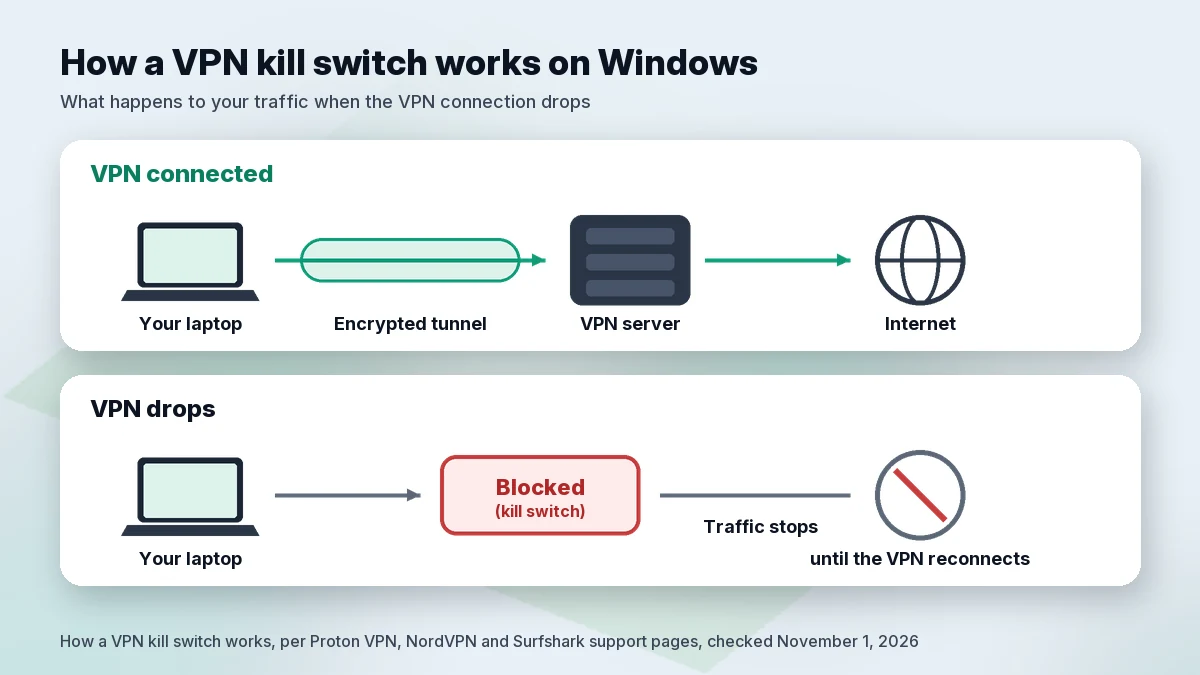
A kill switch blocks internet traffic if the VPN connection drops, so your real IP address is not exposed while the app reconnects. Proton describes two modes on Windows: a standard kill switch that acts only when the connection drops by accident, and an advanced kill switch that “only allows internet access when connected to Proton VPN” and stays active after a restart.
Split tunneling
Split tunneling lets chosen apps or sites skip the VPN, for example a local printer tool. Anything outside the tunnel is not protected by the VPN. On Windows, check whether split tunneling and the kill switch work together. Proton says that on most platforms they do not, but on Windows “you can use either the Advanced or Standard kill switch with split tunneling.” NordVPN’s and Surfshark’s Windows pages list both features but do not say how they interact.
Auto-connect
A VPN you forget to turn on protects nothing. NordVPN’s Windows page lists automatic connection rules, “like connecting whenever you join unknown Wi-Fi networks or starting NordVPN when Windows boots up.” Surfshark’s page says you can set the app to launch and connect on startup. Proton’s Windows page lists “Always-on VPN & Kill switch”; we did not find a per-network Wi-Fi rule described there, so check the app’s settings.
Device limit and renewal price
NordVPN and Proton VPN Plus allow 10 devices; Surfshark sets no cap. The bigger cost difference shows up at renewal (see the table).
Windows built-in VPN client vs a VPN app
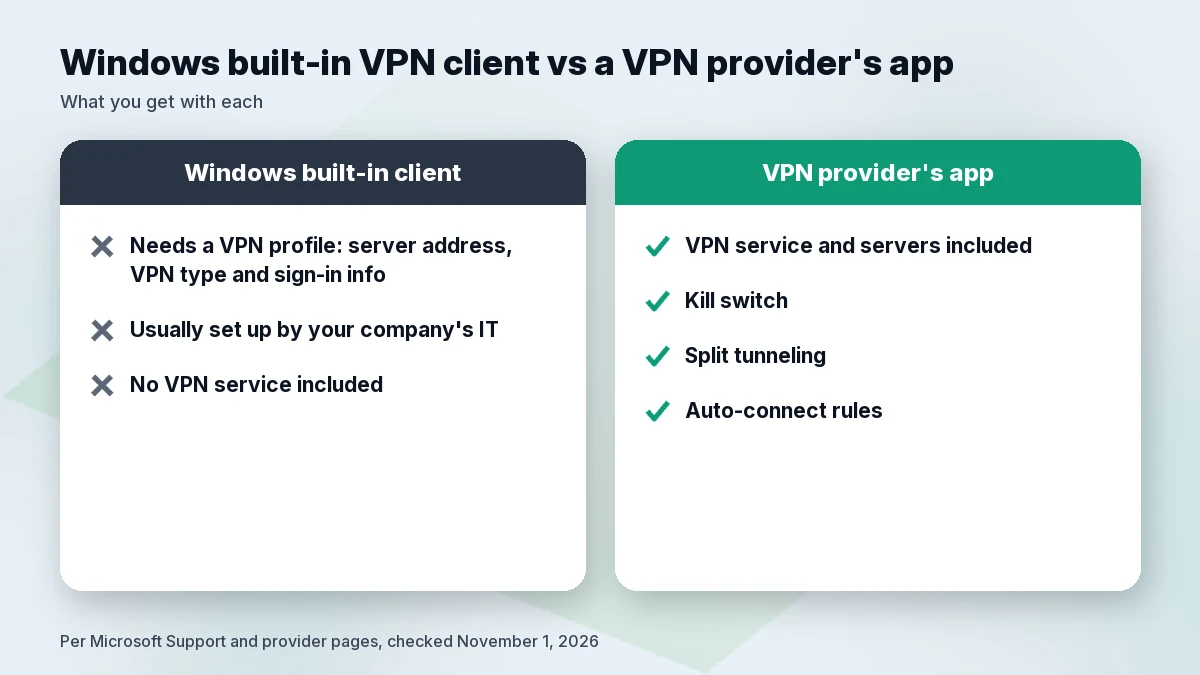
Windows 10 and 11 include a VPN client, but not a VPN service. Microsoft’s support page says you first need a VPN profile: a server address, a connection type and sign-in details entered under Settings > Network & internet > VPN > Add VPN, with “Windows (built-in)” as the provider. For work, Microsoft says to check your company’s intranet or contact your company’s support person. So the built-in client suits a connection your IT team has configured; a provider’s app adds servers, a kill switch, split tunneling and auto-connect rules.
Comparison table
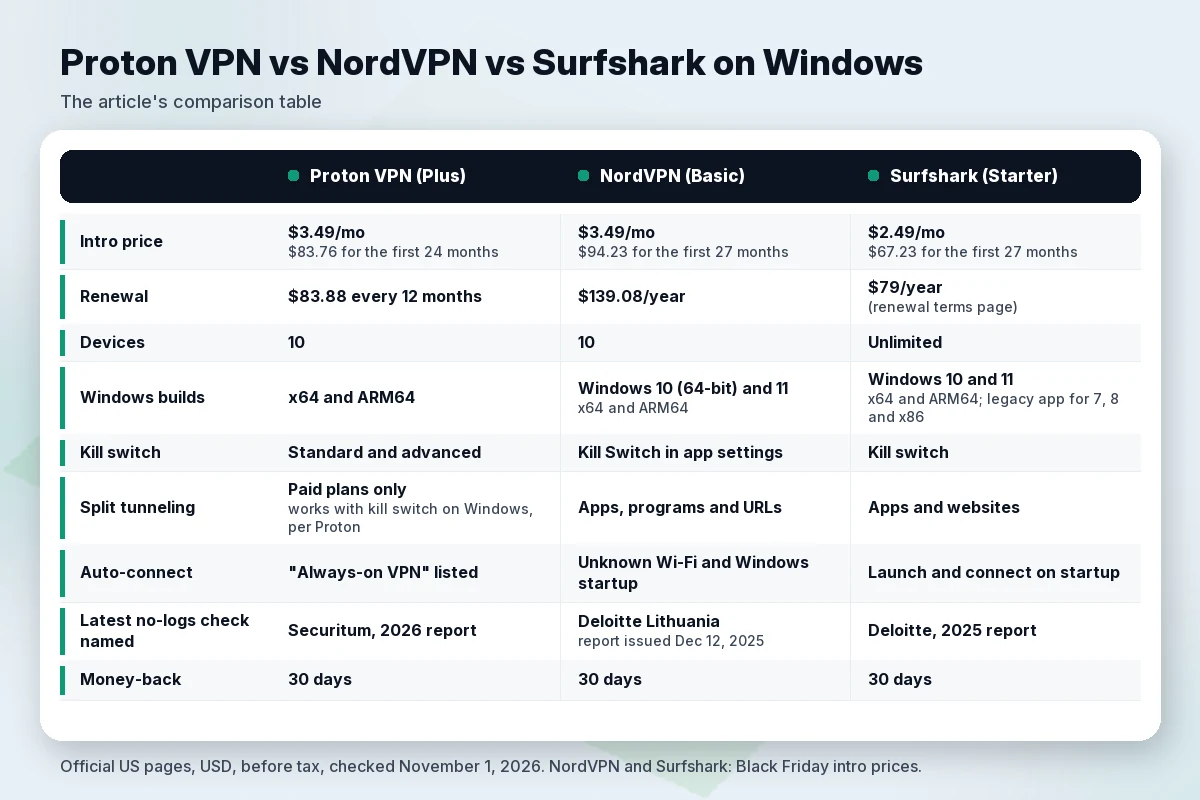
| Proton VPN (Plus) | NordVPN (Basic) | Surfshark (Starter) | |
|---|---|---|---|
| Intro price | $3.49/mo; $83.76 for the first 24 months | $3.49/mo; $94.23 for the first 27 months | $2.49/mo; $67.23 for the first 27 months |
| Renewal | $83.88 every 12 months | $139.08/year | $79/year (renewal terms page) |
| Devices | 10 | 10 | Unlimited |
| Windows builds | x64 and ARM64 | Windows 10 (64-bit) and 11; x64 and ARM64 | Windows 10 and 11; x64 and ARM64; legacy app for 7, 8 and x86 |
| Kill switch | Standard and advanced | Kill Switch in app settings | Kill switch |
| Split tunneling | Paid plans only; works with kill switch on Windows, per Proton | Apps, programs and URLs | Apps and websites |
| Auto-connect | “Always-on VPN” listed | Unknown Wi-Fi and Windows startup | Launch and connect on startup |
| Latest no-logs check named | Securitum, 2026 report | Deloitte Lithuania, report issued Dec 12, 2025 | Deloitte, 2025 report |
| Money-back | 30 days | 30 days | 30 days |
Check Proton price Check NordVPN price Check Surfshark price
Our arithmetic on the intro deals: the first 12 months work out to about $29.88 on Surfshark and about $41.88 on both Proton Plus and NordVPN Basic. At renewal, Surfshark’s $79 is about 2.6 times that first-year rate, Proton’s $83.88 about 2.0 times and NordVPN’s $139.08 about 3.3 times. For other low-cost options, see our best cheap VPN guide.
Proton VPN for Windows
Facts from Proton’s pages: VPN Plus costs $3.49 a month on the 2-year plan, “billed at $83.76 for the first 24 months, then renews at $83.88 every 12 months,” for up to 10 devices. The Windows download page offers x64 and ARM64 builds and says the ARM version supports devices such as the Surface Laptop, Surface Pro, Samsung Galaxy Book S, Lenovo Flex 5G, HP Elite Folio and Acer Spin 7, with “all advanced features from our regular Windows app.” The page labels the kill switch and DNS and IPv6 leak protection as free features, and split tunneling (include or exclude apps, IP addresses and websites) as premium. Proton’s support pages say both kill switch modes work with split tunneling on Windows.
Audits: Proton says Securitum has audited its no-logs policy for a fifth consecutive year, and the latest report is from 2026. The article was last updated June 16, 2026. We cite the year because the page does not give the report’s exact date.
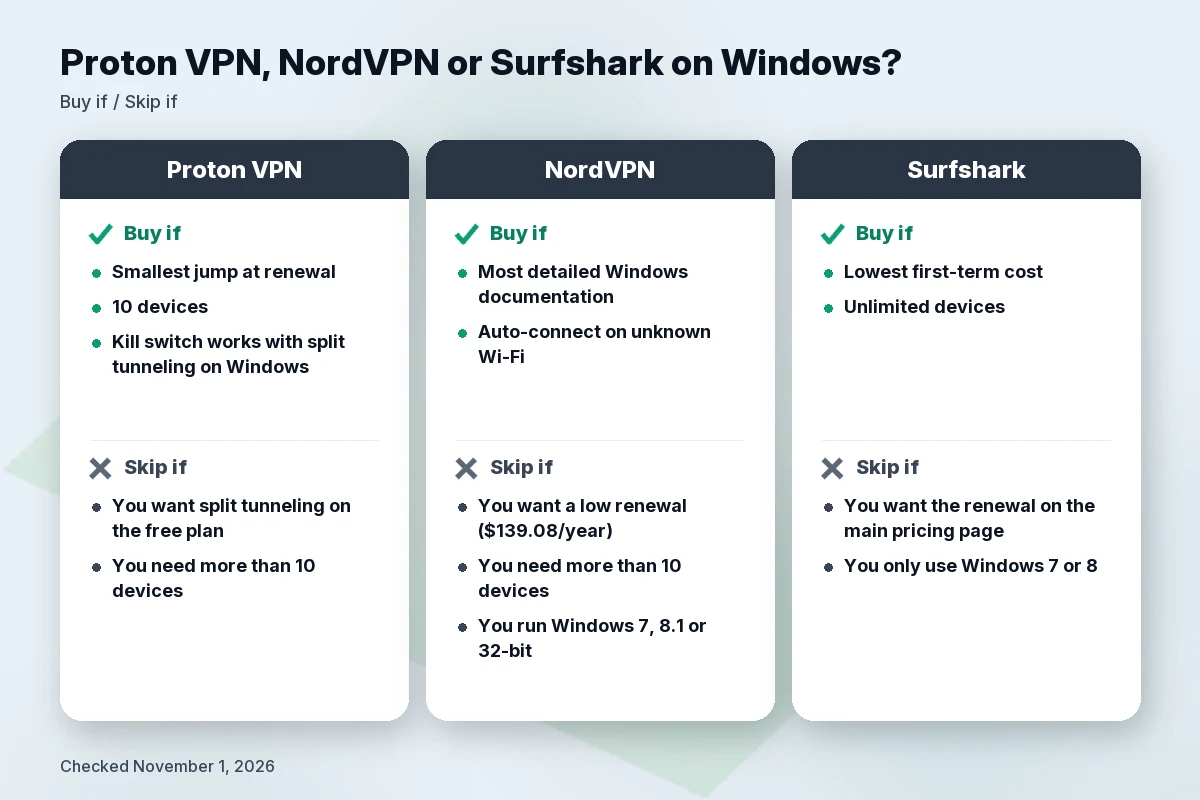
- Buy if you want the smallest jump at renewal, 10 devices and a kill switch that Proton documents as working alongside split tunneling on Windows.
- Skip if you want split tunneling on the free plan (it is premium) or you need more than 10 devices at once.
For more detail, read our Proton VPN review or compare it in NordVPN vs Proton VPN.
NordVPN for Windows
Facts from NordVPN’s pages: Basic costs $3.49 a month, “$94.23 for the first 27 months,” then “renews at $139.08/year,” for up to 10 devices. The Windows page says the app runs on Windows 10 (64-bit) and Windows 11, with x64 and ARM64 versions, and lists the Surface Pro series, HP Elite Folio, Lenovo Yoga 5G and Samsung Galaxy Book S among ARM devices. Listed features include a Kill Switch you enable in the app settings, IP and DNS leak protection, the OpenVPN, NordLynx and NordWhisper protocols, split tunneling for apps, programs and URLs, and the auto-connect rules described above.
Audits: NordVPN says Deloitte Lithuania carried out its sixth no-logs assurance engagement between November 10 and December 12, 2025, under ISAE 3000 (Revised), with the final report issued December 12, 2025. Nord says the full report is available to logged-in users only.
- Buy if you want the most detailed Windows documentation, including auto-connect on unknown Wi-Fi, and accept a higher renewal.
- Skip if you want a low renewal ($139.08 a year on Basic) or need more than 10 devices. Also skip if you still run Windows 7, 8.1 or 32-bit Windows, since those apps no longer get updates.
Is the price worth it? See is NordVPN worth it.
Surfshark for Windows
Facts from Surfshark’s pages: Starter costs $2.49 a month, “$67.23 for the first 27 months (VAT may apply),” with unlimited devices. The pricing page itself does not show the renewal amount; Surfshark’s separate renewal terms page lists $79.00 for the 2-year Starter plan, renewing for a 1-year term. That page says A/B price tests may affect the displayed renewal price, and that Surfshark emails you 30 days before renewal (except monthly plans). The Windows page lists the WireGuard, OpenVPN and IKEv2 protocols, a kill switch, split tunneling for chosen apps or sites, DNS, WebRTC and IPv6 leak protection, and launch-on-startup auto-connect.
Audits: Surfshark’s Trust Center lists Deloitte no-logs reports from 2025 and 2023, a 2025 SecuRing security assessment that covered its desktop apps among others, and a 2026 Cure53 audit of its infrastructure and its new Dausos protocol.
- Buy if you want the lowest first-term cost and one subscription for every device in the house.
- Skip if you want the renewal shown on the main pricing page (it is on a separate terms page) or you only use Windows 7 or 8 and want the current app, not a legacy one.
Surfshark and NordVPN share an owner; see NordVPN vs Surfshark and Surfshark vs Proton VPN.
Alternatives worth a look
- ExpressVPN. Its Windows page says the app works on Windows 10 and 11 (64-bit), including ARM-based PCs such as Copilot+ PCs, and lists a kill switch, split tunneling and rules that connect or disconnect by Wi-Fi network. Basic shows $74.85 for the first 15 months, then $99.95 a year, for 10 devices. Its Trust Center lists an April 2024 audit of its Windows app that confirmed remediation of a DNS issue related to split tunneling. ExpressVPN is owned by Kape. Details in our ExpressVPN review and Surfshark vs ExpressVPN.
- Private Internet Access (PIA). Also owned by Kape. See our PIA VPN review for its pricing and device policy.
Audits and privacy: what the reports cover
All three cite independent no-logs reviews, and we did not review the full reports ourselves. Proton publishes its Securitum reports; NordVPN’s Deloitte report sits behind a Nord Account login; Surfshark says its Deloitte report is in users’ accounts. These reviews describe servers and processes at a point in time. They do not test the Windows app on your PC.
A VPN also does not stop a phishing page, a malicious download or a reused password. Keep Windows Update on. If you work on public networks, see our best VPN for public Wi-Fi guide.
How we evaluated
We did not install or run these apps for this guide, and we publish no speed numbers. On November 1, 2026, we read each company’s official US pricing, Windows download, support and audit pages, plus Microsoft’s support page on Windows VPN connections, and recorded the time of each reading. We compared the same fields for every provider: intro and renewal price, devices, Windows versions and processor builds, kill switch, split tunneling, auto-connect and named audits. Where a page did not answer a question, we say so. Audit conclusions are each company’s description of reports we did not audit ourselves.
FAQ
What is the best VPN for Windows 11?
It depends on your priority: Proton VPN for the smallest renewal increase, NordVPN for the most detailed Windows feature list, Surfshark for the lowest first-term price and no device cap. All three offer Windows 11 apps for x64 and ARM64.
Does Windows have a built-in VPN?
Windows 10 and 11 include a VPN client, not a VPN service. Microsoft says you need a VPN profile, created yourself or provided by your company.
Do these VPNs work on ARM laptops and Copilot+ PCs?
Proton VPN, NordVPN and Surfshark each list an ARM64 build for Windows. NordVPN notes that its next-gen antivirus, part of a higher plan, is not on ARM yet. ExpressVPN also has an app for ARM-based PCs such as Copilot+ PCs.
Should I keep the kill switch on?
On a laptop that changes networks, yes. The cost is being offline until the VPN reconnects.
Is split tunneling safe?
It is a trade-off: excluded apps go out without the VPN, so exclude only what you trust. Proton says its kill switch works with split tunneling on Windows; NordVPN’s and Surfshark’s Windows pages do not say.
Will a VPN slow down my Windows PC?
It can. NordVPN’s Windows page says a VPN may cause a small dip in internet speed because traffic takes an extra hop. We ran no speed tests, so try it on your own connection during the 30-day money-back window that all three list.
Is there a good free VPN for Windows?
Proton VPN Free costs nothing and covers 1 device at “Medium” speed, with servers in 10 randomly selected countries, per Proton’s pricing page. Split tunneling is not included on the free plan. See our best free VPN guide for the trade-offs.
Can I use a VPN on Windows 7 or 8.1?
NordVPN says its Windows 7, 8.1 and 32-bit apps no longer receive feature and security updates. Surfshark lists a legacy app for Windows 7, Windows 8 and x86.
How many PCs can I protect with one subscription?
NordVPN Basic and Proton VPN Plus allow 10 devices; Surfshark lists unlimited devices. For a household, see best VPN for multiple devices.
How much will I pay after the first term?
Before tax: Proton VPN Plus $83.88 every 12 months, NordVPN Basic $139.08 a year, Surfshark Starter $79 a year per its renewal terms page. Surfshark says renewal prices may be subject to A/B testing.
Related guides
- Best VPN for Mac
- Best VPN for Chromebook
- Best VPN for Android
- Best VPN for public Wi-Fi
- Best cheap VPN
- Best free VPN
Verdict
Pick Proton VPN for the most predictable bill after year one. Pick NordVPN for the fullest Windows feature list if a $139.08 renewal is acceptable. Pick Surfshark for the lowest first term and unlimited devices, and note the $79 renewal. Then switch on the kill switch and use the 30-day money-back window to confirm the app works on your PC.
Check Proton price Check NordVPN price Check Surfshark price
Sources
All checked November 1, 2026, 01:02–01:06 BRT (America/Sao_Paulo). Prices in USD before tax.
- Proton VPN pricing: https://protonvpn.com/pricing (01:02 BRT)
- Proton VPN for Windows: https://protonvpn.com/download-windows (01:02 BRT)
- Proton VPN kill switch and split tunneling support: https://protonvpn.com/support/what-is-kill-switch and https://protonvpn.com/support/protonvpn-split-tunneling (01:02 BRT)
- Proton VPN no-logs audits: https://protonvpn.com/blog/no-logs-audit (01:02 BRT)
- NordVPN pricing: https://nordvpn.com/pricing/ (01:03 BRT)
- NordVPN for Windows: https://nordvpn.com/download/windows/ (01:03 BRT)
- NordVPN sixth no-logs assurance engagement: https://nordvpn.com/blog/nordvpn-no-logs-assurance-engagement-2025/ (01:05 BRT)
- Surfshark pricing: https://surfshark.com/pricing (01:03 BRT)
- Surfshark renewal prices: https://surfshark.com/terms-of-service/pricing (01:04 BRT)
- Surfshark for Windows: https://surfshark.com/download/windows (01:02 BRT)
- Surfshark Trust Center: https://surfshark.com/trust-center (01:02 BRT)
- Surfshark and Nord Security merger: https://surfshark.com/blog/surfshark-merges-with-nord-security (01:02 BRT)
- ExpressVPN plans: https://www.expressvpn.com/order (01:03 BRT)
- ExpressVPN for Windows: https://www.expressvpn.com/vpn-download/vpn-windows (01:02 BRT)
- ExpressVPN Trust Center: https://www.expressvpn.com/trust (01:02 BRT)
- Kape brands: https://www.kape.com/our-brands/ (01:03 BRT)
- Microsoft Support, “Connect to a VPN in Windows”: https://support.microsoft.com/en-us/windows/experience/connectivity-networking/connect-to-a-vpn-in-windows (01:06 BRT)